
The Open NSPF facility enables you to modify and enhance Natural ISPF according to the specific needs of your site. This is easily done by writing site-specific logic in user-exits, while keeping all the advantages of the Natural ISPF environment such as split-screen, multi-session and command logic.
This document covers the following topics:
Natural ISPF is an integrated product, that enables you to work with different external
objects (such as PDS, NATURAL, JOBS) in a unified
environment. Hence, Natural ISPF functionality is provided by means of objects (for
example, PDS MEMBER) that are accessed by functions (for example,
EDIT). The unified environment is presented to the user by
means of menus (such as the Administrator Menu) and commands (such as
TECH).
Customized Menus:
Natural ISPF menus are built from a screen layout and a command related to each
option. In Open NSPF, it is possible to define new menus, to alter existing menus and
change the default Main Menu. This option has existed in Natural ISPF since Version
1.1 and is documented in the Natural
ISPF Administration Guide. For example, you can add the
option Predict to your Main Menu.
Customized Commands:
A Natural ISPF command can be executed from any place in Natural ISPF and is not
related to any specific object. Open NSPF enables you to define new commands. These
commands are directed at user-written subprograms. You can also use this facility to
define command synonyms or to overwrite existing commands. For example, you can define
MAIL as a new command that checks whether there is mail waiting for you
(in Con-nect or another site-specific office system).
Customized Objects and Functions:
A Natural ISPF object usually references external objects or data which can be read,
modified or edited (for example, a library member). Each object can be identified by
several fields. For example, the object PDS is identified by the fields
DSNAME, MEMBER, VOLSER and NODE.
A Natural ISPF object can be related to one or several (new or existing) functions
such as EDIT, BROWSE. Each
activation of a function for an object invokes a Natural ISPF panel, a full screen
that can be suspended and resumed according to Natural ISPF logic, until it is
terminated by the user, or by the logic of the function (for example,
DELETE). For example, you can add new object
EMPLOYEE and relate it to functions LIST,
DELETE and INFORMATION.
You can also add a new function and relate it to an existing object. Since Natural ISPF does not know the new function, you have to maintain it in the object user exit and transfer control to another user-defined object, which contains the logic to be executed (see also the subsection Object Exits in the section User Exits in the Natural ISPF Administration Guide).
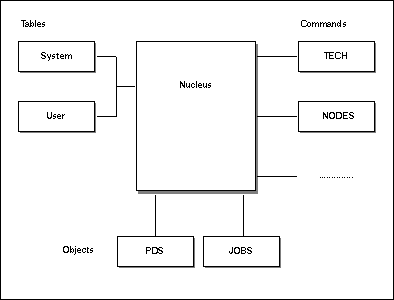
Natural ISPF architecture can be summarized by listing the following modules:
Nucleus:
The nucleus is responsible for all the common logic, for example, the logic
supported by the following main modules:
Command Processor:
The Command Processor interprets commands typed in by the user.
Browser:
The Browser displays LIST/BROWSE/EDIT sessions on the screen.
Manager:
The Manager supports multiple sessions and split screen.
The nucleus is responsible for the screen I/O of the Editor, but not for the
object-specific screens. The nucleus is the main part of Natural ISPF. It is written
mostly in Natural and executed from SYSLIB.
Natural ISPF tables:
The Natural ISPF tables are stored in the Natural system file and contain
definitions such as the existing objects, their names and synonyms, the functions,
the commands, menus, user profiles etc. Natural ISPF is installed with predefined
tables, stored in the System Profile Library (SYSISPS1). Site-specific
tables that can extend or overwrite the predefined tables are stored in the User
Profile Library (SYSISPFU).
Command Modules:
There is a module for each command, implementing the command logic. The command
modules are written as Natural subprograms, called from the Natural ISPF nucleus,
and operate from SYSLIB.
Object Modules:
There is one module for each object, responsible for the logic specific to this
object. For example, the PDS module implements reading a member from a PDS library,
writing it, deleting it, displaying the PDS entry panel, displaying information
screen etc. The object modules are written as Natural subprograms, called from the
Natural ISPF nucleus, and operate from SYSLIB.
This architecture can be illustrated as follows:
One of the attractive features of Natural ISPF is its multi-session management. A user
can work in many sessions simultaneously. For example, he can be editing a PDS member
while looking at a JOB output. This is done using the Natural ISPF
Multi-Operation Environment. It is important to understand this mechanism in order to
work properly with Open NSPF.
An operation in Natural ISPF is a series of actions within a given context, that can be interspersed with other operations (from the user point of view, an operation can be suspended and resumed). For example, an operation could be issuing a direct command to edit a PDS member, changing a few lines, saving the member, and ending the session. Other examples of operations in Natural ISPF are:
Performing a function for an object (for example, BROWSE
JOB)
Activating a menu
Special nucleus operations (such as display of PF key assignments)
An operation in Natural ISPF is built of events, where each event is a piece of code that must be executed as a whole (the operation cannot be suspended in the middle of an event). When an operation starts, a special area called "operation data" is allocated, the data in this area is the only data that stays "alive" between the events of the operation. This data is released when the operation ends. This operation data is the only place where data involving the operation can 'live' outside any event, and this is also the preferred communication area between events.
In Open NSPF, operations are involved when implementing customized objects. Note the following:
The operation starts when a direct command for a function is issued to this object (either by the user or by an open module), or when a line command is issued from a list of this object type.
When an operation starts, the operation data is allocated, then a series of events
for this object is issued, each event is a CALLNAT to the object
subprogram, where the operation data is passed as a parameter.
An operation ends when the command END is issued to it.
This command can be issued by the user or by an open-module.
Note
A command is not an operation, as only a single call is made to the command
module, and no operation data is needed. Displaying a menu is internally an
operation, but since it is handled by the nucleus, this is irrelevant to the Open
NSPF programmer.
Defining new user objects and new user commands is done by adding an object code or a command code to the Site Control Table. User objects can additionally be related to existing Natural ISPF functions.
The Site Control Table resides in the User Profile Library and is usually called
CONTROLU. It can be accessed for update operations with the command
EDIT CNF CONTROLU, or from the
CONTROLU (Edit Site Control Table) option on the
Configuration Menu.
Implementing the corresponding logic in Natural ISPF is done by writing a subprogram
and copying it to the Natural ISPF Execution Library (SYSLIB). Each new
object and command has a unique program, which is called by Natural ISPF whenever the
object is accessed or the command is issued. The naming convention for the Open NSPF
subprograms is as follows:
ISUxnn
where:
ISU |
Fixed prefix for Open NSPF. |
x |
|
nn
|
Two-letter code of the routine as defined in the Site Control Table. |
The object EMPLOYEE will use the code EM, which means a
subprogram named ISUOEM must handle all logic for the object
EMPLOYEE.
The following subjects are valid for all Open NSPF routines, that is, for routines implementing new objects or new commands. This subsection contains reference information and can be skipped if you are reading this section for the first time to gain an idea of Open NSPF.
For the mechanism of the error handling, see the description of the following fields:
| Field Name | Length | Type |
|---|---|---|
INPUT-ERROR-CODE |
(N3) | Input |
If not equal to 0, Natural ISPF is in error-mode. Error mode usually means skipping
further action and displaying the error (acoustic alarm signal and message text in the
appropriate part of the HEADER field) to the user in the next input
operation. Error mode is reset automatically after the subsequent input operation.
| Field Name | Length | Type |
|---|---|---|
OUTPUT-ERROR-CODE |
(N3) | Output |
If an error occurs in a user subprogram, this field must be set to a non-zero value.
The current function is aborted and the error is displayed on the next screen.
Additional information about the error must be supplied in the fields
ERROR-NUMBER, ERROR-TEXT and ERROR-PARM.
OUTPUT-ERROR-CODE should not be set in the DISPLAY event.
| Field Name | Length | Type |
|---|---|---|
ERROR-NUMBER |
(N4) | Output |
If ERROR-TEXT is blank, this field contains the number of the error to be
taken from the Error Message Library. The Natural library if the number is in range 0001
- 6799, library SYSISPS1 if the number is in range 6800 - 9999.
Error numbers 9000 - 9999 are not used by Natural ISPF and can be used for site-specific messages.
| Field Name | Length | Type |
|---|---|---|
ERROR-TEXT |
(A75) | Output |
Contains a text that will be displayed in the next input operation (not necessarily in error mode).
| Field Name | Length | Type |
|---|---|---|
ERROR-PARM |
(A75) | Output |
Contains parameters for the error text separated by a semi-colon (;). Parameters in the
error-text are noted as :1: . :2:. Parameter substitution is
done by Natural ISPF.
A command variable is passed to every user subprogram. This variable contains the current requested command, if it has not been processed by Natural ISPF yet. If the subprogram changes this field, the commands in the field are pushed to the Natural ISPF command stack.
Several data areas are passed to an Open NSPF routine as parameters:
OPERATION-DATA |
Local data for Open NSPF routine. The data is kept between events and lives as long as the current function is active. This can be used to save all data necessary to identify the current object. | |
GLOBAL-DATA |
Shared by all Open NSPF routines, as well as
by user exits, and can be used to communicate between these programs. An example
for using GLOBAL-DATA can be found in the Example Library:
|
|
ISUCPR |
Implements PREFIX command and
stores GLOBAL-DATA.
|
|
ISPJ---U |
Job user exit that evaluates
GLOBAL-DATA.
|
|
STATIC-DATA
|
Additional shared data. For details on usage, see below. | |
Open NSPF routines are subprograms which cannot use a Natural Global Data Area for data shared in several programs. In case this type of data is needed, Natural ISPF offers a mechanism to create and retrieve "static data" which is accessible by all Open NSPF routines via the Natural ISPF data manager.
Natural ISPF can store and retrieve data items throughout the session. The items have a length of 253 bytes and are identified by two letters. They are passed to every Open NSPF routine in two parameters:
STATIC-DATA (A253)
STATIC-ID (A2)
By default, the data item identified by a blank is passed first, and the data item
which was last used is passed. You can modify STATIC-DATA. If in a call to
the Open NSPF routine the STATIC-ID is changed, Natural ISPF will call
again with the same event and will pass the static data item that was requested. This is
possible for user objects and user commands.
A coding example in an Open NSPF subroutine:
DEFINE DATA PARAMETER
  USING ISP-UO-A
PARAMETER
1 #STATIC-DATA(A253)
1 REDEFINE #STATIC-DATA     /* user redefinition of STATIC-DATA
  2 #MY-FIELD1  (A10)
  2 #MY-FIELD2  (N05)
  2 #MY-FIELD3  (A32)
1 #GLOBAL-DATA(A32)
1 #OPERATION-DATA(A253)
1 REDEFINE #OPERATION-DATA
  .....
  .....
END-DEFINE
*
IF #STATIC-ID NE 'PP'         /* get static data with id=PP
  MOVE 'PP' TO #STATIC-ID
  ESCAPE ROUTINE              /* return to get data
END-IF
IF #STATIC-DATA EQ ' '        /* empty just created
  RESET  #MY-FIELD1
         #MY-FIELD2
         #MY-FIELD3           /* set initial values
END-IF
  .....                       /* now it can be used
  .....
Open NSPF routines to implement new user objects are of type Natural subprogram with a predefined parameter area to communicate with Natural ISPF:
DEFINE DATA
PARAMETER USING ISP-UO-A      /* Standard Open NSPF interface
PARAMETER
1 #STATIC-DATA        (A253)
1 #GLOBAL-DATA        (A32)   /* Shared data for Open NSPF routine
1 #OPERATION-DATA     (A253)  /* Local data for Open NSPF routine
LOCAL ......
END-DEFINE
The parameter area ISP-UO-A can be found in the User Exit Library. The Open
NSPF routine is called from Natural ISPF every time object-specific logic is to be
executed, that is, when the object is accessed by a related function.
The object-specific logic identified by the EVENT field in the parameter
area is referred to as an event (see the subsection Event Logic).
To add a new object to Natural ISPF, proceed as follows:
Allocate a two-letter code to the object (to determine the subprogram name). Object codes should start with an alpha character, special characters and numbers are reserved for specific use.
Prepare a Natural subprogram to handle the object and copy it to SYSLIB.
Add the object to the Site Control Table.
Relate the object to functions. It is recommended that you use existing Natural ISPF functions, but you can also define new functions.
Once the object is defined to Natural ISPF, the object program can be invoked using the Natural ISPF command
FF OO parameters
where:
FF
|
is the function ID. |
OO |
is the object ID (object abbreviation). |
This results in a call to a program with the name
ISUOnn, where
nn stands for the two-character code
identifying the object.
Note
One of the related functions could also be the function
ENTRY, which presents an Entry Panel, a screen which allows
field-oriented input of all parameters relevant for the object (typically the components
of OPERATION-DATA). The command ENTRY OO can then
be inserted in one of your site-specific menu definitions, thus making it available within
your site-specific menu structure (see the explanation for
ENTRY in the section Menu Maintenance of the Natural ISPF
Administration Guide).
The Site Control Table can be found in the User Profile Library and is usually called
CONTROLU. In this table, you can define new objects, and
you can relate objects to functions.
Edit macro MAC-CNFZ is available when editing the Site Control Table. If
you wish to use this edit macro, you must use the Natural utility SYSMAIN
to copy the following programs from the Example Library (SYSISPE) to the
User Profile Library (SYSISPFU):
MAC-CNF*
MACCNF*
Note
As an alternative, it would also be sufficient to define the library
SYSISPE as a STEPLIB for the library
SYSISPFU.
To create a new CONTROLU member, you can use the edit macro with the
function command:
EDIT CNF CONTROLU MODEL=MAC-CNFZ
To modify an existing CONTROLU member, use the command:
REGENERATE
in the edit session with the existing member.
The following is an example of a Site Control Table:
* OBJECTS
*
*CODE
*  !SUB-system
*  ! !Object sec
*  ! ! !1 letter abbv
*  ! ! ! !3 letter abbv
*  ! ! ! !   !name     !description     !type
*  ! ! ! !   !         !                !
>UU!I! ! !PRU!PRUSERS  !PROCESS users   !U
>E7! ! ! !EMP!EMPLOYEES!Employees       !U
>-9! ! ! !TXT!Text     !Text Members    !U
Note
The column delimiting character (!) used in the above example is
keyboard-language dependent and corresponds to hex code 4F.
| Parameter | Meaning |
|---|---|
CODE |
Two-character code to be used for the subprogram name. It is strongly
recommended that you use a letter as first character. For example:
E7. This means that the subprogram name must be
ISUOE7.
|
SUB-System |
One-character code of the subsystem to which the object applies. The
subsystem codes are the same as used in the Configuration Table, for
example, M for z/OS (MVS). If the subsystem is not installed,
the object is not available. If no subsystem is specified, the object is
always available. For a list of available subsystems, see Subsystems Supported by Natural
ISPF of the Natural ISPF Administration
Guide.
|
Object sec |
Authorization class (see Authorization Classes in this
documentation). If you want to restrict access to this object/function it is
recommended that you use the '=' (USER DEFINED)
authorization class and assign different authorization levels to user/user
groups.
|
1Letter abbv |
An object can be abbreviated with 1 letter (as N for
Natural), but you should not use this 1-byte abbreviation because
most of them are already used.
|
3Letter abbv |
A 2- or 3-character ID to abbreviate the object in function commands,
for example, EMP for EMPLOYEES.
|
Name |
Full name of the object, for example, EMPLOYEES.
|
Description |
Further description of the object used in active help screens. |
Type |
Identification of a user-defined object. This column must
contain the letter U for every definition of a user-defined
object.
|
You can define new functions in the Site Control Table CONTROLU in lines
starting with the minus sign (-), for example:
* FUNCTIONS
*Code
*  !1 Letter abv
*  ! !2 Letter abv
*  ! !  !Name
*  ! !               !Action
*  ! !                        !Security
*  ! !                        !!Parameters?
*  ! !                        !!!Prompt-type
*  ! !                        !!!!Editor?
*  ! !                        !!!! !
-IS! !IS!INSPECT     !*Insp'td!1   !
-RM! !RM!REMARK      !*Remarkd!2  X!
Note
The column delimiting character ! used in the above example is
keyboard-language dependent and corresponds to hex code 4F.
| Parameter | Meaning |
|---|---|
CODE |
Two-character identifier of function (passed to the subprogram), for
example, RM for the function
REMARK.
|
1Letter abbv |
A function can be abbreviated with 1 letter (as
E for Edit), but you should not use this
1-byte abbreviation because most of them are already used.
|
2Letter abbv |
Two-letter abbreviation of the function (to be used as line command). |
Name |
Full name of the function. |
Action |
Associated attribute text, to be used as reply to line commands in list sessions; max. 8 characters, first character should be an asterisk (*). |
Security |
Security level assigned, to be compared with the user's authorization level (a digit in the range 1-9). The function can be activated only if the user has an authorization level greater or equal to the security level assigned to the function. |
Parameters |
Leave blank - for future use. |
Prompt-type |
Leave blank - for future use. |
Editor |
Specify X to indicate that function invokes an Editor session
(session-type E/B/L/R).
Leave blank to indicate that the function results in a message or in a screen
handled by the object's user subprogram.
|
You can relate the new object to Natural ISPF functions in the Site Control Table as follows:
* FUNCTIONS FOR OBJECTS
*
*
*CODE
*  !FUNCTION-OPTION  OPTIONS = D - Default function  X - regular
*  !    !    !    !    !    !    !    !    !
$E7!LS-D!---X!IN-X!DL-X!    !    !    !    !
$-9!LS-D!BR-X!ED-X!DL-X!---X!    !    !    !
$UU!LS-D!---X!DL-X!    !    !    !    !    !
Note
The column delimiting character ! used in the above example is
keyboard-language dependent and corresponds to hex code 4F.
| Parameter | Meaning | |
|---|---|---|
CODE |
Two-character code of the object. | |
FUNCTION-OPTIONS |
In each of these columns, you can define a
function that can be applied to the object. A maximum of 10 functions can be
activated per object. Each function definition consists of 4 bytes:
AABC, where:
|
|
AA |
Function code, for all available function codes see the section User Exits in
the Natural ISPF Administration Guide. Two hyphens (--)
as function code means |
|
B |
Not used. | |
C |
Function type:
|
|
In the list of active jobs, you want to abbreviate the line command
MODIFY with MO, which prompts
for an operator command to be sent to the selected active job. Standard Natural ISPF
does not support this functionality, but with Open NSPF it could be implemented as
follows.
The following definitions must be specified in the Site Control Table:
*
* Define a new function MODIFY
*
-MO! !MO!MODIFY      !*Modifd !1   !
*
* Define a new object TASK
*
>-A! ! ! !TAS!TASK     !Tasks           !U
*
* Relate the new function to active jobs (code A)
* and to new object TASK
*
$A !MO-X!    !    !    !    !    !    !    !
$-A!MO-D!    !    !    !    !    !    !    !
Now you must implement ISUO-A which contains the logic for the
MODIFY command (a coding example can be found in the
Example Library). When an MO line command is entered in the
list of active jobs you must supply logic to invoke ISUO-A. This can be
done with an object transfer in the active jobs user exit ISPA---U (a
coding example can be found in the Example Library).
Events are passed to the user-subprogram in the EVENT field of the
parameter area. The subprogram must be able to react to the event by executing some
object-specific logic for all functions defined for this object. Of course, the
subprogram can use other routines to handle an event.
Unknown events must be ignored by the subprogram to allow for the addition of events in later versions of Natural ISPF.
Natural ISPF can handle different types of sessions for Natural ISPF objects, as well as for user objects:
| Type | Description |
|---|---|
' ' |
The session is handled by the user subprogram. Usually, performing a
function means entering data and reacting to user commands, but this is not
always the case. For example, a function such as
DELETE can operate without additional terminal I/O
and then terminate. The user subprogram must:
|
E |
The session is an Editor session, all terminal I/O is handled by Natural
ISPF. All editing commands are allowed in this session. The user subprogram
must:
|
B |
A Browse session is very similar to an edit session, the only difference is that update commands are not allowed. In this case, the subprogram does not have to be prepared to save the data. |
L |
The session is an Editor session, which contains a list of items, such as a
list of members in a library. All terminal I/O is handled by Natural ISPF. The
list can be manipulated with Editor commands, updates are not allowed.
Additionally, all function commands defined for the object can be used as line
commands. The user subprogram must:
|
R |
The session is like a list, but the list is refreshed whenever
ENTER is pressed (can be used for displaying data which changes
very frequently like the list of active jobs in Natural ISPF). Line command
handling is identical to a list session. The user subprogram must:
|
This table gives an overview which events receive control depending on the session type, and the numbers indicate the normal sequence of events.
| LINE | PARM | PARM-END | START | TITLE | REFRESH | COMMAND | END | PERFORM | DISPLAY | LISTITEM | |
|---|---|---|---|---|---|---|---|---|---|---|---|
LIST |
1 | 1 | 2 | 3 | x | ||||||
LIST
REFRESHABLE |
1 | 1 | 2 | 3 | 4 | x | |||||
EDIT |
1 | 1 | 2 | 3 | |||||||
BROWSE |
1 | 1 | 2 | 3 | |||||||
SELF-HANDLED |
1 | 1 | 2 | 3 | 4 |
This subsection provides a detailed description of all events.
LINEThis event is called as first event when the function is invoked with a line command.
In the LINE event, the parameters for the current function
must be extracted as in the PARM event for direct commands.
Therefore, the parameters supplied in LINE-DATA must be separated and
written to OPERATION-DATA as in the PARM event.
Remember that when designing a list, all identifiers necessary for line command
processing should be in the first 100 byte of a line, because this part of a line is
passed in the field LINE-DATA. Care must be taken if left/right shifting
commands are possible for the Editor session, because the data visible to the user are
always delivered by the LINE-DATA field.
PARMNatural ISPF function commands can be issued with positional and/or keyword parameters.
Keyword parameters are recognized as a pair of tokens, separated by the equal sign (=).
This event implements parameter passing, and is processed only if parameters are passed.
Each parameter is passed in a separate event in the PARM-KEYWORD and
PARM-VALUE fields, so successive calls of this event depend on the number
of parameters typed in by the user.
PARM-KEYWORD contains a keyword if the parameter has been typed in as
a keyword parameter, or the position if the parameter was entered as a positional
parameter.
PARM-VALUE contains the parameter value. Valid parameters should be
stored in OPERATION-DATA for further processing of the function.
Assume the user issued the command:
EDIT MYPROG T NODE=148 VOLSER=DISK01
This command results in the following PARM events:
| Number | PARM-KEYWORD | PARM-VALUE |
|---|---|---|
| 1 | 1 |
MYPROG |
| 2 | 2 |
T |
| 3 | NODE |
148 |
| 4 | VOLSER |
DISK01 |
PARM-ENDFor future use.
STARTThis event is called after all parameters have been passed with the
PARM or LINE event. This event
is also executed if no parameters are passed.
Normally, the parameters collected in OPERATION-DATA are checked if they
are all available and correct to execute the function. The function can be aborted by
setting the field and return to the caller.
In this event, the Session Type
(E/B/L/R) must be set. The next
screen is displayed either in PERFORM event in the Open NSPF
routine or by the Natural ISPF control logic if the Editor is used, depending on the
SESSION-TYPE. For the Session Type Edit/Browse/List/Refreshable list
(abbreviated respectively as
E/B/L/R), an incore file must be
created. Except for type R, the file must be filled with data. For type
R, the file is filled with data in the REFRESH
event.
TITLEThis event is called once after the START event to get the
session title. The given title is then available in the TITLE field in
successive PERFORM events, or is displayed in the top left
corner of the Browser screen.
REFRESHThis event is called for Session Type R before the screen is displayed
(the screen is displayed outside the Open NSPF routine). In this event, the contents of
the incore file should be refreshed, which usually means delete and fill again with
refreshed data.
COMMANDWhen the session is handled by Natural ISPF (Session Type E/B/L/R), a
command is routed to the Open NSPF routine when it is not a valid Editor command. When
the screen is self-handled (Session Type ' '), all commands are first
routed to this event. The command must be filtered if it is a valid local command for
the current function. Commands which are not handled locally must be returned to Natural
ISPF. If line commands and main commands are entered simultaneously, the event
LINE for the new function is executed before the
COMMAND event.
ENDThis event is called as the last event before session terminates. If an incore file has
been created (Session Type E/B/L/R), it must be deleted.
PERFORMThis event is called when the screen is handled by the Open NSPF routine itself
(Session-Type ' '). Normally an INPUT WITH TEXT #TITLE is
coded here.
DISPLAYThis event is called when the screen handled by the Open NSPF routine (Session-Type
' ') must be refreshed, for example when an
UNZOOM command is entered, that is, the current screen
should be displayed (INPUT statement) and control should be given to
Natural ISPF (ESCAPE statement), which will handle non-conversational mode.
LISTITEMThis event is called when the user enters the new command
ALL in a LIST session. In the
LISTITEM event, the parameters for the current function
must be extracted similarly to the LINE event for line
commands. Therefore, the identifier of a single object in the list supplied in the field
LINE-DATA must be extracted and written to the field
ITEM-NAME. Remember that when designing a list, all identifiers necessary
for line command processing should be in the first 100 bytes of a line, because this
part of a line is passed in the field LINE-DATA. Care must be taken if
left/right shifting commands are possible for the incore file, because the data visible
to the user are always delivered by the LINE-DATA field.
This subsection provides a detailed description of all parameters passed to and from the Open NSPF routine.
| Parameter Name | Length | Type |
|---|---|---|
COMMAND |
(A50) | Input/Output |
The first token entered in the command line. If a PF key is pressed, the value assigned
to the PF key is delivered as command. If a command is entered and a PF key is pressed
simultaneously, the contents of the PF key is concatenated before the command. The value
returned in the command field will be processed by Natural ISPF. This takes effect in
the START, PERFORM,
COMMAND and END events and
results in invocation of the corresponding function.
| Parameter Name | Length | Type |
|---|---|---|
CHANGED |
(L) | Input/Output |
This flag is set in an Editor session (session type E) if data are
modified. It indicates whether the session was changed by the user and therefore an
update must be done. This is relevant to the COMMAND event
when a SAVE command is executed and in the
END event where the session is closed.
The flag can also be reset by the subprogram (for example, after a successful
SAVE).
| Parameter Name | Length | Type |
|---|---|---|
ERROR-NUMBER |
(N4) | Input/Output |
As input parameter, a non-zero ERROR-NUMBER indicates that a message has
to be displayed to the user. The text of the message has already been prepared in the
TITLE field.
As output parameter, a non-zero ERROR-NUMBER indicates that the text
stored in SYSERR for this number has to be displayed to the user in the
next Natural ISPF screen (this could be in an Open NSPF subprogram or in Natural ISPF
itself).
See also the field OUTPUT-ERROR-CODE. If OUTPUT-ERROR-CODE is
not set (value is zero), information can be passed to the user since the current
function is not aborted. The error text is taken according to number ranges from the
following libraries:
6800 - 8999: SYSISPS1
9000 - 9999: are reserved for the user in SYSISPS1
| Parameter Name | Length | Type |
|---|---|---|
ERROR-TEXT |
(A75) | Output |
Overrides ERROR-NUMBER.
| Parameter Name | Length | Type |
|---|---|---|
ERROR-PARM |
(A75) | Output |
The ERROR-PARM tokens delimited by a semicolon (;). Parameters to be
substituted in the error texts are denoted as :1: :2:
| Parameter Name | Length | Type |
|---|---|---|
FUNCTION |
(A2) | Input |
The function code as defined in the member
CONTROLx.
| Parameter Name | Length | Type |
|---|---|---|
GLOBAL-DATA |
(A32) | Input/Output |
Data Area common to all Open NSPF routines.
| Parameter Name | Length | Type |
|---|---|---|
HEADER |
(A79) | Output |
If the Editor is used (Session Type E/B/L/R) the column headers are
delivered to the caller in this field. If omitted, no column headers are presented in
the Editor session.
| Parameter Name | Length | Type |
|---|---|---|
IDENTIFIER |
(A8) | Input |
Unique identifier created for this session. Can be used as file identifier to the
Incore Database. This identifier is available in the START
event and all subsequent events.
| Parameter Name | Length | Type |
|---|---|---|
INPUT-ERROR-CODE |
(N3) | Input |
Denotes that there is an error situation, that is, the field
OUTPUT-ERROR-CODE was set in a previous function or in Natural ISPF
itself. In terms of Natural ISPF, this means that the screen must be presented with the
ALARM feature.
| Parameter Name | Length | Type |
|---|---|---|
LINE-DATA |
(A100) | Input |
Contains the Editor line as displayed currently in the screen area. Care must be taken
if shift left/right is used. In this case, the visible data on the screen is always
delivered in LINE-DATA.
| Parameter Name | Length | Type |
|---|---|---|
EVENT |
(A8) | Input |
Defines the event that is to be handled by the Open NSPF routine. For description and possible values, see the subsection Event Description.
| Parameter Name | Length | Type |
|---|---|---|
OUTPUT-ERROR-CODE |
(N3) | Output |
A non-zero value denotes an error situation to Natural ISPF, that is, the current
function is aborted and the error denoted by the fields ERROR-NUMBER,
ERROR-TEXT and ERROR-PARM is reported in the previous
screen. This should be used in real error situations. If the screen is handled by an
Open NSPF routine, the message is brought in the field TITLE and is
available in the PERFORM and
DISPLAY events. OUTPUT-ERROR-CODE should not
be set in the DISPLAY event.
| Parameter Name | Length | Type |
|---|---|---|
PARM-KEYWORD |
(A50) | Input |
Contains a keyword, if the notation KEYWORD=PARM-VALUE was used, or a
one-digit number, if the parameter is positional.
| Parameter Name | Length | Type |
|---|---|---|
PARM-VALUE |
(A50) | Input |
Contains the parameter value.
| Parameter Name | Length | Type |
|---|---|---|
PF-KEY |
(A4) | Output |
In the PERFORM event, the PF key pressed must be returned to
Natural ISPF so that it can be handled by Natural ISPF. That is,
*PF-KEY must be moved to PF-KEY.
| Parameter Name | Length | Type |
|---|---|---|
OPERATION-DATA |
(A253) | Input/Output |
Local data for Open NSPF routine. The data is kept between events and lives as long as the current operation is active.
| Parameter Name | Length | Type |
|---|---|---|
SESSION-TYPE |
(A2) | Output |
Possible values:
' ' |
The screen is handled by the Open NSPF routine itself in the
PERFORM event.
|
'E' |
Editor EDIT mode
|
'B' |
Editor BROWSE mode. No line commands are valid
in this type of session.
|
'L' |
Editor LIST mode. All function commands can be
entered as line commands in this type of session.
|
'R' |
Editor refreshable LIST mode. All function
commands can be entered as line commands in this type of session.
|
| Parameter Name | Length | Type |
|---|---|---|
STATIC-DATA |
(A253) | Input/Output |
Shared data segment identified by STATIC-ID. The data is always updated
when it is changed upon return to Natural ISPF. The data segment lives as long as the
Natural ISPF session lives. If the STATIC-DATA and STATIC-ID
are changed in one operation, the data is updated for the old ID and the new Segment for
the new ID is returned.
| Parameter Name | Length | Type |
|---|---|---|
STATIC-ID |
(A2) | Input/Output |
Identification for a shared data segment. If this ID is changed, the current event is
triggered again and the appropriate data segment is returned. The last
STATIC-ID accessed is always returned as a default for new functions.
| Parameter Name | Length | Type |
|---|---|---|
TITLE |
(A79) | Input/Output |
The session title which is displayed in the first line of the screen. It is assigned in
the event TITLE and used in the events
PERFORM and DISPLAY when the
screen is handled by the Open NSPF routine itself (Session Type ' '). An
error message or error text is brought in the right part of the TITLE when
it is requested. This means the fields ERROR-NUMBER and
ERROR-TEXT and ERROR-PARM are converted and assigned to the
TITLE.
| Parameter Name | Length | Type |
|---|---|---|
ITEM-NAME |
(A70) | Output |
Contains valid parameters which must be extracted from the LINE-DATA field
in the LISTITEM event. ITEM-NAME can contain any
combination of positional and keyword parameters according to the parameter syntax for
the current object. The contents of ITEM-NAME are used by Natural ISPF to
generate a function command with parameters as returned in ITEM-NAME. Thus
a later PARM event must also be able to interpret these
parameters. A coding example can be found in the member ISUO-7 in the
Example Library.
The following table gives an overview which parameters take effect depending on the event:
| Event | PARM | PARM-END | START | TITLE | REFRESH | LINE | COMMAND | END | PERFORM | DISPLAY | LISTITEM |
|---|---|---|---|---|---|---|---|---|---|---|---|
| Parameter | |||||||||||
COMMAND |
O | IO | O | ||||||||
CHANGED |
I | I | |||||||||
ERRORNUMBER |
O | O | O | O | O | O | O | ||||
ERROR-TEXT |
O | O | O | O | O | O | O | ||||
ERROR-PARM |
O | O | O | O | O | O | O | ||||
FUNCTION |
I | I | I | I | I | I | I | I | I | I | I |
GLOBAL-DATA |
IO | IO | IO | IO | IO | IO | IO | IO | IO | IO | IO |
HEADER |
O | ||||||||||
INPUT-ERROR-CODE |
I | I | |||||||||
IDENTIFIER |
I | I | I | I | I | I | |||||
LINE-DATA |
I | I | |||||||||
EVENT |
I | I | I | I | I | I | I | I | I | I | I |
OUTPUT-ERROR-CODE |
O | O | O | O | O | O | O | ||||
PARM-KEYWORD |
I | ||||||||||
PARM-VALUE |
I | ||||||||||
PF-KEY |
O | ||||||||||
OPERATION-DATA |
IO | IO | IO | IO | IO | IO | IO | IO | IO | IO | |
SESSION-TYPE |
O | ||||||||||
STATIC-DATA |
IO | IO | IO | IO | IO | IO | IO | IO | IO | IO | |
STATIC-ID |
IO | IO | IO | IO | IO | IO | IO | IO | IO | IO | |
TITLE |
O | I | I | ||||||||
ITEM-NAME |
O |
Note
The PARM-END event is for future use. As new
functionality is implemented in future, more events may be created. In order to be
upwards compatible with future versions of Natural ISPF, it is therefore good coding
practice if your subprograms ignore unknown or unused events.
The following example can be found in the Example Library:
  ***********************************************************************
  * OBJECT : ISUO-7  DATE CREATED: 16.02.93      BY: JWO
  * ---------------------------------------------------------------------
  * PURPOSE:
  *   Example program which uses Incore Database(IDB)
  *   and OPEN NSPF. The functions list of employees
  *   and info employees are implemented and have an
  *   NSPF like user-interface
  ***********************************************************************
  *
  DEFINE DATA PARAMETER
    USING ISP-UO-A
  PARAMETER
  1 #STATIC-DATA(A253)
  1 #GLOBAL-DATA(A32)
  1 #OPERATION-DATA(A253)
  1 REDEFINE #OPERATION-DATA               /* our memory
    2 #PERSONNEL-ID (A8)
    2 #NAME        (A20)
    2 #FIRST-NAME  (A20)
  1 #LINE-DATA(A100)                     /* list line passed when
  1 REDEFINE #LINE-DATA                  /* line commands are entered
    2 #LINE-PERSONNEL-ID (A8)
    2 #F1               (A01)
    2 #LINE-FIRST-NAME  (A20)
    2 #F2               (A01)
    2 #LINE-NAME        (A20)
  *
  LOCAL USING IDBI---L                   /* for Incore database
  LOCAL
  1 EMPLOYEES  VIEW OF EMPLOYEES
    2 PERSONNEL-ID
    2 FIRST-NAME
    2 NAME
    2 SEX
    2 BIRTH
    2 DEPT
    2 JOB-TITLE
  1 EMPL-LIST  VIEW OF ISP-IDB-EMPL-LIST /* Incore file to be listed
    2 PERSONNEL-ID
    2 FIRST-NAME
    2 NAME
    2 BIRTH
    2 JOB-TITLE
  1 #HEADER2
    2 PERSONNEL-ID  (A8) INIT <'Number'>
    2 #F1           (A1)
    2 FIRST-NAME    (A20) INIT <'First-Name'>
    2 #F2           (A1)
    2 NAME          (A20) INIT <'Name'>
    2 #F3           (A1)
    2 BIRTH         (A6)  INIT <'Birth'>
    2 #F4           (A1)
    2 JOB-TITLE     (A20) INIT <'Title'>
  1 REDEFINE #HEADER2
    2 #HEADER1 (A77)
  1 #NO-RECORDS(L) INIT <TRUE>
  1 #END-NAME (A8)
  END-DEFINE
  *
  * Mainline
  * Functions for EMPLOYEES are LIST, INFO and ENTRY PANEL
  *
  DECIDE ON FIRST VALUE OF #FUNCTION
    VALUE 'LS'
      PERFORM EMPL-LIST
    VALUE 'IN'
      PERFORM EMPL-INFO
    VALUE '--'
      PERFORM EMPL-ENTRY-PANEL
    NONE IGNORE
  END-DECIDE
  *
  *
  * Function Subroutines
  *
  *
  DEFINE SUBROUTINE EMPL-LIST
  *
  DECIDE ON FIRST VALUE OF #EVENT
    VALUE 'LISTITEM'                     /* For ALL command
      PERFORM ITEM-OPTION
  *
    VALUE 'PARM'                         /* Get parameters
      PERFORM PARM-OPTION
  *
    VALUE 'START'
      IF #NAME = ' '                     /* parameter missing
        MOVE 1 TO #OUTPUT-ERROR-CODE     /* error
        MOVE 6802 TO #ERROR-NUMBER
        ESCAPE ROUTINE
      END-IF
  *
  *       Fill Incore File (Edit session) with data
  *
      EXAMINE #NAME FOR '*' REPLACE    '  '
      COMPRESS #NAME H'FF' INTO #END-NAME LEAVING NO
  *
      READ (100) EMPLOYEES  BY NAME STARTING FROM #NAME
        IF EMPLOYEES.NAME GT #END-NAME
          ESCAPE BOTTOM
        END-IF
        MOVE FALSE TO #NO-RECORDS
        MOVE BY NAME EMPLOYEES TO EMPL-LIST
        STORE EMPL-LIST IDENTIFIER = #IDENTIFIER
      END-READ
  *
      IF #NO-RECORDS
        MOVE 1 TO #OUTPUT-ERROR-CODE
        MOVE 'No employee found' TO #ERROR-TEXT
      END-IF
      ASSIGN #SESSION-TYPE = 'L'         /* it is a LIST session
      ASSIGN #HEADER = #HEADER1          /* with field headers
      END TRANSACTION
  *
    VALUE 'TITLE'                        /* Create a Title
      COMPRESS #TITLE  #NAME INTO #TITLE
  *
    VALUE 'END'                          /* Delete Incore file
      MOVE #IDENTIFIER TO FILE-IDENTIFIER
      MOVE 'DELETE' TO ACTION
      CALLNAT INCORE USING INCORE-CTL INCORE-DATA
  *
  *
    VALUE 'COMMAND' IGNORE               /* Local command handling
    VALUE 'PARM-END' IGNORE              /* End of parameter parsing
    NONE IGNORE                          /* other events ignored
  END-DECIDE
  *
  END-SUBROUTINE
  *
  DEFINE SUBROUTINE EMPL-INFO
  DECIDE ON FIRST VALUE OF #EVENT
  *
    VALUE 'LINE'                         /* Get parameters from list-line
      PERFORM LINE-OPTION
  *
    VALUE 'PARM'                         /* Get parameters
      PERFORM PARM-OPTION
  *
    VALUE 'START'
      IF #PERSONNEL-ID = ' '             /* Missing parameters
        MOVE 1 TO #OUTPUT-ERROR-CODE
        MOVE 6802 TO #ERROR-NUMBER
        ESCAPE ROUTINE
      END-IF
      ASSIGN #SESSION-TYPE = ' '         /* session is handled in here
  *
    VALUE 'TITLE'                        /* Create a Title
      IF #NAME NE ' '
        COMPRESS #TITLE  #NAME INTO #TITLE
      ELSE
        COMPRESS #TITLE  #PERSONNEL-ID INTO #TITLE
      END-IF
  *
    VALUE 'PERFORM' ,'DISPLAY'           /* handle session
      MOVE TRUE  TO #NO-RECORDS
      FIND EMPLOYEES WITH PERSONNEL-ID = #PERSONNEL-ID
        INPUT WITH TEXT #TITLE USING MAP 'ISUO-7IM'
        IF #EVENT = 'DISPLAY'
          ESCAPE ROUTINE
        END-IF
        MOVE *PF-KEY TO #PF-KEY          /* return pressed key for
                                         /* interpretation
        MOVE FALSE TO #NO-RECORDS
      END-FIND
      IF #NO-RECORDS
        MOVE 1 TO #OUTPUT-ERROR-CODE
        MOVE 'No employee found' TO #ERROR-TEXT
        MOVE 'END' TO #COMMAND
      END-IF
    VALUE 'COMMAND' IGNORE               /* Local command handling
    VALUE 'PARM-END' IGNORE              /* End of parameter parsing
    NONE IGNORE
  END-DECIDE
  END-SUBROUTINE
  *
  DEFINE SUBROUTINE EMPL-ENTRY-PANEL
  *
  DECIDE ON FIRST VALUE OF #EVENT
  *
    VALUE 'LINE'                         /* Get parameters from line
      PERFORM LINE-OPTION
  *
    VALUE 'PARM'                         /* Get parameters
      PERFORM PARM-OPTION
  *
    VALUE 'TITLE'                        /* Create a Title
      MOVE 'EMPLOYEES - ENTRY PANEL' TO #TITLE
  *
    VALUE 'PERFORM' ,'DISPLAY'           /* Non Editor functions
      INPUT (AD=MI) WITH TEXT #TITLE
        'COMMAND ===>'(I)  #COMMAND
        /
        /
        /  '   Name         '(I)  '===>'(D) #NAME
        /  '   Personnel-No '(I)  '===>'(D) #PERSONNEL-ID
      IF #EVENT = 'DISPLAY'   ESCAPE ROUTINE END-IF
      IF #COMMAND = ' ' AND *PF-KEY = 'ENTR'
        IF #PERSONNEL-ID EQ ' '
          MOVE 'LIST' TO #COMMAND
        ELSE
          MOVE 'INFO' TO #COMMAND
        END-IF
      END-IF
      MOVE *PF-KEY TO #PF-KEY
  *
    VALUE 'COMMAND' IGNORE               /* Local command handling
    VALUE 'PARM-END' IGNORE              /* End of parameter parsing
    VALUE 'START'  IGNORE
    VALUE 'END'    IGNORE
    NONE  IGNORE
  END-DECIDE
  END-SUBROUTINE
  *
  *  General Subroutines
  *
  DEFINE SUBROUTINE PARM-OPTION
  *
  * Employee name is an accepted parameter
  * either with keyword NAME or as first parameter.
  * Employee number is  accepted with keyword NUMBER.
  *
  DECIDE ON FIRST VALUE OF #PARM-KEYWORD
    VALUE '1','NAME'     MOVE #PARM-VALUE TO #NAME
    VALUE 'NUMBER'
      IF  #PARM-VALUE IS (N8)
        MOVE RIGHT #PARM-VALUE TO #PERSONNEL-ID
      ELSE
        MOVE 1 TO #OUTPUT-ERROR-CODE     /* error
        MOVE 6801 TO #ERROR-NUMBER       /* invalid parameter
        ESCAPE ROUTINE
      END-IF
    NONE IGNORE
  END-DECIDE
  END-SUBROUTINE
  *
  DEFINE SUBROUTINE LINE-OPTION
  *
  * Move the relevant data from the list line into our
  * program data
  *
  MOVE #LINE-PERSONNEL-ID TO #PERSONNEL-ID
  MOVE #LINE-NAME         TO #NAME
  END-SUBROUTINE
  *
  *
  DEFINE SUBROUTINE ITEM-OPTION
  *
  * Move the relevant data from the list line into ITEM-NAME
  *
  COMPRESS 'NUMBER = ' #LINE-PERSONNEL-ID INTO #ITEM-NAME
  END-SUBROUTINE
  *
  END
Every command defined for Open NSPF is implemented by an Open NSPF routine. The Open NSPF routines are of type Natural subprogram with a fixed parameter area to communicate with Natural ISPF:
DEFINE DATA
PARAMETER USING ISP-UC-A      /* Standard Open NSPF interface
PARAMETER
1 #STATIC-DATA        (A253)
1 #GLOBAL-DATA        (A32)   /* Shared data for Open NSPF routine
LOCAL ......
END-DEFINE
The parameter area ISP-UC-A can be found in the User Exit Library
(SYSISPX). The Open NSPF routine is called from Natural ISPF every time the
command is issued.
The Site Control Table can be found in the User Profile Library and is usually called
CONTROLU. In this table, you can define new commands.
Edit macro MAC-CNFZ is available when editing the Site Control Table. If
you wish to use this edit macro, you must use the Natural utility SYSMAIN
to copy the following programs from the Example Library (SYSISPE) to the
User Profile Library (SYSISPFU):
MAC-CNF*
MACCNF*
Note
As an alternative, it would also be sufficient to define the library
SYSISPE as a STEPLIB for the library
SYSISPFU.
If you wish to create a new CONTROLU member, you can use the edit
macro using the function command
EDIT CNF CONTROLU MODEL=MAC-CNFZ
If you wish to modify an existing CONTROLU member, use the following
command in the edit session with the existing member:
REGENERATE
To add a new command to Natural ISPF, proceed as follows:
Allocate a two-letter code to the command.
Prepare a Natural subprogram to handle the command and copy it into
SYSLIB.
Add the user command to the Site Control Table.
Once the command has been entered in the Site Control Table and the corresponding
subprogram has been copied to SYSLIB, the subprogram is executed every time
a user issues the command.
The command attributes are entered into one line in the Site Control Table in fixed positions with the exclamation mark (!) in the beginning of the line.
Example:
*COMMAND     !
*            !SECURITY OPTION/LEVEL
*            !  !COMMAND-TYPE
*            !  ! !MIN ABBV
*            !  ! ! !PROGRAM
*            !  ! ! !        !PROGRAM-PARM
*            !  ! ! !        !    !SUBSYSTEM
!MAIL        !  !U!4!ML      !    !
Note
The column delimiting character ! used in the above example is
keyboard-language dependent and corresponds to hex code 4F.
| Parameter | Meaning |
|---|---|
Command |
Full command name, for example: MAIL.
|
Security Option/Level |
One character security option with one digit for level. The command will be
active only if the user has been assigned an authorization level greater or
equal to the command level (e.g. The one-character security option is the Authorization class (see Authorization
Classes in the Natural ISPF Administration
Guide). To restrict access to this object/function you should use
the '=' ( |
Command-Type |
Identification of a user-defined command. This column must contain
the letter U for every definition of a user-defined
command.
|
Min abbv |
Minimum characters in command line to identify the command. For example, 2
would allow users to enter MA. 4 allows no command
abbreviation for MAIL.
|
Program |
Two-character code to be used for the subprogram name. It is strongly
recommended that you use a letter for the first digit. For example, a code of
ML means the subprogram must be called
ISUCML.
|
Program-Parm |
For future use. |
Subsystem |
One-character subsystem code. The codes are the same as in the
Configuration Table. The command will be active if the subsystem is installed.
For example, M means the user command is available to z/OS users.
If left blank, the command is always active. For a list of available subsystems,
see Subsystems Supported by
Natural ISPF of the Natural ISPF
Administration Guide.
|
| Parameter Name | Length | Type |
|---|---|---|
COMMAND |
(A128) | Input/Output |
This field contains the command in full length which the user typed in to invoke the Open NSPF routine, including those parameters that precede the first parameter delimiter.
| Parameter Name | Length | Type |
|---|---|---|
COMMAND-PARM |
(A64) | Input/Output |
Command parameters which were entered by the user after the first parameter delimiter.
For example, assuming the parameter delimiter is a comma (,), and the user-defined
command is UCOM, the COMMAND and
COMMAND-PARM fields have the following contents:
| Command typed in by user | Value for COMMAND parameter | Value for COMMAND-PARM parameter |
|---|---|---|
UCOM |
UCOM |
(blank) |
UCOM A |
UCOM A |
(blank) |
UCOM A,X |
UCOM A |
X |
UCOM A B,X |
UCOM A B |
X |
UCOM A,X,Y |
UCOM A |
X,Y |
| Parameter Name | Length | Type |
|---|---|---|
ERROR-NUMBER |
(N4) | Output |
An error number which is reported to the user. The error is brought in the field
TITLE and is available in the PERFORM and
DISPLAY events so that it can be presented to the user. See
also the field OUTPUT-ERROR-CODE. If OUTPUT-ERROR-CODE is not
set (value is zero), information can be passed to the user since the current function is
not aborted. The error text is taken according to number ranges from the following
libraries:
6800 - 8999: SYSISPS1
9000 - 9999: are reserved for the user in SYSISPS1.
| Parameter Name | Length | Type |
|---|---|---|
ERROR-TEXT |
(A75) | Output |
Text to be displayed. If this field is filled, ERROR-NUMBER is ignored.
| Parameter Name | Length | Type |
|---|---|---|
ERROR-PARM |
(A75) | Output |
The ERROR-PARM tokens delimited by a semicolon (;). Parameters to be
substituted in the error texts are denoted as :1: :2:
| Parameter Name | Length | Type |
|---|---|---|
GLOBAL-DATA |
(A32) | Input/Output |
Data Area common to all Open NSPF routines.
| Parameter Name | Length | Type |
|---|---|---|
STATIC-DATA |
(A253) | Input/Output |
Shared data segment identified by STATIC-ID. The data is always updated
when it is changed upon return to Natural ISPF. The data segment lives as long as the
Natural ISPF session lives. If the STATIC-DATA and STATIC-ID
are changed in one operation, the data is updated for the old ID and the new segment for
the new ID is returned.
| Parameter Name | Length | Type |
|---|---|---|
STATIC-ID |
(A2) | Input/Output |
Identification for a shared data segment. If this ID is changed, the subprogram is invoked again and the appropriate data segment is returned.
| Parameter Name | Length | Type |
|---|---|---|
OUTPUT-ERROR-CODE |
(N3) | Output |
A non-zero value denotes an error situation to Natural ISPF, that is, the current
function is aborted and the error denoted by the fields ERROR-NUMBER,
ERROR-TEXT and ERROR-PARM is reported in the previous
screen. This should be used in real error situations.
The following example program is relevant to sites that run Con-nect. It checks for new items in the user's Con-nect Inbasket.
*  Program checks whether something new is in
*  CON-NECT  inbasket
DEFINE DATA
PARAMETER USING ISP-UC-A
PARAMETER
1 #STATIC-DATA(A253)
1 #GLOBAL-DATA(A32)
LOCAL
1 #RC        (N2)
1 #CAB       (A8)
1 #PSW       (A8)
1 #PHONE     (P8)
1 #MAIL      (P8)
1 #INVIT     (P8)
1 #OP-MAIL   (P8)
1 #POST-MAIL (P8)
END-DEFINE
MOVE *USER TO #CAB
CALLNAT 'Z-INBKT' #RC #CAB #PSW #PHONE #MAIL #INVIT #OP-MAIL #POST-MAIL
IF #RC NE 0
  MOVE 'Connect error' TO #ERROR-TEXT
  MOVE 1               TO #OUTPUT-ERROR-CODE
ELSE
  MOVE  'You have' TO #ERROR-TEXT
  DECIDE FOR EVERY CONDITION
    WHEN #PHONE NE 0
      COMPRESS #ERROR-TEXT #PHONE 'phones' INTO #ERROR-TEXT
    WHEN #MAIL NE 0
      COMPRESS #ERROR-TEXT #MAIL 'mail' INTO #ERROR-TEXT
    WHEN #INVIT NE 0
      COMPRESS #ERROR-TEXT #INVIT 'Invitation' INTO #ERROR-TEXT
    WHEN NONE
      COMPRESS #ERROR-TEXT 'No mail' INTO #ERROR-TEXT
  END-DECIDE
END-IF
END