
This document covers the following topics:
Traditionally, data processing applications mainly handle fields and files. With the technological advances in the field of data processing, however, the need for manipulating more complex data structures is arising on a large scale. Applications must be able to support the integration of texts, tables, images, graphics, etc.
The Natural ISPF Incore Database facility enables the Natural programmer to maintain complex data structures in the user memory, and to perform complex actions on these structures. Using the Incore Database, you can handle texts, reports, files and tables using the Natural language.
Using incore files in application development has several advantages:
You can integrate Software AG Editor functions in Natural programs, enabling flexible manipulation of your incore files;
An incore file is a temporary workfile of unlimited space running in memory;
You can have your personal environment to test and prototype your applications away from your site's database administration activities. After prototyping, no further source changes are required to access a real database;
If you wish to keep the contents of an incore file permanently, you can write them to a container file. You can retrieve the incore file later, thus avoiding the need to regenerate the data from your programs.
The Incore Database facility allows you to perform the following:
Define an incore file structure using Natural DDMs;
Dynamically create and delete incore files;
Manipulate the data in an incore file using the Natural DML or the WRITE
reportn statement;
Invoke the INCORE processor (with CALLNAT interface) to
perform operations on an incore file as a whole, for example:
BROWSE an incore file (for example, one which
contains a report)
EDIT an incore file (for example, one which contains
text)
STORE incore files as a whole into a container file
and retrieve them later
Incore database files can be handled like Adabas files with some restrictions on field types, see the subsection Defining Fields of an Incore File. Incore files are not identified by a file number but by an identifier, this allows multiple copies of a file created with the same DDM to be in the database. Incore files are temporary files which cannot be shared by users, each file belongs to only one user. The following figure illustrates this concept:
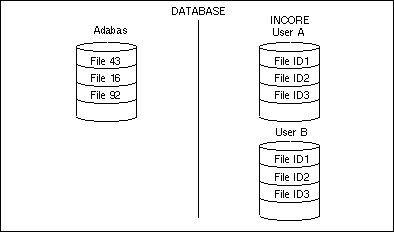
Incore files are allocated dynamically and stored in memory and, if required, swapped
to disk (in fact, the files are stored in the Editor Buffer Pool). Incore files provide
"unlimited memory" to a user. The Incore Database can be used in an
online environment as well as in Batch. If incore files are to be kept permanently, they
can be stored in the CONTAINER (usually an Adabas file) for later
retrieval.
Note
The theoretical maximum for incore files per user is 50. For this reason it is
recommended to delete unused incore files, especially when the error message NAT6896
(Session does not exist) occurs.
You define the fields of an incore file by defining a Natural DDM. This can be done with
the Natural utility SYSDDM or with Predict. In Predict, an incore database is
defined exactly as an Adabas database. The DDM is recognized as an incore file by using a
special DBID (see the the Natural ISPF
Installation documentation or ask your administrator). The file
number (FNR) must be a value lower than 191.
Incore DDMs can include fields of type: Alphanumeric, Numeric, Binary and Packed. Fields can be defined as MU, and can be defined as descriptors. The following types are not supported: Sub, Super, Phonetic and Hyperdescriptors.
Periodic groups are now supported, but internally handled as a series of multiple value fields and therefore may not themselves contain multiple value fields.
In addition to these fields, you can define a control pseudo-field (that is, no real database field):
RN RECORD-NUMBER (N7)
This field is used to access a physical record number within an incore file.
The number of fields of an incore file (including multiple occurrences) is limited to 66 (for exceptions to this limitation, see below).
The record size of an incore file manipulated using Natural DML or using the
CALLNAT INCORE interface (not with CONTAINER actions) is
limited to 4000 - n bytes, where
n is the number of fields within the file.
If an incore file is to be stored in / retrieved from the Natural ISPF Container File, its record size is limited to 3896 - n bytes.
However, you can define and use an incore file with more than 66 fields, if the record size of the file does not require the maximum sizes mentioned above. To be precise, for each additional field over 66, the maximum record size must be decreased by 28 bytes.
If a view definition contains the pseudo field RECORD-NUMBER, this
field can be ignored with respect to the above limitations of record sizes and
number of fields.
Each incore file has an identifier, Format A8. This identifier must be supplied (but can be supplied implicitly) with every Natural statement and incore processor call that refers to the incore file. The identifier notation is:
IDENTIFIER =const/var
If the identifier is omitted, the default is set implicitly by prefix L plus
the three-digit FNR. For example, if the incore file to be referenced has file number 12,
the default identifier is L012.
The following Natural DML lines read an incore file with identifier PER01
and display fields NAME, AGE, CITY:
....
0080 READ INCORE-PERSONNEL IDENTIFIER = 'PER01'
0090   DISPLAY NAME  AGE CITY
....
The following Natural statements browse an incore file with identifier
PER02 using an ISPF-like user interface:
...
0120 MOVE 'BROWSE' TO ACTION
0130 MOVE 'PER02' TO FILE-IDENTIFIER
0140 CALLNAT INCORE USING INCORE-CTL INCORE-DATA
0150 IF ERROR-CODE > 0
....
After an incore DDM has been defined, incore files can be created in several ways:
Implicitly with the first store statement.
Explicitly using a CALLNAT interface statement. Using this method,
file-internal parameters can be controlled and null files can be created, since no
initial STORE is required. This interface is described in more detail in
a later subsection.
By WRITE/DISPLAY report statements. With this mechanism,
reports can be stored and manipulated in the incore database.
An incore file can be created implicitly with the first STORE statement.
The actual record format is then set by the fields that are specified with the
STORE statement.
If the file contains multiple value fields or periodic groups, the first
STORE statement must specify all occurrences that are to be used with
this file. Subsequent STORE statements can specify selected occurrences as
long as they do not specify an occurrence greater than the highest occurrence from the
first STORE statement.
The Natural DML lines
....
0080 STORE INCORE-PERSONNEL IDENTIFIER = 'PER01'
0090   WITH NAME = 'SMITH'  AGE = 20   CITY = 'NY'
....
create a new incore file with identifier PER01 and fields
NAME, AGE, CITY. One record is stored in the
file, as specified by the field values.
When creating an incore file implicitly, no additional parameters for creating the file can be defined, the default values will be taken by incore database. If these values are not correct for your type of application or you want to create an empty incore file, you have to create an incore file explicitly.
You can create an incore File explicitly using the CALLNAT statement
ACTION = 'CREATE'.
The additional parameters are:
| Parameter | Meaning |
|---|---|
FILE-IDENTIFIER |
The identifier to be assigned |
VIEW |
To take the field definitions and field headers from a View
defined to Predict. If this field is omitted, the file layout is taken from the
first STORE statement.
|
IDB-LOG |
Possible values are: If If |
INDEX
|
Possible values are: The Incore Database can perform
|
ISN-TYPE |
Possible values are:
The ISN can be referred from Natural using the
You can also assign a standard ISN to a record. This is a fixed number which
does not change throughout the record's life (but note the exception which
applies to |
WILD-CARD-SEARCH |
Possible values are:
To enable a wildcard search, |
The following program displays the NAME, AGE, and
CITY data for all personnel whose names begin with S and belong to any
department that consists of 5 characters and begins with DEV:
0270 FIND INCORE-PERSONNEL WITH NAME = 'S*' 0280 AND DEPARTMENT ='DEV__' 0290 DISPLAY NAME AGE CITY 0300 END-FIND
The records of an incore file are ordered in a physical sequence. Each record
therefore has a physical record number. The record number of a record increases by 1
when a record is inserted before it, or decreases by 1 if a record before it is
deleted. In addition to using the ISN, this physical record number can be referred to
directly using the DDM pseudo-field RECORD-NUMBER (Adabas short name
RN). The sequence of records may be relevant in cases in which the
order of records is significant, for example, TEXT lines.
The following table shows the effect of the ISN-TYPE parameter on ISN
assignment as well as the usage of *ISN and
RECORD-NUMBER in various situations:
| Statement | Value of ISN-TYPE parameter specified for CREATE | Usage of RECORD-NUMBER | ISN assignment / availability |
|---|---|---|---|
STORE |
'STANDARD' (default)
|
Physical record number can be set in the RN
field: if set to nn, the record is inserted and the added record has an
RN of nn. If
RN is zero or not specified, the record is appended to the end
of the file.
|
ISN is automatically generated in ascending order. If this is not
intended, use the NUMBER option of the STORE
statement to set the ISN explicitly.
|
'REUSE' |
First unused ISN is allocated. If this is not intended,
use the NUMBER option of the STORE statement to set
the ISN explicitly.
|
||
'RENUM' |
The record is added either at the end of the file or at
the position specified in the RN field; in both cases the
physical number is the ISN.
|
||
READ PHYSICAL |
Record number can be returned in the RN
pseudo-field.
|
ISN is returned in the *ISN system
variable.
|
|
READ BY ISN |
RN not available.
|
ISN is returned in the *ISN system
variable.
|
|
READ LOGICAL/FIND |
'STANDARD' or 'REUSE' |
The RN pseudo-field is filled only if the
descriptor field referred to in the search criteria is also RN;
otherwise it contains zero.
|
ISN is returned in the *ISN system
variable.
|
'RENUM' |
ISN not available. | ||
GET |
'STANDARD' or 'REUSE' |
RN not available.
|
ISN can be used in criteria of GET statement.
|
'RENUM' |
Record number can be returned in the RN
pseudo-field.
|
ISN can be used in criteria of GET statement.
|
You can direct output to an incore file using the WRITE or
DISPLAY statement. The file is then created dynamically.
0010 DEFINE PRINTER(3) OUTPUT 'INCORE' 0020 FORMAT(3) LS=70 0030 READ(100) PERSONNEL 0040 DISPLAY(3) NAME AGE SEX 0050 END
The incore file thus created is assigned the identifier
REPORTnn, where
nn is the report number (in the above
example, REPORT03). The incore file layout will consist of one field,
Type Axx, where
xx is the report line size (in the above
example, A70). The Adabas name of the field is A1. The program
IDB-REPO in the example library shows how to read an incore file
created by a WRITE / DISPLAY statement.
New reports written to INCORE create new incore files. If a new report
is written to an incore file with the same identifier, the 'old' file is overwritten.
Once an incore file is created using the DISPLAY or WRITE
statement, it can be manipulated as described in the subsection Manipulating
Incore Files.
Records can be retrieved using any of the Natural statements READ,
FIND, GET and HISTOGRAM.
The following lines display the contents of the incore file identified by
DOC:
0140 READ TEXT IDENTIFIER = 'DOC' 0150 DISPLAY LINE(AL=70) 0160 END-READ
The following lines display all records as specified by the fields from the incore file identified by the default value (Lxxx, where xxx is the DDM file number).
0270 FIND INCORE-PERSONNEL WITH NAME = 'SMITH' 0280 AND AGE > 27 0290 DISPLAY AGE CITY 0300 END-FIND
NoteREAD PHYSICAL, READ BY ISN, READ LOGICAL,
FIND SORTED, GET *ISN are all supported. The system
variables *NUMBER, *ISN are
supported with some restriction in some modes of operation. See the explanation of the
ISN-TYPE and INDEX parameters in the
subsection Creating
an Incore File Explicitly. If the incore file does not exist,
the processing loop returns no records and terminates immediately.
Binary fields may only be used as secondary search criteria, that is, following
AND in a FIND, and may not be used at all for logical
reads/histograms.
In a series of nested FIND or READ LOGICAL processing
loops, only 2 may refer to the same file identifier.
The stored record is normally added at the end of existing records. However, you can
control the physical sequence of the record in a single operation using the pseudo-field
RECORD-NUMBER.
The following program writes ten records with the text "Sample text line
no: n" to an incore file, and then inserts the text line this is
Line Number 5 to Line 5.
0010 DEFINE DATA LOCAL 0020 1 TEXT VIEW OF ISP-IDB-TEXT 0030 2 LINE 0040 2 RECORD-NUMBER 0050 1 I(P3) 0060 END-DEFINE 0070 FOR I = 1 TO 10 0080 COMPRESS 'Sample text line no:'I INTO TEXT.LINE 0090 STORE TEXT 0100 END-FOR 0110 MOVE 'this is Line Number 5' TO TEXT.LINE 0120 MOVE 5 to TEXT.RECORD-NUMBER 0130 STORE TEXT
Note
The view TEXT (a file of lines) is a very useful way of maintaining
texts in an incore file. The DDM ISP-IDB-TEXT consists of one field:
LINE (A80). This DDM is supplied with the Incore Database facility of
Natural ISPF.
Records in an incore file can be modified using the Natural statements
UPDATE, DELETE.
This little program updates an incore file by adding 1 to the value of the
AGE field of a specified record.
0270 FIND(1) INCORE-PERSONNEL WITH NAME = 'SMITH' 0280 ADD 1 TO AGE 0290 UPDATE 0300 END-FIND
This program deletes all lines containing the string $TEMP$ from the
incore file identified by DOC1:
0270 READ TEXT IDENTIFIER = 'DOC1' 0280 IF LINE = SCAN '$TEMP$' 0290 DELETE 0300 END-IF 0310 END-READ
You can use the CALLNAT interface to create, delete, list, edit and browse
incore files. Corresponding subprograms are supplied with the Incore Database component of
Natural ISPF.
The subprograms are loaded into libraries SYSISPDB and SYSTEM.
If you intend to use Incore Database functionality within your Natural application, make
sure that one of the above mentioned libraries is defined as a STEPLIB for
your application, or copy all modules for SYSISPDB into one of your
STEPLIBs. In addition, you must define library SYSLIBS as
steplib for your application.
The parameters for the INCORE subprogram (IDBI--NN) are in a
local-data-area: IDBI---L, which contains the following three variables:
| Parameter | Meaning |
|---|---|
INCORE
|
The name of the call subprogram. |
INCORE-CTL |
The first parameter for the subprogram contains control fields for internal use. |
INCORE-DATA |
The second parameter contains all fields described in this section. |
The input parameter must be assigned before the CALLNAT is issued. The
result will be in the data-area fields after the CALLNAT execution. Available
functions for CALLNAT statements to the Incore Database are:
| Parameter | Meaning |
|---|---|
EDIT |
Pass control to the user and allow him to edit incore file contents. |
BROWSE |
Pass control to the user and display incore file contents. |
COMMAND |
Issue an Editor command operating on an incore file. |
DELETE |
Delete an incore file from the Incore Database. |
CREATE |
Create an incore file explicitly. |
(blank)
|
List existing incore files. |
These program lines specify the DELETE function and the
incore file identifier EX1 before the CALLNAT is issued:
.... 0630 MOVE 'DELETE' TO ACTION 0640 MOVE 'EX1' TO FILE-IDENTIFIER 0650 CALLNAT INCORE USING INCORE-CTL INCORE-DATA 0660 IF ERROR-CODE > 0 ....
You can delete an incore file using a CALLNAT statement with ACTION
= 'DELETE' with FILE-IDENTIFIER identifying the incore file to be
deleted.
The following lines delete an incore file identified by CURRENT.
0810 ASSIGN ACTION = 'DELETE' 0820 ASSIGN FILE-IDENTIFIER = 'CURRENT' 0830 CALLNAT INCORE USING INCORE-CTL INCORE-DATA ....
You can list all existing incore files using a CALLNAT statement within a
REPEAT loop using ACTION = ' '. Search criteria for the
parameter FILE-IDENTIFIER is optional. The FILE-IDENTIFIER and
NUMBER-OF-RECORDS are retrieved by the subprogram.
END-OF-DATA contains Y after the last call that returns real
data.
The following program displays all incore files whose identifiers begin with
R:
0900 RESET INCORE-CTL INCORE-DATA 0910 MOVE 'R*' TO INCORE-DATA.FILE-IDENTIFIER 0920 CALLNAT INCORE INCORE-CTL INCORE-DATA 0930 REPEAT UNTIL INCORE-CTL.END-OF-DATA = 'Y' 0940 DISPLAY FILE-IDENTIFIER NUMBER-OF-RECORDS 0950 CALLNAT INCORE INCORE-CTL INCORE-DATA 0960 END-REPEAT
The display and modification of an incore file on a terminal screen is not as simple as in the case of a record field manipulation. Sometimes, the data will not fit on a single screen page, so that scrolling capabilities are a requirement.
Additionally, editing requires complex functions such as insert characters, delete characters, order text, find/replace string. The incore facility provides such editing capabilities with a single statement.
Using ACTION='EDIT' or ACTION='BROWSE' on the
CALLNAT statement, the incore file is presented using the Software AG
Editor. The incore processor does all the terminal input output for you. Once the user
has finished modifying or viewing the file, control is returned to your Natural program.
Formatted files that contain several fields can also be edited or browsed. In this
case, the fields are delimited with a blank. Physical tabulation is available in edit
mode. When in edit mode, only fields of the types Alpha and Numeric are supported
(Packed and Binary are not supported). If the file contains binary or packed fields,
actions EDIT and BROWSE are
handled identically.
The following lines start an edit session with the incore file identified by
MYDOC:
.... 0510 ASSIGN ACTION = 'EDIT' 0520 ASSIGN FILE-IDENTIFIER='MYDOC' 0530 CALLNAT INCORE USING INCORE-CTL INCORE-DATA ....
Incore 1 (data prefixed with 4-digit line number):
EDIT:-MYDOC------------------------------------------------------------------
COMMAND==>
**** ******************************* top of data ****************************
0001 This is the first line of text
0002
0003 It shows an example of an edit session
**** ************************************************************************
Enter-PF1---PF2---PF3---PF4---PF5---PF6---PF7---PF8---PF9---PF10--PF11--PF12-
Help Quit Rfind Rchan Up Down Swap Right Left Curso
|
The following lines create an incore file dynamically by writing output from the
PERSONNEL file to it. The first 100 records from the
PERSONNEL file are written to the incore file, which is assigned the
default identifier of REPORT03.
.... 0010 DEFINE PRINTER(3) OUTPUT 'INCORE' 0020 FORMAT(3) LS=70 0030 READ(100) PERSONNEL 0040 DISPLAY(3) NAME CITY SEX ....
The following lines browse the newly created incore file REPORT03 using
the CALLNAT statement.
.... 0840 ASSIGN ACTION = 'BROWSE' 0850 ASSIGN FILE-IDENTIFIER = 'REPORT03' 0860 CALLNAT INCORE USING INCORE-CTL INCORE-DATA ....
Incore 2 (no prefixes displayed):
BROWSE:-REPORT03-------------------------------------------------- Row 1 of 149
COMMAND==>
1Page 1 93-06-21 09:56:44
NAME CITY S
E
X
-------------------- -------------------- -
GUENTER JOIGNY F
BRAUN ST-ETIENNE M
CAOUDAL LE BLANC MESNIL M
VERDIE MILLAU M
GUERIN BOULOGNE BILLANCOURT F
VAUZELLE MAMERS M
CHAPUIS IVRY SUR SEINE M
MONTASSIER RENNES M
JOUSSELIN PERPIGNAN M
BAILLET LYS LEZ LANNOY M
MARX PARIS M
D'AGOSTINO FONTENAY SOUS BOIS M
LEROUGE ARGENTEUIL M
Enter-PF1---PF2---PF3---PF4---PF5---PF6---PF7---PF8---PF9---PF10--PF11--PF12---
Help Quit Rfind Rchan Up Down Swap Right Left Curso
|
When starting a session with the Editor using ACTION='EDIT' or
ACTION='BROWSE', some additional parameters can be specified to set up
the Editor environment:
MODIFIED (A3) = ['YES']
['NO']
This value is returned to the caller when ACTION='EDIT' or
ACTION='COMMAND'.
YES means the text has been modified in an edit session.
PREFIXES (A6) = ['NUMS']
['CMD']
['NONE']
Default: NUMS for ACTION='EDIT'; NONE for
ACTION='BROWSE'.
| Parameter | Meaning |
|---|---|
NUMS |
Data is prefixed with a 4-digit line number. For an example, see figure with Example 1. |
CMD |
Data is prefixed with 2 blanks. For an example, see figure on next page. |
NONE |
No prefixes are displayed. For an example, see figure with Example 2. |
Incore 3 (data prefixed with 2 blanks):
BROWSE:-REPORT01-------------------------------------------------- Row 1 of 149
COMMAND==>
1Page 1 93-06-21 09:36:59
NAME CITY S
E
X
-------------------- -------------------- -
GUENTER JOIGNY F
BRAUN ST-ETIENNE M
CAOUDAL LE BLANC MESNIL M
VERDIE MILLAU M
GUERIN BOULOGNE BILLANCOURT F
VAUZELLE MAMERS M
CHAPUIS IVRY SUR SEINE M
MONTASSIER RENNES M
JOUSSELIN PERPIGNAN M
BAILLET LYS LEZ LANNOY M
MARX PARIS M
D'AGOSTINO FONTENAY SOUS BOIS M
LEROUGE ARGENTEUIL M
Enter-PF1---PF2---PF3---PF4---PF5---PF6---PF7---PF8---PF9---PF10--PF11--PF12---
Help Quit Rfind Rchan Up Down Swap Right Left Curso
|
SHOW-COMMAND-LINE (A3) = ['YES']
['NO']
['USR']
Default: YES
| Parameter | Meaning |
|---|---|
YES
|
Command line is displayed (COMMAND==>). See
figure above.
|
NO |
Command line is not displayed. For an example, see figure below. |
USR |
Command line is not displayed inside the window, but can be
entered into *COM variable in the map displayed by
the caller. Commands entered into *COM are executed
by IDB routine.
|
Incore 4 (command line not displayed):
BROWSE:-MYDOC------------------------------------------------------ Row 1 of 12
This is a sample text line
|
TITLE (A50) = ['text']
['NO']
| Parameter | Meaning |
|---|---|
text |
Text to be displayed in the top-left corner of the edit
screen. For an example, see figure below. Default title is composed of the
contents of the fields ACTION and FILE-IDENTIFIER (for
example: EDIT-MYDOC); see figure Incore 1 and figure Incore
4.
|
NO |
No default text is generated. Messages only are put into the message line. The position of the message line remains unchanged and is controlled by the user program. |
Incore 5 (text displayed in top-left corner of screen):
This is a program-supplied title-----------------------------------------------
COMMAND==>
0001 This is a sample text line
**** ***************************** bottom of data *****************************
|
MESSAGE (A50) = ['text']
| Parameter | Meaning |
|---|---|
text |
Text to be displayed in the top-right corner of the edit screen, the first time the edit screen is displayed. For an example, see figure below. |
Incore 6 (text displayed in top-right corner of screen).
This is a program supplied title-------------Please modify text or press PF3!!
COMMAND==>
0001 This is a sample text line
**** ***************************** bottom of data *****************************
Enter-PF1---PF2---PF3---PF4---PF5---PF6---PF7---PF8---PF9---PF10--PF11--PF12---
Help Quit Rfind Rchan Up Down Swap Right Left Curso
|
COMMAND (A50) = ['command']
A valid Editor command, to be executed by the Editor before the edit screen is displayed.
This program starts an edit session with incore file TXT1. The Editor
command prompt is not shown, the document name is displayed in the top left corner.
When the edit screen is displayed, the cursor will be on the first occurrence of
string SUBJECT:
.... 0780 ASSIGN ACTION = 'EDIT' 0790 ASSIGN FILE-IDENTIFIER = 'TXT1 0800 ASSIGN SHOW-COMMAND-LINE = 'NO' 0810 ASSIGN TITLE =#DOCUMENT-NAME 0820 ASSIGN COMMAND = 'FIND SUBJECT' 0830 CALLNAT INCORE USING INCORE-CTL INCORE-DATA ....
ALARM (A3) = ['YES']
['NO']
Default: NO
| Parameter | Meaning |
|---|---|
YES |
The Editor sounds an audible signal the first time the
edit screen is displayed (useful together with MESSAGE).
|
NO |
No signal is sounded. |
SCROLL (A4) = ['CSR']
['PAGE']
['HALF']
Default: CSR
| Parameter | Meaning |
|---|---|
CSR |
Scroll by cursor position. |
PAGE |
Scroll by page. |
HALF |
Scroll by half a page. |
Other values such as WORD are also allowed, for a full list of valid
values, see the Software AG Editor documentation.
HORIZONTAL-SCROLL (A3) = ['YES']
['NO']
Default: NO
| Parameter | Meaning |
|---|---|
YES |
Allow horizontal scroll (left/right). |
NO |
Disallow horizontal scroll. The message cols
nnn
mmm is not displayed, either.
|
HEADER (A80) = ['text']
['YES']
| Parameter | Meaning |
|---|---|
text |
Text to be displayed above the first line of the data. For an example, see figure Incore 1 below. |
YES |
If CALLNAT ACTION = 'CREATE' was used with
specification of view fields, YES generates the text
automatically from the header defined in Predict.
|
If HEADER is empty, the header line will not be displayed. Incore 1 (text displayed above first line of data):
Top of the Pops - All-time Greats------------------------------------------------
COMMAND==>
Title Group No.
**** ********************** top of data **********************
0001 I Can't Dance Genesis 034
0002 Steel Wheels Rolling Stones 077
0003 Private Dancer Tina Turner 089
0004 Goodbye Cream Cream 118
0005 Abbey Road Beatles 234
0006 Joshua Tree U2 255
0007 Thriller Michael Jackson 276
0008 Born in the USA Bruce Springsteen 301
0009 So Peter Gabriel 345
0010 Nightingales and Bombers Manfr. Mann's Earthb.412
**** ******************** bottom of data *********************
Enter-PF1---PF2---PF3---PF4---PF5---PF6---PF7---PF8---PF9---PF10--PF11--PF12---
Help Quit Rfind Rchan Up Down Swap Right Left Curso
|
START-HIGHLIGHT-CHAR (A1) = ['char'] END-HIGHLIGHT-CHAR (A1) = ['char']
Special characters that start and end highlighting of text in a browse screen.
Highlighting must be started and ended on one line. The
START/END characters themselves are displayed as blanks.
An example of highlighted text is given in the figure below.
Incore 2 (highlighted text):
BROWSE:-MYDOC------------------------------------------------------- Row 1 of 2
COMMAND==>
This word is highlighted
This word is highlighted
Enter-PF1---PF2---PF3---PF4---PF5---PF6---PF7---PF8---PF9---PF10--PF11--PF12---
Help Quit Rfind Rchan Up Down Swap Right Left Curso
|
Note that to achieve the highlighting in the above example, each occurrence of
"word" must be enclosed in the
START/END characters.
Instead of editing in full screen mode, you can display the edit screen in a window and edit in the window.
The DEFINE WINDOW and SET WINDOW statements define the
window in which the Editor is displayed:
DEFINE WINDOW WIND1 SIZE 15 * 60 '
BASE 3 / 10
SET WINDOW 'WIND1'
ASSIGN ACTION = 'EDIT'
....
Incore 3
Enter Incore file Id: DOC1
+-------------------------------------------------------------------+
! EDIT:-DOC1------------------------------------------------------- !
! COMMAND==> !
! **** ************************ top of data *********************** !
! 0001 This is a sample text line !
! **** ********************** bottom of data ********************** !
! !
! !
! !
! !
! !
! !
! Enter-PF1---PF2---PF3---PF4---PF5---PF6---PF7---PF8---PF9---PF10- !
! HELP QUIT RFIND RCHAN UP DOWN SWAP RIGHT !
+-------------------------------------------------------------------+
|
A number of more detailed sample programs are delivered on the Natural ISPF installation medium. For a list of their names, issue the command:
HELP EXAMPLE
and scroll down to the heading INCORE DATABASE Examples.
The Editor is sensitive to the PF key status, declared in the program. Key position,
key display form, key sensitivity and key name can be declared from the program using
the SET KEY statement. Keys are translated to Editor commands, using the
DATA clause in the SET KEY command.
SET KEY PF7=DATA 'UP 4' NAMED 'Up' SET KEY PF8=DATA 'DOWN 4' NAMED 'Down'
The display of the PF key lines when editing/browsing is controlled by the field:
KEYS-TYPE (A8) = {'OFF'}
{'ON'}
{'DEFAULT'}
{'SCREEN'}
Possible values are:
| Parameter | Meaning |
|---|---|
OFF |
No control is given to the user by PF keys |
ON |
Control is given to the user by PF keys. Keys can be defined by the
statement xx is the Editor command to be executed when the PF key is pressed. yy is the text to be displayed in the PF key lines. The two bottom lines of the screen or window are reserved for display of defined keys. Note |
DEFAULT |
Keys are active, Natural ISPF default PF keys are active regardless of the user keys definitions. |
SCREEN |
Same as ON, but no lines are reserved for
display of PF keys (to be used only with DEFINE WINDOW CONTROL
SCREEN clause).
|
If no key is defined, the Natural ISPF default keys are used.
A user exit IDB-USRN, distributed in the User Exit Library, can be used
to set default PF keys and some language-dependent constants. In order to use this
exit you have to copy IDB-USRN to your library and modify it according to
your needs.
After you have edited or browsed an incore file, the QUIT command
returns control to the program. However, it is possible to pass escape commands to the
Editor. These are commands that, when entered in the edit session, also return control
to the program, which then processes the command.
The following parameters can be used on the CALLNAT:
ESCAPE-MAIN-COMMANDS (A120) = {'command1 command2 ...'}
{*}
Passes escape commands to the Editor. Multiple commands must be separated by a blank. The asterisk (*) as value can be used to pass all commands which cannot be processed by the incore processor to the caller.
RETURN- MAIN-COMMAND (A10) = 'token'
When control is returned to the program, the first token of the command is returned in this field.
RETURN-MAIN-COMMAND-PARM (A10) = 'text'
The rest of the command is returned in this field.
The following program starts an edit session with incore file TXT and
passes the escape commands CLEAR and
ZIP to the Editor.
1120 ASSIGN ACTION ='EDIT' 1130 ASSIGN FILE-IDENTIFIER = 'TXT1' 1140 ASSIGN ESCAPE-MAIN-COMMANDS = 'CLEAR ZIP' 1150 CALLNAT INCORE USING INCORE-DATA INCORE-CTL 1160 DECIDE ON FIRST VALUE OF RETURN-MAIN-COMMAND 1170 VALUE ' ' IGNORE 1180 VALUE 'CLEAR' PERFORM DELETE-TEXT 1190 ESCAPE TOP /* BACK TOP PROCESS EDIT .....
Following the same logic, escape line commands can also be used. The available parameters are:
ESCAPE-LINE-COMMANDS (A36) = 'command'
Passes the line command(s) to the Editor.
RETURN-LINE-COMMAND (A2) = 'command'
When an escape line command is entered in the edit session, the program receives the line command in this field.
RETURN-LINE-DATA (A80) = 'data'
When an escape line command is entered in the edit session, the program receives the text in this line in this field.
RETURN-LINE-NUMBER (N7) = 'number'
When an escape line command is entered in the edit session, the program receives the relative line number in this field.
1250 ASSIGN ACTION = 'EDIT' 1260 ASSIGN FILE-IDENTIFIER = 'TXT1' , 1270 ASSIGN ESCAPE-LINE-COMMANDS = 'TL' 1280 CALLNAT INCORE USING INCORE-DATA INCORE-CTL 1290 DECIDE ON FIRST VALUE OF RETURN-LINE-COMMAND 1300 VALUE ' ' IGNORE 1310 VALUE 'TL 1320 CALLNAT 'TRANSLAT' RETURN-LINE-DATA 1330 FIND(1) TEXT IDENTIFIER = 'TXT1' 1340 WITH RECORD-NUMBER = RETURN-LINE-NUMBER 1350 MOVE RETURN-LINE-DATA TO LINE 1360 UPDATE .... 1450 END-FIND
If the contents of an incore file has been saved (stored) in the database and the
incore file is not deleted, it could be necessary to mark the incore file as not being
modified since the last update of the database. This can be done by using the
RESETMOD action. No further parameters are required.
The following program lines specify the RESETMOD function:
.... 0440 MOVE 'RESETMOD' TO ACTION 0450 MOVE 'EX1' TO FILE-IDENTIFIER 0460 CALLNAT INCORE USING INCORE-CTL INCORE-DATA 0470 IF ERROR-CODE > 0 ....
All Editor commands are described in detail in the Software AG Editor documentation. The following commands are supported when editing incore files:
Display commands:
BNDS,COLS MASK CAPS,HEX,NULLS,ADVANCE,ESCAPE,EMPTY,FIX,PROTECT TABCHAR,TABS,LTAB, EXCLUDE,INCLUDE,XSWAP PROFILE,RESET
Position commands:
BOTTOM,TOP,DOWN,UP,LEFT,RIGHT,-H,-P,+H,+P CURSOR,HOME LABEL LOCATE,LX,POINT
Text commands:
CHANGE,FIND,RFIND,RCHANGE DELETE,DX,DY,CX,CY SHIFT LC,UC RENUMBER,UNREN POWER,ORDER CENTER,JLEFT,JRIGHT,JUSTIFY WINDOW,CWINDOW,MWINDOW,DWINDOW
Positioning:
A,B,O,T
Display:
X,F,L
Text handling:
I,D,R,C,M,W,N ),(,>,< S,J,UC,LC BNDS,COLS,MASK,TABS TF,TC,LJ,RJ,TI,TE CX,CY,DX,DY,MX,MY,CX-Y,DX-Y,MX-Y,CY- X,DY-X,MY-X WS,WM,WC,WM
You can issue an edit command to an incore file using ACTION = 'COMMAND'
on the CALLNAT statement to INCORE. With this mechanism
program controlled editing can be implemented in an easy way. If the command modified
data, YES is returned in the MODIFIED field.
The following lines issue the EDITOR CHANGE command to an incore file
identified by REPORT03:
.... 0840 ASSIGN ACTION = 'COMMAND', 0850 ASSIGN FILE-IDENTIFIER = 'REPORT03' 0860 ASSIGN COMMAND = 'Change ATKIN ADKIN all' 0870 CALLNAT INCORE USING INCORE-CTL INCORE-DATA ....
If an error occurs during the execution of the CALLNAT statement, it is
returned to the ERROR-CODE and ERROR-TEXT fields.
The following matrix provides an overview of which parameters on the
CALLNAT statement are relevant to which actions on incore files:
I=Input
O=Output
R=Required
| Action | CREATE | EDIT | BROWSE | DELETE | COMMAND | blank |
|---|---|---|---|---|---|---|
| Field | ||||||
ACTION |
IR | IR | IR | IR | IR | IR |
FILE-IDENTIFIER |
IR | IR | IR | IR | IR | IO |
END-OF-DATA |
O | |||||
ERROR-CODE |
O | O | O | O | O | O |
ERROR-TEXT |
O | O | O | O | O | O |
NUMBER-OF-RECORDS |
O | |||||
PREFIXES |
I | I | ||||
SHOW-COMMAND-LINE |
I | I | ||||
TITLE |
I | I | ||||
ESCAPE-MAIN-COMMANDS |
I | I | ||||
ESCAPE-LINE-COMMANDS |
I | I | ||||
HORIZONTAL-SCROLL |
I | I | ||||
COMMAND |
I | I | I | |||
HEADER |
I | I | ||||
MESSAGE |
I | I | ||||
ALARM |
I | I | ||||
START-HIGHLIGHT-CHAR |
I | |||||
END-HIGHLIGHT-CHAR |
I | |||||
SCROLL |
I | I | ||||
KEYS-TYPE |
I | I | ||||
MODIFIED |
O | O | ||||
RETURN-LINE-COMMAND |
O | O | ||||
RETURN-LINE-DATA |
O | O | ||||
RETURN-LINE-NUMBER |
O | O | ||||
RETURN-MAIN-COMMAND |
O | O | ||||
RETURN-MAIN-COMMAND-PARM |
O | O | ||||
IDB-LOG |
I | |||||
INDEX |
I | |||||
ISN-TYPE |
I | |||||
VIEW |
I | |||||
WILD-CARD-SEARCH |
I |
You can use a "container" data set in which you can store incore files for later retrieval. The container data set itself can be an Adabas or VSAM file. The following figure illustrates the container data set concept:
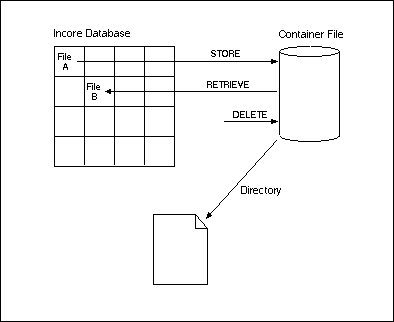
You can access this container using a CALLNAT statement in the same way as
for INCORE, this subprogram is called IDBC---N.
Local data containing the subprogram parameters are supplied in a local-data-area called
IDBC---L. The physical container data set is preset using the
LFILE parameter (see the Natural ISPF Administration Guide).
END TRANSACTION is not performed by these container accesses, and must be
performed by the user program.
Available functions for CALLNAT statements to the container data set are:
| Function | Meaning |
|---|---|
STORE |
Store an incore file into the container data set. |
RETRIEVE |
Retrieve an incore file from the container data set. |
DELETE |
Delete an incore file from the container data set. |
| (blank) | Retrieve a directory of the container data set. |
An incore file saved in a container data set is identified by means of three fields:
TYPE (A8)
GROUP (A48)
NAME (A32)
The following lines store the incore file identified by PERS in the
container data set. The file can later be identified using the values of the
TYPE, GROUP and NAME fields:
0510 ASSIGN ACTION          = 'STORE'
0520 ASSIGN FILE-IDENTIFIER = 'PERS'
0530 ASSIGN TYPE            = 'APP1'
0540 ASSIGN GROUP           = 'PERSONS'
0550 ASSIGN NAME            = 'REP001'
0560 CALLNAT CONTAINER USING CONTAINER-CTL CONTAINER-DATA
The following lines retrieve this incore file from the container data set, assigning
the identifier PERS1:
0610 ASSIGN ACTION          = 'RETRIEVE'
0620 ASSIGN FILE-IDENTIFIER = 'PERS1'
0630 ASSIGN TYPE            = 'APP1'
0640 ASSIGN GROUP           = 'PERSONS'
0650 ASSIGN NAME            = 'REP001'
0660 CALLNAT CONTAINER USING CONTAINER-CTL CONTAINER-DATA
Lists of files in the container data set can be generated in the same way as listing incore files.
The following program lists all container entries of type APP1 and group
PERSONS:
0760 ASSIGN ACTION          = ' '
0770 ASSIGN TYPE            = 'APP1'
0780 ASSIGN GROUP           = 'PERSONS'
0790 CALLNAT CONTAINER USING CONTAINER-CTL CONTAINER-DATA
0800 REPEAT UNTIL END-OF-DATA = 'Y'
0810   DISPLAY TYPE GROUP NAME
0820   CALLNAT CONTAINER USING CONTAINER-CTL CONTAINER-DATA
0830 END-REPEAT
The following deletes the incore file identified by the TYPE,
GROUP and NAME fields from the container data set:
0930 ASSIGN ACTION          = 'DELETE'
0940 ASSIGN TYPE            = 'APP1'
0950 ASSIGN GROUP           = 'PERSONS'
0960 ASSIGN NAME            = 'REP001'
0970 CALLNAT CONTAINER USING CONTAINER-CTL CONTAINER-DATA