
This document covers the following topics:
This section tells you how to configure some items in the Natural ISPF system to suit your installation's needs. The following points are described:
Editing the CONFIG member to:
customize Natural ISPF to the subsystems installed at your site (see Defining Installed Subsystems);
activate user exits (see Activating Natural ISPF User Exits);
activate the logon screen (see Activating Logon Screen);
set special purpose switches (APPLYMOD parameters) (see
Special Purpose
Switches).
Customizing CA Panvalet definitions (see Editing the CA Panvalet Definition Member);
Customizing CA Librarian definitions (see Editing the CA Librarian Definition Member);
Defining short names for libraries (see Defining Short IDs for Libraries);
Setting Natural ISPF system parameters (see Natural ISPF Parameters);
Generating a Natural command processor which can be used to improve performance (see NCP Concept);
Defining libraries for which versioning is to be enforced (see Defining Versioned Libraries ) and maintaining versioning data (see Maintaining Versioning Data);
Defining the Entire System Server node table (for multi-CPU environments or Mainframe Navigation) (see Entire System Server Node Table).
Other configuration tasks such as user definitions and menu customization are described in separate sections.
The following subsections describe these functions in the order you are advised to follow when configuring Natural ISPF. All settings can be modified later in any order by an authorized user.
In addition to the administration functions mentioned above, you can further customize Natural ISPF to the requirements of your site using the Open NSPF facility. This allows you to:
Define site-specific commands (for example, MAIL to check
your automatic office system for a new item).
Define site-specific objects and relate them to functions (for example, define
EMPLOYEE as a new object and relate it to functions
LIST, INFORMATION,
DELETE).
The Open NSPF facility is described in detail in the Natural ISPF Programmer's Guide.
All Natural libraries accessed during administration functions are referred to in this section by their descriptive names. For a list of library names as they appear on the installation medium, see Natural ISPF Libraries.
Select the ADMIN option on the Main Menu. You are presented
with the Administrator Menu which contains all available administration options with a
short description of their meaning, for example:
  ---------------------------- ADMINISTRATOR MENU -------------------------------
  OPTION  ===>
                                                                 User ID  FHI
                                                                 Time     15:38:16
    _ 1    CONFIG     - Configuration parameters                 Terminal DAEFTCS3
    _ 2    USER       - User maintenance                         Library  NSPF241
    _ 3    MENU LIST  - Display N-ISPF menu list                 Node     148
    _ 4    MENU       - Add/update N-ISPF menu
    _ 5    EXAMPLE    - Invoke example menu
    _ 6    NODES      - Update N-ISPF nodes table

    _ 7    SHORTLIB   - Edit global shortlib member
    _ 8    PANDEF     - Edit PANVALET definition member
    _ 9    LIBDEF     - Edit LIBRARIAN definition member
    _ 10   PDS VERS.  - Edit PDS versioned libraries list
    _ 11   NAT VERS.  - Edit NAT versioned libraries list
    _ 12   VERSIONS   - Maintain versioning data

    _ 13   BPSTAT     - Display editor BufferPool status
    _ 14   BP FILES   - List all BufferPool files
    _ 15   BP RECS    - List all Recovery files
   Enter-PF13--PF14--PF15--PF16--PF17--PF18--PF19--PF20--PF21--PF22--PF23--PF24---
         Help  Relis §End  !Br : t;fin !inf  Up    Down  Susp; Left  Right Exc :
|
Select the CONFIG option on the Administrator Menu. The
Configuration Menu appears:
   ---------------------------- CONFIGURATION MENU -------------------------------
   OPTION  ===>
                                                                 User ID  FHI
                                                                 Time     15:43:54
    _ 1    N-ISPF     - N-ISPF parameters                        Terminal DAEFTCS3
                                                                 Library  NSPF241
    _ 2    CONFIG     - Edit Config member                       Node     148
    _ 3    CONTROLU   - Edit Site control table

    _ 4    NCP        - Use NCP command processor


   Enter-PF13--PF14--PF15--PF16--PF17--PF18--PF19--PF20--PF21--PF22--PF23--PF24---
         Help  Relis §End  !Br : t;fin !inf  Up    Down  Susp; Left  Right Exc :
|
This menu contains all available configuration options with a short description of their meaning.
The User Profile Library can contain the member CONFIG which defines the
installed subsystems and active user exits. If you wish to activate user exits, other
subsystems and/or special purpose switches, you must modify the CONFIG
member.
Without the CONFIG member, there are no active user exits and the enabled
subsystems are Natural and z/OS. An example of the CONFIG member is contained
in the System Profile Library. You can copy this example to the User Profile Library using
the SYSMAIN utility.
The CONFIG option on the Administrator Menu provides direct
write access to the CONFIG member using the Editor. Any modification made to
this member will take effect next time you invoke Natural ISPF. It is therefore
recommended that you restart Natural ISPF after modification of the CONFIG
member.
The following subsubsections describe how to define subsystems, activate user exits and activate the logon screen.
The currently available subsystems are listed in a table in Subsystems Supported by Natural ISPF at the end of this documentation.
To enable a subsystem, enter its abbreviation preceded by a plus sign + starting in
Column 1 of any line in the CONFIG member. You can only enter one subsystem
per line.
The following example of a CONFIG member defines a Natural ISPF system
with subsystems Natural, z/OS (MVS), SAT and CA Panvalet:
EDIT-NAT:SYSISPFU(CONFIG)-Program->Struct-Free-45K ------------ Columns 001 072 COMMAND===> SCROLL===> CSR ****** ****************************** top of data ***************************** 000010 * Defined subsystems 000020 * 000030 +N - NATURAL SUBSYSTEM 000050 +M - MVS SUBSYSTEM 000060 +S - SAT SUBSYSTEM 000070 +P - PANVALET SUBSYSTEM ****** **************************** bottom of data **************************** |
Note
The Natural ISPF menus distributed on your installation medium display the lines
relevant to the subsystem(s) activated here; lines (menu options) which have been
defined in these menus but which are not related to one of the activated subsystems
will be invisible for all users at your site.
You can activate a user exit for a Natural ISPF object in the CONFIG
member by entering a 3-character abbreviation in a line preceded by an opening
parenthesis ( . Multiple abbreviations separated by blanks can be entered in one line,
and multiple lines are possible, all preceded by an opening parenthesis ( .
You can use the following abbreviations to activate the associated exit:
| Abbreviation | Object (Member: TAB-EXIT) |
|---|---|
ACT |
Active jobs |
BPF |
Buffer pool files |
BPR |
Buffer pool recovery files |
CNF |
Configuration object |
CON |
System console |
CST |
Module CSECT |
CTN |
Incore container file |
DS |
Data set |
ERR |
Natural error |
JOB |
Job |
LIB |
CA Librarian member |
LOG |
System log |
LV |
CA Librarian member version |
MAC |
Macro |
MNU |
Natural ISPF menu |
MV |
Members versions |
NAT |
Natural object |
NV |
NAT member version |
OUT |
Work output |
PAN |
CA Panvalet member |
PDS |
PDS member |
PV |
PDS member version |
REC |
Recovery file |
SYS |
Job SYSOUT |
USR |
Natural ISPF user |
VIW |
Database view |
VOL |
Volume |
| Abbreviation | Area of Application (Member: TAB-EXIT) |
|---|---|
HSM or HSM-S |
z/OS migrated data set recall (HSM, DMS archiving facility or similar product). |
GROUPS |
Locate group profiles that apply for users |
LOGON |
Logon procedure |
LOGOFF |
Logoff procedure |
NODE |
Access a Node |
PRINT |
|
PROFIL |
Editor profile name |
RENAME |
Rename |
RESUME |
Return to Natural ISPF |
SESS |
Submit or export from edit session |
SUSP |
Suspend Natural ISPF |
Note
See also the subsection Special Purpose Switches and the detailed
descriptions of the user exits in section User Exits.
The following example of a CONFIG member activates the user exits for
Natural objects and PDS members.
  EDIT-NAT:SYSISPFU(CONFIG)-Program->Struct-Free-45K ------------ Columns 001 072
   COMMAND===>                                                    SCROLL===> CSR
  ****** ****************************** top of data *****************************
  000010 * Defined subsystems
  000020 *
  000030 +N  - NATURAL SUBSYSTEM
  000040 +M  - MVS SUBSYSTEM
  000050 +P  - PANVALET
  000060 *
  000070 * Active user exits
  000080 *
  000090 (NAT PDS
  ****** **************************** bottom of data ****************************


  Enter-PF1---PF2---PF3---PF4---PF5---PF6---PF7---PF8---PF9---PF10--PF11--PF12---
        Help  Split End   Suspe Rfind Rchan Up    Down  Swap  Left  Right Curso
|
This means that when a user issues a specified command for any of these object types, the related user exit is called before the command is executed. For more information on user exits, see section User Exits.
You can add a line in the CONFIG member which causes a logon screen to be
displayed when a user invokes Natural ISPF.
The line must start with a dollar sign ($) in column 1 followed by the word
LOGON:
$LOGON
You can enter up to two additional parameters in the same line, separated by blanks. The following are possible:
| Parameter | Meaning |
|---|---|
PROCESS |
Causes automatic logon to Entire System Server. |
USER=user-id |
Displays the logon screen only to the specified user. This feature is useful if no security check is performed at your site. The user ID specified here should be the ID passed to Natural by the TP monitor. |
You can optionally add the following parameter in a line of the CONFIG
member:
-VERSIONS-BY-NODE
It is recommended that you use this parameter only if your site has several Entire System Server nodes that access different computers in your environment. The node number is then used as part of the identifier of versioning data.
This means that if you have more than one Entire System Server node on one computer,
you are strongly advised not to use the VERSIONS-BY-NODE parameter.
Natural ISPF provides some special purpose switches, which for resource reasons can be
controlled by setting a switch with a value in the CONFIG member. The
general syntax for setting a switch is:
APPLYMOD nn = V /* Comment
where:
| Parameter | Meaning |
|---|---|
nn |
is a 1 or 2 byte numeric value identifying the particular
APPLYMOD.
|
V |
is a value assigned to the APPLYMOD to select a
particular option.
|
The special purpose switches available are described in detail in the following.
Alphabetical List of APPLYMODs:
Activates a new syntax and semantic for specifying the SCAN
parameter for LIST functions, which allows you to specify
search strings containing blanks even as first or last character. The new syntax is
similar to the syntax for the editor command FIND, this
means that, if the search string contains blanks, it must be embedded in single (') or
double (") quotes. Moreover, if the search string is embedded in single quotes, a
single quote occurring within the search string must be specified as two
single quotes ('' - two characters).
Example - To search for all occurrences of Marc's (embedded in blanks),
specify either:
SC=' Marc''s '
or
SC=" Marc's "
Notes:
APPLYMOD 10 causes different
results for SCAN operations. For example, if
APPLYMOD 10 is not activated, the command LIST *
SC='STAT' results in a list of all members of the current library
containing the string 'STAT' (embedded in single quotes). When
APPLYMOD 10 is activated, the same command will result in a list of
all members containing the string STAT, which is consistent with the
semantic of the FIND command, where FIND
STAT and FIND 'STAT' provide identical
results. To list all members containing 'STAT', you would have to
specify LIST * SC='''STAT''' or LIST *
SC="'STAT'" in this case.
APPLYMOD 10 may also cause command scripts containing
these kinds of SCAN operations to provide different
results.
Possible values for APPLYMOD 10 are:
| Parameter | Meaning |
|---|---|
| (blank) | Switch is off; SCAN results are
identical to previous versions.
|
X |
Switch is on; new logic is enabled. |
Default is APPLYMOD 10 = (blank); i.e. switch is off.
You should set this switch if you want to enable your users to scan for strings with trailing blanks, and if there is no need for scan operations to behave consistently with previous versions of Natural ISPF.
When working with Natural members, a maximum line length of 88 bytes is used. If you need a line size greater than 88 (for example, for editing or printing), you can enter the new line size here. Possible values are:
| Parameter | Meaning |
|---|---|
0 |
Switch is off. |
nn |
New line size in range from 88 to 233. |
Default is APPLYMOD 16 = 0 (switch is off).
Set this switch if your Natural programs contain source lines longer than 88 bytes. Note that increasing this value means that Natural edit sessions will consume more space in the Editor Buffer Pool.
z/OS only: deactivates the selection of SYSOUT files for a specific output class. That is, all SYSOUT files for a given job are displayed in a list of SYSOUT files. Possible values are:
| Parameter | Meaning |
|---|---|
| (blank) | Switch is off. Listed SYSOUT files will be selected by job number and the assigned output class. |
X |
Switch is on. In a list of SYSOUT files, all files of a job will be listed. |
Default is APPLYMOD 18 = (blank); i.e. switch is off.
It is recommended that you set this switch only when notified by Software GmbH. In general, a difference between the two settings can only be seen with jobs that create output in more than one output class.
Activates the extended Natural/USPOOL interface under Com-plete. Using
USPOOL functionality, for example, a logical printer driver can be
invoked. Possible values are:
| Parameter | Meaning |
|---|---|
| (blank) | Switch is off. A DRIVER parameter
specified with any PRINT command issued by a
Natural ISPF user is interpreted as the name of a printer control character
table (as defined with the NTCC macro - for further
information, see the Natural documentation).
|
X |
Switch is on. When executing under Com-plete, a
DRIVER parameter specified with any
PRINT command issued by a Natural ISPF user is
interpreted as the name of a Logical Output driver routine for Com-plete. See
the subsection Logical Output Drivers in Section 3: TIBTAB-Terminal
Information Block Table of your Com-plete System
Programmer's Guide.
|
Default is APPLYMOD 22 = (blank); i.e. switch is off.
For installation of this feature, read also the related subsection of Optional Interfaces in the Installation documentation.
Use this switch to control how Natural ISPF reacts, if the Natural source area is found non-empty at the time when Natural ISPF is started, or if it is first suspended (for example, with the session command Natural) and then re-entered. Possible values are:
| Parameter | Meaning |
|---|---|
N |
Switch is off. This setting ensures that Natural ISPF acts in a way fully compatible with previous versions, this means that the source area contents are ignored in the situations described above. |
X |
Switch is on. Natural ISPF opens an
EDIT session for the object found in the source
area, without prompting. When re-entering the program in this way, Natural
ISPF is suspended again as soon as the new edit session is ended (users are
prompted whether this is intended). This is the default setting.
|
P |
Switch is on, but users will be prompted if it is intended
to open an EDIT session for the object found in the
source area.
|
Y |
Switch is on, but suspension is performed without prompting. |
Z |
Switch is on, but no automatic suspension is performed. |
Default is APPLYMOD 26 = X (switch is on).
Set this switch to N, if Natural ISPF is invoked from applications that
use the source area for text generation and if you do not want users to modify the
source area lines from Natural ISPF. You can also set the switch to Y or
Z to suppress prompting in the situations indicated above.
Activates Con-nect Inbasket checking, when the office system is installed and the appropriate subsystem is activated in the Natural ISPF configuration member (see the subsection Defining Installed Subsystems). Possible values are:
| Parameter | Meaning |
|---|---|
0 |
Switch is off. |
nn
(<=150)
|
Time interval in minutes after which your Con-nect Inbasket is checked. If the number of new items in the Inbasket has changed since the last check, the user is notified by a message. No error message is issued if the user does not have a personal Con-nect cabinet. |
nn
(>150)
|
This option is similar to the above, that is, Inbasket
checking is activated, but (nn-150) is
used as the time interval in minutes and an error message is issued if the
user does not have a personal Con-nect cabinet.
|
Default is APPLYMOD 42 = 0 (switch is off).
Use this switch when Con-nect is installed and you want users to be notified of incoming Con-nect messages.
z/OS only: when browsing job output, this switch controls whether or not all SYSOUT data sets are shown as one file. Possible values are:
| Parameter | Meaning |
|---|---|
| (blank) | Switch is off - SYSOUT data sets are shown as separate files. |
X |
Switch is on - SYSOUT data sets are shown as one file. |
Default is APPLYMOD 47 = 0 (switch is off).
Set this switch if this function is requested at your site.
Reduces Entire System Server (ESY) calls to check whether a data set is a GDG.
| Parameter | Meaning |
|---|---|
| (blank) | Check for GDG. |
X |
Do not check. |
Default is APPLYMOD 53 = (blank); i.e. check for GDG.
Set this switch if you are not using Natural ISPF together with GDG (Generation data sets).
Avoids timeout of Editor session 40, which contains Natural ISPF internal data, by
doing STATUS calls every 10 minutes. Possible values are:
| Parameter | Meaning |
|---|---|
| (blank) | Status calls not active. |
X |
Status calls active. |
Default is APPLYMOD 55 = (blank), i.e. no status calls.
Set this switch if you reduced the Delete file timeout value for the Editor Buffer
Pool and some of your user get error messages like Write to BP failed.
Bypass for Adabas calls exceeded when printing empty SYSOUT data sets.
| Parameter | Meaning |
|---|---|
| (blank) | Bypass not active |
X |
Bypass active |
Default is APPLYMOD 57 = (blank) (bypass not active).
It is recommended that you set this switch only when notified by Software GmbH.
Activates a general limit for Editor FIND commands, when
editing or browsing PDS members, sequential data sets, or SYSOUT data sets. A
FIND command will then display a message after scanning
5000 records, if you want to continue the search the command
RFIND must be entered. The limit can always be modified
(see also Editor command LIMIT).
| Parameter | Meaning |
|---|---|
| (blank) | No limit for FIND
command.
|
X |
Default limit (5000) is activated. |
Default is APPLYMOD 58 = (blank) (no limit).
Set this switch if you are working with large data sets in a TP environment and
FIND commands consume a lot of CPU and cannot be
interrupted.
Activates full expiration date checking before writing to a data set. If you are working with expiration date and a data set has not yet expired, a prompt warns you that you are going to write to this data set.
| Parameter | Meaning |
|---|---|
| (blank) | No expiration date checking. |
X |
Full expiration date checking is active. |
Default is APPLYMOD 59 = (blank) (no check).
Set this switch if you are using expiration date to protect your data sets and you
want to avoid overwriting and operator messages. If you are working without expiration
date in most of your data sets, you should not set this APPLYMOD.
Defines whether any fields in the user defaults cannot be inherited from a group. This means that if the field is not defined in the user profile, Natural ISPF will not read group profiles to find a value for this profile field.
To activate this switch, you should assign a numeric value lower than 64; this value will be interpreted as bit-coded. This means, that for each bit set in the binary representation of that number, Natural ISPF will not search group profiles for a definition of the corresponding profile field, as shown in the table below. Of course, any definition found in the user profile of the individual user will always be honored, regardless of the value assigned to this switch.
| Parameter | Meaning |
|---|---|
.......1 |
INIT-LOGON |
......1. |
Default PRINTER |
.....1.. |
Default FILE-TYPE |
....1... |
Default DSNAME |
...1.... |
Initial COMMAND |
Default is APPLYMOD 65 = (blank) (all fields are inherited).
Set this switch, if the performance of the Natural ISPF initialization phase is dissatisfying, and if none or only some of the above-mentioned fields need to be inherited from group profiles.
APPLYMOD 65 = 5
If a user logs on to Natural ISPF and the profile does not contain a value for the
fields INIT-LOGON and FILE-TYPE, Natural ISPF will not
search for the group profiles of this user for these fields.
Defines whether a warning is displayed whenever a user tries to access a data set
which has been migrated by HSM, DMS or a similar archiving system. The user can cancel
the action to avoid a RECALL or can continue processing.
| Parameter | Meaning |
|---|---|
X |
Users are prompted for confirmation before recalling a migrated data set. |
| (blank) | Same as X.
|
D |
Prompting takes place only for data sets showing
ARCIVE in the VOLSER field of the catalog entry
(DMS).
|
H |
Prompting takes place only for data sets showing
MIGRAT in the VOLSER field of the catalog entry
(HSM).
|
N |
No warning window opens. An error message is issued which informs the user that the data set is not available. |
C |
Users are prompted for confirmation before recalling a
migrated data set. The VOLSERs that indicate a migrated data set are read from
the CONFIG member. Enter up to four VOLSERs preceeded by an
underscore (_) and set APPLYMOD 68 to character
C.
|
Default is APPLYMOD 68 = (blank) (users will be prompted before
recall).
For the default setting, it is recommended that the Entire System Server startup
parameter RECALL be set to NO for performance reasons.
Asynchronous recalling is not part of standard Natural ISPF features but can
easily be implemented by coding an appropriate job submission within the HSM user
exit of Natural ISPF (see section User
Exits). Do not set APPLYMOD 68 to
N if you have activated this user exit.
Set this switch to N (as in the example below) if you are using HSM or a similar product and you want to deny Natural ISPF users the right to recall and access migrated data sets.
If you are not using HSM or a similar product, setting this switch to
N will improve performance if your Entire System Server startup
parameters do not contain the recommended setting RECALL=NO. This is
because if the default setting RECALL=YES is in effect, each data set
must be checked for migration before its file attributes can be queried from
Entire System Server.
APPLYMOD 68 = N
APPLYMOD 68 = C
_MIGRAT
_ARCIVE
Defines whether windowing is suppressed when Natural ISPF is executed in batch. When executing Natural ISPF in batch, this switch can be used to overcome some Natural problems with windowing. This switch is evaluated in batch only.
Default is APPLYMOD 71 = (blank) (windowing active in batch).
It is recommended that you set this switch only when notified to do so by Software GmbH.
APPLYMOD 71 = X
Improves performance with export PC for large data sets. Prompt for PC file name is displayed without delay in minutes.
| Parameter | Meaning |
|---|---|
| (blank) | Prompt after reading to the end of the file to determine the number of records contained. |
X |
Prompt immediately. |
Default is APPLYMOD 75 = (blank) (no improvement).
Set this switch to export large data sets or members to your PC.
Modifies the header line of EDIT/BROWSE and
LIST sessions. The node number is displayed in the header
if it is different from the default node.
| Parameter | Meaning |
|---|---|
| (blank) | Node will not be displayed in header. |
X |
Node will be displayed. |
Default is APPLYMOD 87 = (blank).
Set this switch if you are in a multi-CPU environment with different Entire System Server nodes and you are accessing different nodes from the same Natural ISPF environment.
Makes the handling of data entered in the Natural Objects Entry Panel identical to previous versions of Natural ISPF (although different from the general logic).
| Parameter | Meaning |
|---|---|
| (blank) | Fields of the Natural Objects Entry Panel will be filled with the values contained when the user left this panel the last time. |
X |
Field values from the last use are filled in only if these values do not refer to a library different from the current library, as shown on the Natural ISPF Main Menu (logic compatible with ISP 1.4). |
Default is APPLYMOD 89 = (blank).
Set this switch if your users prefer the old way of handling the Natural Objects Entry Panel.
Controls the way in which the BR-CONSOLE session is to be filled in
environments where the views CONSOLE and CONSOLE-LOG are
both supported (i.e. in z/OS environments). Possible values are:
| Parameter | Meaning |
|---|---|
| (blank) | Automatic selection. Natural ISPF will choose the access method which best suits the environment of the node being addressed. |
L |
Session is filled using the view CONSOLE-LOG.
Not supported for z/OS/JES3 environments. The local command
LINES is supported.
|
N |
Session is filled using the new
CONSOLE function, supported by Entire System
Server version 2.1.1 onwards only for the environment z/OS/ESA SP 5.1.0 and
onwards. The local command LINES is supported to
extend the CONSOLE session.
|
O |
Session is filled using old
CONSOLE function, which is restricted to the size
of one screen. The local command LINES is not
supported.
|
Default is APPLYMOD 90 = (blank) (automatic selection).
It is recommended that you set/modify this switch only when notified to do so by Software GmbH.
Controls whether or not activating the session exit ISP--S-U will also
cause this exit to be invoked when an EXPORT function is
about to be executed.
| Parameter | Meaning |
|---|---|
| (blank) | Exit will be invoked for SUBMIT
functions only, as described in section Session Exit
ISP--S-U in this documentation.
|
| X | Exit will be invoked both for
SUBMIT and EXPORT
functions, thus making it possible to disallow a specific
EXPORT operation, for example, after the size of
the file being exported has been checked.
|
Default is APPLYMOD 91 = (blank) (exit used for
SUBMIT only).
To edit and save CA Librarian members, which contain CA Librarian control cards, starting with a hyphen (-) , the hyphen must be internally replaced with an equal sign (=) in column 1 of any data line. Set this switch to activate this substitution.
Possible values are:
| Parameter | Meaning |
|---|---|
| (blank) | Switch is off - no substitution is performed. |
X |
Switch is on - substitution is activated |
Default is APPLYMOD 96 = (blank) (switch is off).
Set this switch if your CA Librarian members contain data lines starting with the escape character, a hyphen (-), which is usually reserved for CA Librarian control cards.
By default in Natural ISPF group profiles are searched for with prefix logic. This switch, on the other hand, can be used to search for user group profiles that are derived from user groups defined in Natural Security.
Possible values are:
| Parameter | Meaning |
|---|---|
| (blank) | Switch is off. Group profiles are searched for with prefix logic, as in previous versions of Natural ISPF. |
S |
Switch is on. Group profiles are derived from Natural Security definitions (both privileged and non-privileged groups). |
P |
Switch is on. Group profiles are derived from Natural Security definitions (from privileged groups only). |
Default is APPLYMOD 101 = (blank) (switch is off).
Set this switch if Natural Security is installed, and if you would like profile
characteristics that are not defined for a specific user to be inherited from profile
definitions made for a user group that contains the specific user. Leave the switch
unchanged if you would like profile characteristics defined for a matching user prefix
(for example, AB* for user ABEG) to apply for these users.
Note
If no matching group profile is found, but a profile definition for the default
user * exists, this definition will be inherited, regardless of the setting of the
above APPLYMOD parameter.
When displaying Natural map layouts with the function command
FORMAT, the maximum line length is set to the current
value of Natural's system variable *LINESIZE.
If you need a greater line size for browsing, printing, or performing
other functions on formatted maps, you can enter the new line size here.
Possible values are:
| Parameter | Meaning |
|---|---|
0 |
Switch is off. |
nn |
New line size in the range from 80 to 250. |
Default is APPLYMOD 103 = 0 (switch is off).
Set this switch if your Natural maps have more columns than the displayable line size
in your Natural ISPF environment. You will then be able to use the scroll commands
RIGHT and LEFT to display the
columns which do not fit on the screen.
As of Natural ISPF Version 2.4.1,
the menu structure is
cursor-sensitive. To select a menu item you can either mark it with an X,
or simply place the cursor in front of it. To use menu screens as in earlier versions,
without cursor-sensitivity, set this parameter to X.
Possible values are:
| Parameter | Meaning |
|---|---|
| (blank) | Menus are cursor-sensitive. |
X |
Menus are not cursor-sensitive. |
Default is APPLYMOD 104 = (blank) (switch is off).
In some cases, JES does not count all records of a SYSOUT file. This occurs if the
compiler or the assembler outputs contain control records. The
BOTTOM command of Natural ISPF does not point to the end
of the SYSOUT file if these outputs report a record count without the control records.
This APPLYMOD instructs Natural ISPF not to rely on the record count
reported by JES but to count the records themselves. Hence this may take some time,
enable this switch if best performance is desired.
Possible values are:
| Parameter | Meaning |
|---|---|
| (blank) | Take record count from JES. |
X |
Count all records. |
Default is APPLYMOD 105 = (blank) (switch is off).
Affects the ALLOCATE function command for z/OS data sets.
The default value for the RLSE parameter is NO. If
this APPLYMOD is used, the RLSE option defaults to
YES instead of NO.
Possible values are:
| Parameter | Meaning |
|---|---|
| (blank) | Default value of the RLSE parameter
is NO.
|
| X | Default value of the RLSE parameter
is YES.
|
Default is APPLYMOD 108 = (blank) (switch is off).
The following is an example of the CONFIG member with the
APPLYMODs entered. Note that in this example, some
APPLYMODs are activated, others are commented out (see also the
subsection Using Comment
Lines below).
EDIT-CNF:SYSISPFU(CONFIG) ------------------------------------- Columns 001 072 COMMAND===> SCROLL===> CSR 000400 * The next line will determine whether to input logon-screen at the 000410 * begining of NSPF. 000420 * PROCESS keyword is optional and means to logon to natural process 000430 * USER=xxx will ask for logon only if user = xxx 000440 * $LOGON PROCESS 000450 * APPLYMOD 16=132 000460 * APPLYMOD 18=X 000470 APPLYMOD 22=X 000480 APPLYMOD 42=5 /* Inbasket every five minutes ****** **************************** bottom of data **************************** |
You can enter comment lines in the CONFIG member to provide information or
explanations of entries. Comment lines must start with an asterisk (*) in Column 1 of
the line.
To deactivate any subsystem or user exit(s), it may be useful to turn the entry in the
CONFIG member into a comment by entering an asterisk (*) in the first
column of the corresponding line. This gives you a better overview of active and
disabled items, and makes it easy to reactivate any available item.
When defining exits or APPLYMODs, you can enter comments at the end of the
line if they are preceded by /* (see also the example above).
The definitions for the Natural ISPF/CA Panvalet interface must be contained in the
PANDEF member in the User Profile Library.
You can change some of these definitions. However, before you modify the
PANDEF member, copy the example member from the System Profile Library to
the User Profile Library. Then:
Enable access to CA Panvalet in the CONFIG member (see the subsection
Editing the Configuration Member
CONFIG).
Restart Natural ISPF.
The Administrator Menu now includes the PANDEF option.
Select this option to give you direct write access to the PANDEF member.
In the PANDEF member, you can specify how CA Panvalet members are updated.
Any of the following options are possible, entered in a line of the PANDEF
member starting in Column 1:
| Option | Explanation |
|---|---|
-UPDATEMODE |
Default. An update deck containing only the modified lines of the CA Panvalet member is created and used for updates. |
-REPLACEMODE |
The whole CA Panvalet member is replaced. |
-MIXMODE |
Both modes UPDATE and
REPLACE are allowed. When the
SAVE command is issued, Natural ISPF will select
the method that will cause the fewest lines to be sent to CA Panvalet.
|
If your installation requires special control for all CA Panvalet updates, you can
activate the ISPT-SVU user exit. This exit receives control after each
successful CA Panvalet update (PAM#1), and can be used to obtain the last
output from CA Panvalet.
The ISPT-SVU exit is a Natural subprogram and can access Entire System
Server to obtain the CA Panvalet output, analyze it, and write it to a data base, file
or SPOOL file.
A sample exit is distributed in the Natural ISPF Exit Library. To activate this exit,
copy your ISPT-SVU object to SYSLIB using the utility
SYSMAIN and enter:
$SAVEEXIT
in Column 1 of any line of the PANDEF member. For a list of definable
parameters, see the section User
Exits.
You can define which parameter fields on the CA Panvalet Entry Panel are mandatory when
users add a new member to CA Panvalet (for example, the parameters
USER, LANG,
COMMENT). Users must then enter a valid value in these input
fields on the CA Panvalet Entry Panel or specify the corresponding object parameters
when using the EDIT function command syntax for a new member.
The following text entered in the PANDEF member starting in Column 1
defines the corresponding parameters as mandatory:
/USER
/LANG
/COMMENT
The PANDEF member contains language and sequence number definitions. You
must ensure that the language definitions (sequence numbers and message line) correspond
to your CA Panvalet definitions, as Natural ISPF uses them to create update decks (in
UPDATE and MIX mode). You can
check these definitions by displaying a CA Panvalet member using the Editor in
BROWSE mode.
In the example of a PANDEF member that follows, these language definitions
follow the fields defined as mandatory when users create new CA Panvalet members:
   EDIT-CNF:SYSISPFU(PANDEF) ------------------------------------- Columns 001 072
    COMMAND===>                                                    SCROLL===> CSR
   ****** ****************************** top of data *****************************
   000010 * PANVALET LANGUAGES TABLE
   000020 -UPDATEMODE   ( OR -REPLACEMODE   -MIXMODE )
   000030 * IF THE NEXT LINE STARTS WITH $ USER EXIT AFTER SAVE IS INVOKED
   000040 $SAVEEXIT
   000050 * THE FOLLOWING LINE CONTAIN FIELDS THAT ARE ESSENTIAL FOR ADD MEMBER
   000060 /USER
   000070 /LANG
   000080 /COMMENT
   000090 *SCREEN LANG
   000100 *     !COMMAND LANG
   000110 *     !         !SEQ START - END
   000120 *     !         !       !GENERATED MESSAGE LINE
   000130 !AUTOC!AUTOCODER!001-005!N
   000140 !ASMB !BAL      !073-077!Y
   000150 !COBOL!COBOL    !001-006!N
   000160 !ANSCB!ANSCOBOL !001-006!N
   000170 !COB72!COBOL72  !001-006!N
   000180 !FORT !FORTRAN  !073-077!N
   000190 !PL/1 !PL/1     !073-077!N
   Enter-PF13--PF14--PF15--PF16--PF17--PF18--PF19--PF20--PF21--PF22--PF23--PF24---
  Help  SORT  End   Suspe Rfind Rchan Up    Down  Swap  Left  Right Curso
|
Note
The above example was created using a German-language keyboard. For the separator
(!), use the character that corresponds to X'4F'.
The definitions for the Natural ISPF/CA Librarian interface must be contained in the
LIBDEF member in the User Profile Library.
You can change some of these definitions. However, before you modify the
LIBDEF member, copy the example member from the System Profile Library to
the User Profile Library. Then:
Enable access to CA Librarian in the CONFIG member (see the subsection
Editing the Configuration Member
CONFIG).
Restart Natural ISPF.
The Administrator Menu now includes the LIBDEF option.
Select this option to give you direct write access to the LIBDEF member.
The following topics are covered below:
You can define which parameter fields on the Librarian Entry Panel are mandatory when
users wish to edit a CA Librarian member (for example, the parameters
PROGRAMMER and LANGUAGE for new
members). Users must then enter a valid value in these input fields on the Librarian
Entry Panel or specify the corresponding object parameters when using the
EDIT function command syntax for a new member.
Additionally, you can specify other mandatory parameters that do not appear on the Librarian Entry Panel, but the user is prompted by a window when requesting an edit session:
If you specify the DESCRIPTION parameter, the user, when
requesting to edit a new member, is prompted by a window in which he can describe
the new member. This description appears on a list of members in the appropriate
column.
If you specify the HISTORY parameter, the user, when
requesting an edit session with an existing member, is prompted by a window in which
he must enter the reason for changing the member.
The following text entered in the LIBDEF member starting in Column 1
defines the corresponding parameters as mandatory:
| Option | Explanation |
|---|---|
/PGMR |
PROGRAMMER field on Entry Panel.
|
/LANG |
LANGUAGE field on Entry Panel.
|
/DESC |
DESCRIPTION prompt.
|
/HIST |
HISTORY prompt (reason for change).
|
You can control the way in which a member's PGMR attribute is handled
during update (that is, when saving the contents of an EDIT
session) by specifying one of the following entries, instead of the entry
/PGMR mentioned in the subsection above.
Note
Each of these entries must start in Column 1.
| Option | Explanation |
|---|---|
/PGMR=STD |
This is identical to a plain /PGMR entry, that
is, the PGMR attribute is left unchanged during update (and must be
specified when adding a new member).
|
/PGMR=OPTUPDATE |
Specifies similar handling for
ADD (prompt, if field is empty). However, if for an
update, the PGMR field is either explicitly specified by the user
or supplied by an active user exit, ISPL---U, it will be passed to
CA Librarian for updating.
|
/PGMR=NATUSERID |
Specifies that *USER will be
used as PGMR attribute both for adding new members and updating
existing ones. No prompting will take place.
|
/PGMR=NSCUNAME1 |
This is like NATUSERID, but PGMR
will be based on the Natural Security definition (first "word" of
*USER-NAME).
|
/PGMR=NSCUNAME2 |
This is like NSCUNAME1, but the
PGMR attribute will be formed from the first character plus last
"word" of *USER-NAME separated by a
period (.).
|
If you wish to have -INC statements expanded by default when browsing CA
Librarian members, add the following entry to the LIBDEF member:
/EXPAND
Apart from your own site-specific definitions described above, the LIBDEF
member contains language and sequence number definitions which you must not modify.
Below is an example of a LIBDEF member.
  EDIT-NAT:SYSISPFU(LIBDEF)-Program->Struct-Free-44K -- >>> Versioning is invoked
   COMMAND===>                                                    SCROLL===> CSR
  ****** ****************************** top of data *****************************
  000010 * THE FOLLOWING LINES DEFINE MANDATORY FIELDS FOR NEW MEMBERS:
  000020 /LANG
  000030 /DESC
  000040 * /HIST - THIS LINE IS INACTIVE (NOT STARTING IN COLUMN 1)
  000050 *
  000060 * THE FOLLOWING LINE SPECIFIES THAT PGMR WILL ALWAYS BE SET TO
  000070 * THE CONTENTS OF THE NATURAL SYSTEM VARIABLE *USER:
  000080 /PGMR=NATUSERID
  000090 *
  000100 * LIBRARIAN LANGUAGES TABLE
  000110 *CODE LANG
  000120 *   !SYNONYM
  000130 *   !       !SEQ START - END
  000140 *   !       !
  000150 !ASM!ASM    !073-080
  000160 !BAS!BASIC  !000-000
  000170 !CMD!CLIST  !000-000
  000180 !JCL!CNTL   !073-080
  000190 !COB!COBOL  !001-006
  Enter-PF1---PF2---PF3---PF4---PF5---PF6---PF7---PF8---PF9---PF10--PF11--PF12---
        Help  Split End   Suspe Rfind Rchan Up    Down  Swap  Left  Right Curso
|
Notes:
!), use the character that corresponds to X'4F'.
HISTORY parameter is commented
out. This means that users are not prompted to give a reason for modifying a member.
In the User Profile Library, you can create a text member ULIBID, in which
you can define two-character abbreviations for data set names or file names.
Users can use short IDs when addressing data sets/libraries in the input fields of Entry Panels or in the object parameters of function command syntax.
The short IDs defined here are valid system-wide (global short names). However, users can
define their own short IDs in their user profile, for example by using the
SHORTLIB command. When a short ID is used, the user profile
is searched first. For further information see the following subsections in the Natural ISPF User's Guide:
description of the SHORTLIB command in section Command Reference;
Library Definition in section Profile Maintenance.
To define global short library names, select the SHORTLIB
option from the Administrator Menu. This gives direct write access to member
ULIBID in Editor format.
Example of global short library name definitions:
  EDIT-NAT:SYSISPFU(ULIBID)-Program->Struct-Free-45K -- >>> Versioning is invoked
   COMMAND===>                                                    SCROLL===> CSR
  ****** ****************************** top of data *****************************
  000010 * table with global shortlibs
  000020 SP SYSM.PROCLIB SYSXA1
  000030 EL EDITOR.COMN.IV135.LOAD
  000040 NL FRZ.NAT215.MVSLOAD
  000050 OL OPS.SYSF.PROD.LOAD
  000060 OJ OPS.COMN.JCL
  000070 OA OPS.AKTUELL.LINKLIB
  000080 AL OPS.SYSF.V5.ADALOAD
  000090 CL PUB.SYSF.USER.LOAD
  ****** **************************** bottom of data ****************************


  Enter-PF1---PF2---PF3---PF4---PF5---PF6---PF7---PF8---PF9---PF10--PF11--PF12---
        Help  Split End   Suspe Rfind Rchan Up    Down  Swap  Left  Right Curso
|
Each entry consists of a two-character short name followed by a blank followed by the full library name. If the library is not cataloged, the library name must be followed by a blank and the volume serial number to eliminate the catalog request at access time.
Lines beginning with an asterisk (*) are interpreted as comment lines.
When defining short names for libraries, it is advisable to observe naming conventions for easy identification. The following convention is suggested:
The first character could describe the system or product, for example, A
for Adabas.
The second could describe the library type, for example, L for
LOAD, S for SOURCE, J for JCL.
Using this convention, the library short name AL could easily be identified
as the Adabas load library currently in use.
You can set the default parameters for the Natural ISPF system by selecting the
N-ISPF option from the Configuration Menu and then entering the required
value in the following parameter table:
   ------------------------------ NSPF PARAMETERS --------------------------------
   COMMAND ===>


      NATPROC DBID   148   ( Natural Process dbid)

      MACRO CHAR     §     ( Character for macro program facility)
      MACRO SMODE    S     ( Mode (Struct,Report) for non Natural macro)

      VERSIONS DBID    9   ( Versions file dbid)
      VERSIONS FNR    33   ( Versions file number)
      MAX VERSIONS    21   ( Maximum versions for member in versions file)

      PROCESSOR ID   A     ( NCP command processor id to be used)

      NOM PRINTER
                           ( Printer handled by ENTIRE OUTPUT MANAGEMENT)


   Enter-PF1---PF2---PF3---PF4---PF5---PF6---PF7---PF8---PF9---PF10--PF11--PF12---
  Help  Split End   Suspe Rfind Rchan Up    Down  Swap  Left  Right Curso
|
| Parameter | Member: ISPPARAM |
|---|---|
NATPROC DBID |
Entire System Server data base ID as defined in the
NTDB macro in the NATPARM module. This
field is for information only and cannot be modified.
|
MACRO CHAR |
Special character to be used for macro statements in objects that use the Macro facility. |
MACRO SMODE |
Defines the mode of a non-Natural object that uses the Macro facility (for example, a JCL member stored as PDS member). Possible values:
This system parameter cannot be modified by a user while editing. |
VERSIONS DBID *
|
Physical DBID of versioning data. |
VERSIONS FNR *
|
File number of versioning data. |
MAX VERSIONS |
Maximum number of previous versions kept for any one member.
At the next SAVE, the oldest version is
deleted.
|
PROCESSOR ID |
Last byte of the NCP command processor to be used. For details, see the subsection NCP Concept. |
* All versioning data (modified lines, known as "update decks", of Natural
members and PDS members) are stored in an Adabas or VSAM file. When a user selects a
previous version from a list, the current object version with the appropriate update
deck is displayed. You must specify the file by data base ID and file number here. You
can use the Natural system file (FNAT) to store the versioning data, but it
is strongly recommended that you load a separate file (see also the Installation
documentation).
The VERSIONS DBID and VERSIONS FNR fields must be set once
after the versioning file has been installed to activate versioning.
Note
When the NTFILE/LFILE parameter is
used, regardless if with or without PASSW, the values for VERSIONS
DBID and VERSIONS FNR in the Natural ISPF parameters are ignored,
but some values must be set in these fields to activate versioning. It is highly
recommended to use the correct numbers to prevent confusion.
| Parameter | Meaning |
|---|---|
NOM PRINTER |
To use the extended interface between Natural ISPF and
Entire Output Management (NOM), enter the logical printer profile which is
handled by NOM. Prerequisite is the NAF/NOM interface. Assume your NOM
PRINTER is FROM-ISP. The following table shows the
required definitions.
|
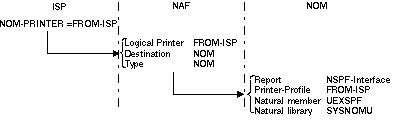
With this definition all reports created by Natural ISPF can be handled by a user
routine in Entire Output Management. An example UEXSPF is delivered in the
Example Library. For modification and execution it must be copied to the library
SYSNOMU. For further details, see the Entire Output Management System
Programmer's documentation, section Printer
Exits, User Separation Routines, Separator
Pages.
Usually Natural ISPF offers commands/functions and objects for several subsystems on
z/OS. Depending on the installation, only a comparatively small subset of all functions is
activated (with the subsystem definitions in the CONFIG member). The Natural
ISPF command processor has to interpret the command entered on the screen by reading the
whole CONTROL table, which contains commands, functions and objects and by
tailoring this table with information from the CONFIG member.
The following figure illustrates Natural ISPF command processing:
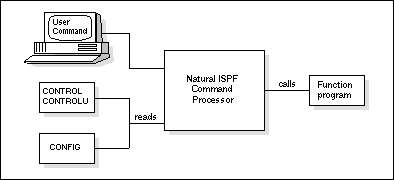
All tables are stored in a database and are read during processing.
This overhead can be reduced by using a command processor (NCP) as illustrated below:
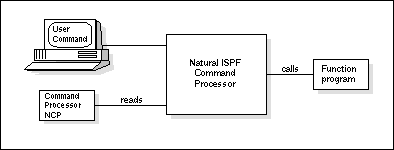
The command processor replaces CONFIG and the CONTROL member(s)
and is stored in the Natural buffer pool improving performance of Natural ISPF command
processing.
When using an NCP, which can be considered as a compiled object of the
CONTROL and CONFIG tables, changes to the Natural ISPF table
sources are not effective until the NCP is regenerated. For this reason the NCP should be
used in stable environments, where changes to the Natural ISPF tables are infrequent.
The following changes in CONFIG affect the NCP:
Activating/deactivating a subsystem
Activating/deactivating object exits
In addition, any change to the Site Control Table CONTROLU affects the NCP.
*
After installation of a new Natural ISPF release or maintenance level, the NCP must be regenerated to reflect changes in delivered tables.
* For a detailed description of the Site Control Table, see the subsection Defining a User Object in section Open NSPF of the Natural ISPF Programmer's Guide.
The following topics are covered below:
To generate an NCP (which is an option) enter the command
GENNCP or select the NCP option
from the Configuration Menu. The following window opens:
   ---------------------------- CONFIGURATION MENU -------------------------------
   OPTION  ===> 4
                                                                 Userid   BRY
               +-----Generation of NCP processor-----+           Time     14:03:46
      1    N-I !                                     !           Terminal DAEFTC45
               ! Enter processor name    :  A        !           Library  NSPFHELP
      2    CON !                                     !           Node     148
      3    CON ! Select one/more functions           !
               !  Generate and compile    :          !
      4    NCP !  Compile only            :          !
               !  Copy processor to SYSLIB:          !
               !  Generate report         :          !
               !                                     !
               +-------------------------------------+
|
| Field | Meaning |
|---|---|
Enter processor name |
Instead of overwriting an existing NCP, you can create a new
one whenever necessary. Enter a 1-byte name (x) and the generated
NCP is stored in the library SYSISPFU with the name
IS-NCP-x.
|
Generate and compile |
With the current contents of the Natural ISPF tables, an NCP
source is generated and compiled to create an object in
SYSISPFU.
|
Compile only |
Mark this option if the generation of a previous execution was successful but the compilation failed. |
Copy processor to SYSLIB |
When a compiled NCP object exists in SYSISPFU,
it must be copied to SYSLIB before it can be activated.
|
Generate report |
Mark this option to perform a report, during generation, containing a log of functions. The report will then be written to the Natural ISPF workpool. |
A compiled NCP object that has been copied to the library SYSLIB and that
follows the naming pattern IS-NCP-x can subsequently be activated by
selecting the N-ISPF (parameters) option from the Configuration Menu and
assigning the name suffix x to the field PROCESSOR ID.
If a NAT0888 occurs with NCP, increase the Natural parameter
DATSIZE. If the defined NCP cannot be used by Natural ISPF
(defined processor deleted or not accessible), an error message is displayed and Natural
ISPF automatically invokes its standard command processing logic without NCP. A defined
NCP can be deactivated by resetting its name in the NSPF Parameters screen.
With Natural ISPF, the following command processors are loaded to SYSLIB
and can be used if no user-defined objects and commands are defined and no user exits
are to be activated.
| Name | Supported subsystems |
|---|---|
IS-NCP-N |
Natural, Incore database |
IS-NCP-M |
Natural, Incore database, z/OS |
IS-NCP-P |
Natural, Incore database, z/OS, CA Panvalet |
IS-NCP-L |
Natural, Incore database, z/OS, CA Librarian |
IS-NCP-A |
Natural, Incore database, z/OS, CA Panvalet, CA Librarian |
The parameters for storing previous versions of some edited Natural ISPF objects are
described in the subsection Natural ISPF
Parameters. The versioning function is activated by the user
using the VERSIONS ON setting in the user profile. For further information,
see the following subsections in the Natural
ISPF User's Guide:
Versioning in section Useful Features;
section Profile Maintenance.
Additionally, you can enforce or exclude versioning for specific Natural libraries and
partitioned organized (PO) data sets. Previous versions of members in these libraries are
always stored according to the parameters set in the Natural ISPF system parameter table,
irrespective of the VERSIONS setting in the user profile.
Versioning for specific libraries is enforced by specifying the library names in a member
in the User Profile Library. Together with the library name, you can specify whether
Natural ISPF will prompt the user to give a reason for changing a member when issuing the
SAVE or STOW command.
This is done by adding the keyword REASON to the library name (see the
examples below). The reason for change is then displayed when the user requests a lists of
versions for the member (see the subsection Versioning in section Useful
Features in the Natural ISPF User's Guide).
With added keyword NOVERSION you can exclude versioning for specific Natural
libraries and partitioned organized (PO) data sets.
The names of all Natural libraries for which versioning is to be enforced or excluded
at all times are maintained in the member VERLSTN in the User Profile
Library. The NAT VERS option on the Administrator Menu gives direct write
access to this member.
The following is an example of the member VERLSTN:
EDIT-CNF:SYSISPFU(VERLSTN)-Program->Struct-Free-45K ----------- Columns 001 072
   COMMAND===>                                                    SCROLL===> CSR
  ****** ****************************** top of data *****************************
  000010 NSPFvrs REASON
  000020 SYSISP2T NOVERSION
  000030 SYSISPFU
  000040 SYSISP2S
  ****** **************************** bottom of data ****************************


  Enter-PF1---PF2---PF3---PF4---PF5---PF6---PF7---PF8---PF9---PF10--PF11--PF12---
Help Split End Suspe Rfind Rchan Up Down Swap Left Right Curso |
Versioning is activated or excluded (NOVERSION) for all Natural libraries
listed (one library per line). Note that when a user SAVEs or
STOWs a member after modification in the library
NSPFvrs (in the example map above,
vrs is a placeholder for the current version, release and
system maintenance level number), a prompt window allows the user to enter a reason for
the change.
The names of all data sets for which versioning is to be active or inactive
(NOVERSION) at all times are maintained in member VERLSTP in
the User Profile Library. The PDS VERS option on the Administrator Menu
gives direct write access to this member.
The following is an example of the member VERLSTP:
  EDIT-CNF:SYSISPFU(VERLSTP)-Program->Struct-Free-45K ----------- Columns 001 072
   COMMAND===>                                                    SCROLL===> CSR
  ****** ****************************** top of data *****************************
  000010 EDITOR.SYSF.ZAPS
  000020 EDITOR.COMN.SOURCE
  000030 EDITOR.COMN.SYSTEM.SRCE REASON
  ****** **************************** bottom of data ****************************


  Enter-PF1---PF2---PF3---PF4---PF5---PF6---PF7---PF8---PF9---PF10--PF11--PF12---
        Help  Split End   Suspe Rfind Rchan Up    Down  Swap  Left  Right Curso
|
Versioning is activated or excluded (NOVERSION) for all data sets listed
(one data set per line). Note that when a user SAVEs a member
after modification in the library EDITOR.COMN.SYSTEM.SRCE, a prompt window
allows the user to enter a reason for the change.
Available maintenance functions on versioning data are:
List versioned members
Delete versioned member
Access to versioning data is provided by the VERSIONS option on the
Administrator Menu. If you select this option, the Versions Objects Entry Panel appears:
  ---------------------- VERSIONS OBJECTS - ENTRY PANEL -------------------------
  COMMAND ===>


     Object type   ===>                         (NAT,PDS,* )
     DSN / Library ===>
     Member        ===>
     Node          ===>
     DBID          ===>
     FNR           ===>


  Enter-PF1---PF2---PF3---PF4---PF5---PF6---PF7---PF8---PF9---PF10--PF11--PF12---
        Help  Split End   Suspe Rfind Rchan Up    Down  Swap  Left  Right Curso
|
You can enter a command in the command line and specify the versioned object you wish to maintain in the parameter fields.
Meaning of the parameter fields:
| Field | Meaning |
|---|---|
Object type |
NAT or PDS. When using the LIST
function, the asterisk wildcard (*) selects all types. The list is then sorted in
the sequence PDS, NAT.
|
DSN / Library |
Data set or library name of versioned object. When using the
LIST function, you can enter a prefix followed by the
asterisk wildcard (*). For example, enter NSPF* to list all library
names starting with NSPF.
|
Member |
Name of versioned member. When using the
LIST function, you can enter a prefix followed by the
asterisk wildcard (*). For example, enter NAT* to list all member
names starting with NAT.
|
Node |
Specify the Entire System Server node to be searched. If no node is specified, all nodes (from 1 to 255) are searched. |
DBID / FNR |
For NAT objects: when using the
LIST function, you can restrict the search to a
specific database ID, a file number, or both. If no DBID or FNR is specified, all
are searched.
|
The following topics are covered below:
The following maintenance function commands are available for versioned objects:
| Command | Parameter Syntax |
|---|---|
LIST |
library/*(member/*)
                                                      TYPE=t NODE=id
                                                      DBID=db
FNR=n |
DELETE |
library/*(member/*)
                                                      TYPE=t NODE=id
                                                      DBID=db
FNR=n |
Note
If you issue any of the above function commands from outside the Versions
Maintenance facility, you must specify the object-type parameter
MV before the object parameters.
The following topics are covered below:
The following example is the result of the command:
LIST MV SYSISP*(*) TYPE=NAT
It shows all versioned members in all Natural libraries that start with
SYSISP:
  LIST-MV:NAT:SYSISP*(*)/DBID=*/FNR=* ------------- Row 0 of 45 - Columns 006 076
   COMMAND===>                                                    SCROLL===> CSR
     TYPE          LIBRARY(MEMBER)                                       NUM SIZE
  ** ******************************** top of list *******************************
     NAT           <9,80>SYSISPDB(IDBC---N)                              001 0001
     NAT           <9,80>SYSISPDB(IDBI---L)                              001 0001
     NAT           <9,80>SYSISPDB(IDBI---N)                              001 0001
     NAT           <9,80>SYSISPE(IDB-C22N)                               001 0001
     NAT           <9,80>SYSISPE(MAC-MVS4)                               001 0001
     NAT           <9,80>SYSISPFU(CONFIG)                                010 0010
     NAT           <9,80>SYSISPFU(ISP-LONU)                              001 0001
     NAT           <9,80>SYSISPFU(LIBDEF)                                003 0003
     NAT           <9,80>SYSISPFU(ULIBID)                                002 0002
     NAT           <9,80>SYSISPFU(VERLSTN)                               002 0002
     NAT           <9,80>SYSISPFU(VERLSTP)                               002 0002
     NAT           <9,80>SYSISPH1(BJOBMENU)                              001 0001
     NAT           <9,80>SYSISPH1(BS2FMENU)                              004 0008
     NAT           <9,80>SYSISPH1(DOCNAME)                               001 0001
     NAT           <9,80>SYSISPH1(EXAMPLE)                               011 0016
     NAT           <9,80>SYSISPH1(INDEX)                                 001 0001
     NAT           <9,80>SYSISPH1(ISUO-9)                                001 0001
  Enter-PF1---PF2---PF3---PF4---PF5---PF6---PF7---PF8---PF9---PF10--PF11--PF12---
        Help  Split End   Suspe Rfind Rchan Up    Down  Swap  Left  Right :s
|
Meaning of the column headings:
| Column | Meaning |
|---|---|
TYPE |
Object type. |
LIBRARY(MEMBER) |
For Natural members, this field shows DBID, FNR, library name and member name. |
NUM |
Number of versions of the member. |
SIZE |
Number of records in the versions file. |
The following example is the result of the command:
LIST MV MBE*(*) TYPE=PDS
It shows all versioned members in all PDS libraries that start with MBE.
Note that if the NODE parameter is not specified, all nodes are
searched:
  LIST-MV:PDS:MBE.COMN.SOURCE(*)/NODE=* ------------ Row 0 of 6 - Columns 006 076
   COMMAND===>                                                    SCROLL===> CSR
     TYPE          LIBRARY(MEMBER)                                       NUM SIZE
  ** ******************************** top of list *******************************
     PDS           <148>MBE.COMN.SOURCE(ISPUPSUM)                        001 0016
     PDS           <148>MBE.COMN.SOURCE(PRINTER2)                        002 0002
     PDS           <148>MBE.COMN.SOURCE(SCRIPT)                          005 0005
     PDS           <148>MBE.COMN.SOURCE(TEST)                            002 0002
     PDS           <148>MBE.COMN.SOURCE(VERSIONS)                        002 0003
     PDS           <148>MBE.COMN.SOURCE(VERSIONS2)                             002 0001
  ** ****************************** bottom of list ******************************


  Enter-PF1---PF2---PF3---PF4---PF5---PF6---PF7---PF8---PF9---PF10--PF11--PF12---
        Help  Split End   Suspe Rfind Rchan Up    Down  Swap  Left  Right :s
|
Meaning of the column headings:
| Column | Meaning |
|---|---|
TYPE |
Object type. |
LIBRARY(MEMBER) |
For PDS members, this field shows the node ID, library name and member name. |
NUM |
Number of versions of the member. |
SIZE |
Number of records in the versions file. |
You select a versioned member from a list by entering a line command in the input field preceding the member name and pressing ENTER. Each line command is an abbreviation of a function command:
| Line Command | Corresponding Function Command |
|---|---|
D |
DELETE
|
You can use the commands ALL,
LAYOUT, RELIST and
SORT. For detailed information, see the subsections in
section Useful
Features of the Natural ISPF User's Guide.
If you select the NODES option from the Administrator Menu, you can edit the
table that is used to offer active help for the field NODE. This field that
appears in several Natural ISPF screens is used for easy selection of a node.
Note
This table is required if you intend to use Mainframe Navigation functionality under
Natural for Windows. In this environment, only nodes defined in this table can be accessed
by Mainframe Navigation. For running Mainframe Navigation, it is important that the nodes
are activated (see below). When the nodes are active, it is recommended to edit and save
this table for getting the complete operating system information.
The following figure illustrates an example node table:
  -----------------------------UPDATE-NODES-TABLE--------------------------------
  COMMAND ===>

      Node Description           Name
      ----  --------------------  ----
      148  F Maschine__________  F-MC
      _68  Alsbach_____________  ALSA  NOT ACTIVE
      _69  E Maschine__________  E-MC
      _70  A Maschine__________  A-MC
      ___  ____________________
      ___  ____________________
      ___  ____________________
      ___  ____________________
      ___  ____________________
      ___  ____________________


  Enter-PF1---PF2---PF3---PF4---PF5---PF6---PF7---PF8---PF9---PF10--PF11--PF12---
        Help  Split End   Suspe Rfind Rchan Up    Down  Swap  Left  Right Curso
|
Meaning of the fields:
| Field | Meaning |
|---|---|
Node |
Node number (Entire System Server DBID). |
Description |
Short description of node. |
Name |
Node name. |
If the node is not active, Entire System Server notifies you with a message. You can add,
modify or delete node definitions by overtyping existing node definitions or entering data
in empty input fields. To save the node table, issue the END
command (usually assigned to PF3).
Note
User access to nodes is not restricted to the nodes that appear in this table. If you
wish to restrict access to specific nodes, you can do so with user exits.