
This document describes the concept and the architecture of the Natural Development Server (product code NDV) which is designed for use under z/OS (Batch).
In addition, an optional Natural Development Server CICS Adapter is available that enables Natural Development Servers for z/OS to be used with a CICS TP monitor.
The following topics are covered:
A Natural Development Server is a multi-user, multi-tasking application. It can host Natural sessions for multiple users and execute their requests concurrently.
The concept is based on the "serverized" Natural runtime system. Its
architecture comprises a server front-end stub (development server stub
NATRDEVS) that uses the Natural front-end to dispatch Natural sessions and
to execute functionality within these sessions.
The Natural remote development server architecture basically consists of:
The stub NATRDEVS is launched to initialize a Natural Development
Server. It listens for incoming transactions and dispatches the appropriate Natural
session for executing the transaction.
The front-end is called (together with the Natural runtime system) by the front-end stub for session initialization/termination, request execution and session roll-in/roll-out.
The module NATGWSTG provides for interaction between the Natural
runtime system and the front-end stub. NATGWSTG is already included in
the Natural nucleus and is called by the Natural runtime system to exchange the
necessary request data.
Transaction processors are called by the front-end stub. The application logic of each individual transaction is implemented within a transaction processor.
Natural Driver
Natural is driven by the Natural Com-plete interface NCF-SERV.
A monitor task allows the administrator to control the server activities, to cancel particular user sessions or to terminate the entire server, etc.
The multi-user, multi-tasking, front-end stub NATRDEVS is launched to
initialize a Natural Development Server.
The following topics are covered below:
The task executing the server initialization (TMain) basically is the main
listener which waits for incoming requests from the remote development client (Natural
Studio). It owns a session directory to manage multiple clients (users) and their
corresponding remote Natural sessions. TMain has the task to accept all
incoming requests and to dispatch them to other subtasks (TWork). The
process is as follows:
First, a command issued by the user on the client side
(in the menu of Natural Studio) connects to
TMain to establish a connection.
Next, TMain inserts the client into its session directory, attaches a
new TWork subtask and passes the connection to TWork.
TWork processes the request (indeed initializes a new Natural session
if the client sends a CONNECT request) and replies to the client.
After the reply, TWork listens on that connection for successive
requests of that particular client. TWork remains active until the user
on the client (Natural Studio) side switches the focus to a different environment
(the local or a different mapped environment).
If the user activates the environment again, TMain launches a new
TWork subtask that resumes the existing Natural session from the
previous TWork.
That is, each client owns one subtask TWork on the Natural Development
Server and multiple remote Natural sessions (one for each mapped environment). This
subtask remains active as long as the mapped environment on Natural Studio is the
currently active environment. Each remote Natural session remains active until the user
disconnects/unmaps the corresponding environment on the client side. Consequently, a
Natural session can be executed under different subtasks if the user switches among
multiple environments.
Within a Natural Development Server session, the following Natural system variables are used:
*TPSYS contains SERVSTUB,
*DEVICE contains VIDEO,
*SERVER-TYPE contains DEVELOP.
The Natural runtime system allows I/O execution in the same way as in an online environment:
A Natural Development Server intercepts the I/O and sends the 3270 data stream to Natural Studio.
Natural Studio internally starts a terminal emulation window and passes the 3270 stream to that window.
After I/O execution, the I/O data is sent back to the server.
The front-end stub invokes the front-end to continue processing after I/O.
The Natural front-end required for a Natural Development Server is a Natural batch front-end driver, which should be LE enabled. See sample installation jobs for details.
The Natural front-end required for executing the Natural sessions under control
of CICS is the Natural remote front-end NATCSRFE that is delivered with the
Natural Development Server. For further information, refer to Introducing the Natural Development Server CICS
Adapter in the Natural Development Server CICS
Adapter documentation.
The transaction processors are Natural programs in the library SYSLIB that
process transactions (for example, "save source",
"get library list") requested by the remote development
client. The transaction processors are invoked by the front-end stub.
The gateway module NATGWSTG is already included in the Natural nucleus.
For CICS support, the Natural Development Server distribution medium in addition
contains the remote gateway modules NATSRGND/NATLRGND. Theses
modules are responsible for transmitting the NDV-relevant data between a Natural
Development Server and the Natural session running in CICS.
For more information, refer to the Natural Development Server CICS Adapter documentation.
To enable the administrator to monitor the status of the Natural Development Server, a monitor task is provided which is initialized automatically at server startup. Using the monitor commands, the administrator can control the server activities, cancel particular user sessions, terminate the entire server, etc. See Operating the Development Server.
The following figure illustrates the interaction of Natural Studio used as a remote development client with a Natural Development Server.
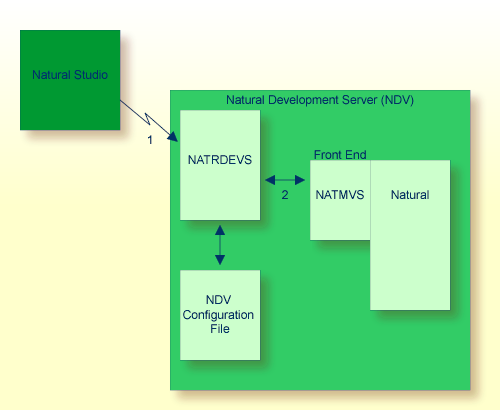
Natural Studio (the client) sends a remote development request to the Natural
Development Server (NDV) using the port number specified with the NDV configuration
parameter PORT_NUMBER.
The Natural Development Server dispatches the Natural session using the Natural
front-end you have specified with the NDV configuration parameter
FRONTEND_NAME (NATMVS in this
example).