
This document describes the purpose and the functions of the Natural Development Server (NDV) CICS Adapter.
The following topics are covered:
The Natural Development Server CICS Adapter is designed for a Natural Single Point of Development context where it enables the use of a Natural Development Server (product code NDV), running under z/OS in batch mode within a CICS TP monitor environment.
See also:
Natural Single Point of Development
Natural Development Server for z/OS
The Natural Development Server CICS Adapter enables you to execute a Natural Single Point of Development session within CICS.
In the menu, Natural Studio offers you a command named . This command enables you to open a Natural session on a remote development server.
If you configure the remote development server for use in conjunction with the Natural Development Server CICS Adapter, this Natural session is not hosted by the remote development server, but it is dispatched remotely within a specified CICS region.
The CICS support is not implemented within the front-end stub NATRDEVS. For
dispatching the Natural sessions in CICS, the development server continues to run in batch
mode or under SMARTS. But it uses the remote front-end NATCSRFE that is
delivered with the Natural Development Server to dispatch the Natural sessions in CICS.
That is, depending on the installed front-end, a development server dispatches the
sessions locally (NATMVS for batch mode) or remotely (NATCSRFE for CICS).
NATCSRFE in turn accepts the Natural request from NATRDEVS and
transfers it to a configured CICS environment using the CICS Socket Interface. Within the
CICS environment, a CICS Natural transaction is launched that processes the Natural
request and returns the result. Thus it is not necessary to execute the entire development
server under CICS. Only small working units (Natural requests such as "save
source" or "get library list") are transferred
to CICS for execution.
The Natural Development Server CICS Adapter comprises the following components:
The following figure illustrates the interaction between Natural Studio as a remote development client, the Natural Development Server and the CICS environment involved.
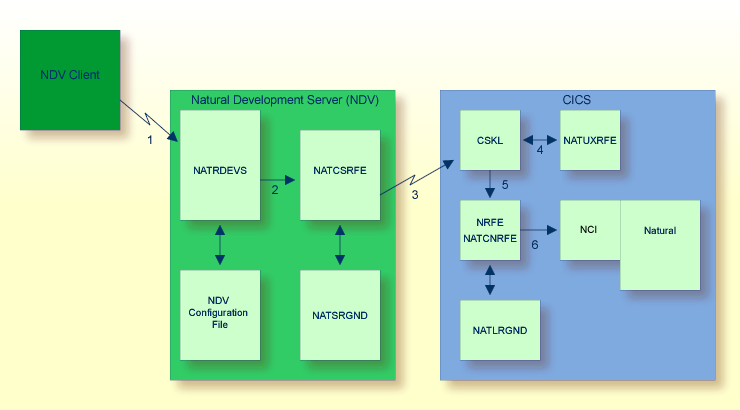
Natural Studio sends the remote development request to the Natural Development Server
using the port number specified with the Natural Development Server configuration
variable PORT_NUMBER.
The Natural Development Server dispatches the Natural session using the Natural
front-end you have specified with the Natural Development Server configuration
variable FRONTEND_NAME. Specify NATCSRFE in
order to use the Natural Development Server CICS Adapter.
NATCSRFE transmits the request to the host/port specified with the
Natural Development Server configuration variable
RFE_CICS_TA_HOST /
RFE_CICS_TA_PORT. You must configure the CICS-supplied
standard listener CSKL to listen at this port.
If the Natural Development Server is configured to perform remote impersonation
(SECURITY_MODE=IMPERSONATE/IMPERSONATE_REMOTE),
NATUXRFE is called to authenticate the client. If the authentication
succeeds, CSKL launches the CICS transaction NRFE under the
account of the client (impersonated).
CSKL launches the CICS transaction you have specified with the Natural
Development Server configuration parameter RFE_CICS_TA_NAME
(NRFE in this example). This transaction must be defined to use the
program NATCNRFE.
NATCNRFE finally dispatches the Natural session using the Natural CICS
front-end you have specified with the Natural Development Server configuration
parameter RFE_CICS_FE_NAME.
The Natural Development Server will use Internet Protocol IPv6 if available. If an IPv6 connection to the CICS adapter is not possible, IPv4 will be used.