
This document describes the utility "ADASEL".
The following topics are covered:
The ADASEL utility selects records from Protection log files and WORK containers.
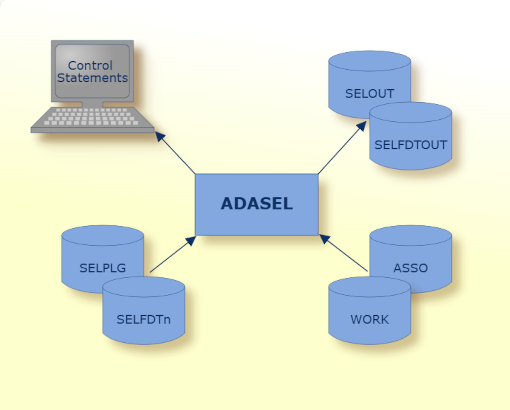
|
Data Set |
Environment Variable/Logical Name |
Storage Medium |
Additional Information |
|---|---|---|---|
|
Associator |
ASSOx |
Disk |
n/a |
|
Alternate FDTs |
SELFDTn |
Disk |
Only required if you process a query with keyword FDTINPUT, to read the FDT from a file (file number 'n'), instead of the database. In case all files are defined as alternate FDT, then no database is required. |
|
Optional output |
SELOUT |
Disk |
The output file location can be defined here. Otherwise, the output is written to stdout. |
|
Optional FDT output |
SELFDTOUT |
Disk |
The FDT output file location can be defined here. The FDTs used in the selection will be exported here, if the FDT parameter is selected. |
|
Protection log |
SELPLG |
Disk |
The input PLOG file is defined here. Alternatively, a directory can be specified here, so that all NUCPLG files in there will be processed. |
|
Control statements |
stdin |
- |
Utilities Manual |
|
ADASEL report |
stdout |
- |
Messages and Codes |
|
Work storage |
WORK1 |
Disk |
Utilities Manual |
The sequential file SELPLG can have multiple extents. For information about sequential files with multiple extents, see Adabas Basics, Using Utilities in the Adabas documentation.
The utility writes no checkpoints.
The following control parameters are available:
      D   DATASET = { PLOG | WORK }

          DBID = number

          FDT

          FILE = <filepath>

          FORMAT = { CSV | DISPLAY | JSON | JSONPRETTY }

          SELECT = <select query>

          SELECTALL { = FDTINPUT }

          SEPARATOR = character | \character

      D   [NO]STAT
Note
The query is case insensitive.
DATASET = { PLOG | WORK }
This parameter selects the file containing the protection log information to be processed. The keyword can take the values PLOG or WORK, where PLOG is the default.
adasel: dataset=work
The WORK dataset is selected.
DBID = number
This parameter behaves differently based on the dataset defined.
PLOG dataset
It can be used to select a different database than the one defined in the PLOG file. The default is the database number defined in the PLOG file.
WORK dataset
It must be used to define the database containing the WORK dataset. There is no default in this case.
adasel: dbid=200
The database currently being used is database 200. The PLOG dataset is selected by default.
adasel: dbid=200 dataset=WORK
The database currently being used is database 200. The WORK dataset is selected.
FDT
The file FDTs used in the selection will be exported as JSON with this parameter. This will be written to a file, if the environment variable SELFDTOUT is defined. Otherwise, it is printed to stdout.
FILE = <filepath>
This function reads a text file containing one or more queries on the dataset.
adasel: file=query.in
The content of the file query.in will be executed on the dataset.
FORMAT = { CSV | DISPLAY | JSON | JSONPRETTY }
This parameter selects the output format. The selection CSV creates a “comma-separated values” output. If DISPLAY is selected, then the output format will be similar to the mainframe output. The JSON and JSONPRETTY selections create a JSON file in CDC style. The JSON format is for machine processing, while the JSONPRETTY format is human readable. The default is DISPLAY.
SELECT = <select query>
The select function executes a text string containing one or more queries on the dataset.
adasel: select=select all from file 1 display all end
The specified query will be executed on the dataset.
SELECTALL { = FDTINPUT }
The 'select all' function creates an output containing the complete content of the dataset. This happens without any library call. If the optional parameter FDTINUT is set, then FDT information will be retrieved from the files defined in the environment variable(s) SELFDTn.
SEPARATOR = character | \character
This parameter defines the separator character for the CSV output. The default is comma.
[NO]STAT
This function enables or disables the display of performance statistics at the end of the execution. The default is NOSTAT.
adasel: stat

------------------------------------------------------------------------------------------------
Total run time:           84,371,489 us,         84.37 sec
  Library init/next:             814 us
  Processing time:        67,242,964 us,         67.24 sec,    14,581,622 PLOG records
    Process FDT cache:     1,202,276 us,          1.20 sec,     1,199,999 hits,    avg:     1 us
                                                                      100 % hit rate, 1 file(s)
    Decompress time:       3,707,651 us,          3.70 sec,     1,200,000 records, avg:     3 us
    Library run:          33,869,021 us,         33.86 sec,     1,200,000 calls,   avg:    28 us
    Print time:            8,331,534 us,          8.33 sec,     1,200,000 records
  Library finish:                 36 us
----- Library measurements ------------
Init/Next Total:                 400 us
  Init/Next Set-Up:              147 us
  Compile query:                 238 us
  Stackm. Set-Up:                  2 us
  Criterion handover:             11 us
Run Total:                45,322,926 us
  Run Setup:                  73,677 us
  Parsing PLOG:            6,271,616 us
  Stack machine:          12,986,070 us
  Run Handover:           25,991,563 us

------------------------------------------------------------------------------------------------
The following paragraphs detail the currently implemented keywords, their control flow, and what their function is. The keywords are given in capital letters but can be written down in any case:
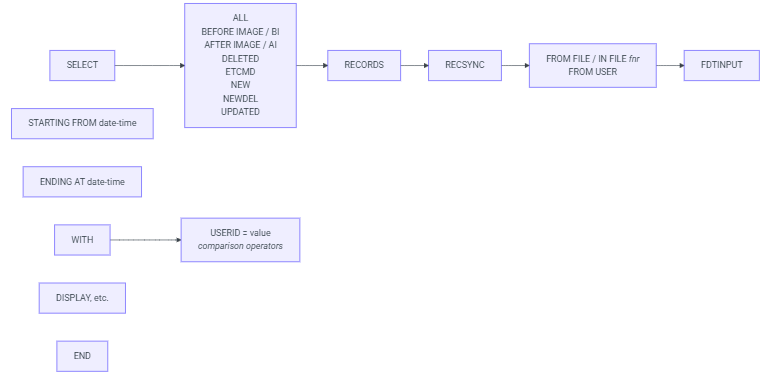
SELECT
marks the beginning of a query
has to be paired with an END statement
select options:
ALL
selects before and after images
is a combination of SELECT AFTER IMAGE and SELECT BEFORE IMAGE
BEFORE IMAGE / BI
selects before images derived from A1 and E1 commands
alternatively, the shorter form SELECT BI can be used
AFTER IMAGE / AI
selects after images derived from A1 and N1 commands
alternatively, the shorter form SELECT AI can be used
DELETED
selects before images derived from E1 commands
ETCMD
selects ET information
NEW
selects after images derived from N1 commands
NEWDEL
selects after images derived from N1 and E1 commands
UPDATED
selects before and after images derived from A1 commands
RECORDS
optional keyword, may be omitted
RECSYNC
optional keyword, may be omitted
specifies whether before and after images are displayed together
if omitted, takes the following default values, based on select option:
TRUE for
ALL
DELETED
NEW
NEWDEL
UPDATED
FALSE for
BEFORE IMAGE / BI
AFTER IMAGE / AI
ETCMD
if given, TRUE for all select options
mode options:
the mode options are mutually exclusive, only one can be used at a time
FROM FILE / IN FILE
marks the selection of blocks based on supplied file number
file number has to follow immediately after
FROM FILE and IN FILE have the same function, they act like synonyms
FROM USER
marks the selection of blocks by user
user name has to be supplied in WITH statement
FDTINPUT
marks the use of an external FDT
the FDT has to be supplied in the environment variable SELPLGn
STARTING FROM
ENDING AT
starting from and ending at set a timeframe for the selection of a PLOG record
the date and time have to be supplied in the format YYYYMMDD/HHMMSS
WITH
acts like a second stage for the SELECT statement
if FROM USER is specified a USERID can be specified here
all comparison operators can be used and joined with OR as well as AND
END
marks the end of a SELECT statement or query
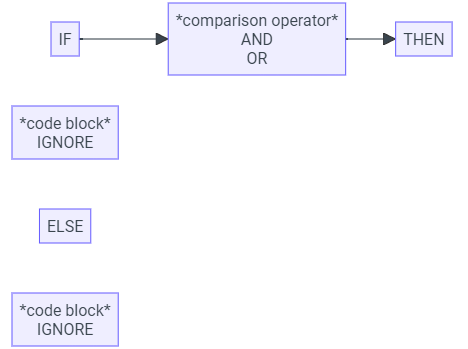
IF
provides a conditional logic similar to other programming languages
accepts every comparison operator
comparison operators can be connected with OR as well as AND
IFs can also be nested
THEN
keyword is optional
marks the part if logical statement is true
ELSE
code block that is executed when the conditional statement is false
IGNORE
stands in for an empty code block
DO / DOEND
acts similar to curly brackets in other programming languages
can be used to enclose a multiline code block for THEN or ELSE part
can be omitted if code is on a single line only¬
evaluates a statement to TRUE or FALSE
evaluates fields against literals or literals against literals
the evaluation depends on the format of the first literal value
statement will either evaluate numerical comparison or string comparison
AA = 'Test' => string comparison
AB(1) >= 10 => numerical comparison
USERID < '*adatst ' => string comparison
SESSNUM != 2 => numerical comparison
if the value formats do not match a runtime error is thrown
if two fields are compared, a numerical comparison is attempted first, if it fails a string comparison will occur
EQUAL
can be specified by EQ and =
GREATER THAN
can be specified by GT and >
LESS THAN
can be specified by LT and <
GREATER THAN OR EQUAL
can be specified by GE and >=
LESS OR EQUAL THAN
can be specified by LE and <=
NOT EQUAL
can be specified by NE, ¬= and !=
THRU
specifies a range of values
the borders are inclusive
syntax can only be used with equal operator, e.g.
AA EQ 10 THRU 50
USERID EQ 'USER_0 ' THRU 'USER_10'
OR
joins two conditional operations together
evaluates to TRUE if one of the two operations is TRUE
AND
joins two conditional operations together
evaluates to TRUE if both operations are TRUE
when used in conjunction, AND takes precedence over OR, similar to how multiplication is "faster" than addition
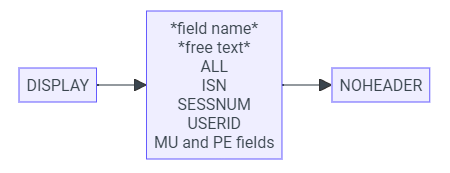
DISPLAY
Prints content to STDOUT.
Must be enclosed in a SELECT statement.
Prints a header section for each record.
Is followed by an output specifier:
field name
Prints the content of one field.
free text
Prints a free text, text has to be encased in quotation marks.
ALL
Prints all data fields in the record.
ISN
Prints the ISN of the record.
SESSNUM
Prints the session number of the record.
USERID
Prints the name of the user that modified the data in the record.
MU and PE fields
Format XXI(J):
XX: field specifier
I: PE number
J: MU number
XXJ / XXI(J): Prints the specified field.
XXI(1-n): Prints all MU fields in the given range for a given PE field I.
e.g. AA5(1-10): prints the fields AA5(1) through AA5(10).
XXI(1-N): Searches and prints all MU fields for a given PE field I.
XX1-n(J): Prints the given MU field J for a given range of PE fields.
e.g. AA1-10(5): prints the fields AA1(5) through AA10(5).
XX1-N(J): Searches and prints all PE fields that have a given MU field J.
XX1-N(1-N): Searches and prints all PE and MU fields.
NOHEADER
Switches off the output of the header.
The header will be turned off for all output produced.
NOHEADER only needs to be specified once per SELECT statement.
The OUTPUT command on the mainframe version of ADASEL was meant to produce a machine-readable hex dump.
For the Linux version, please use the option format=json or format=jsonpretty.
NEWPAGE
In the mainframe version, was meant to create a page break or feed paper through to the next top of the page.
For the Linux version, the keyword is parsed for backwards compatibility, but no new page is generated.

SKIP
Produces line breaks in the output.
If ADASEL is called with the option format=json or format=jsonpretty, no line break will be produced.
Number of lines:
Specifies the number of lines to be skipped.
Can be omitted.
If omitted, will produce 1 line break.
LINES
Closes SKIP instruction.
Keyword can be omitted.
Examples:
SKIP: produces one line break.
SKIP 2: produces two line breaks.
SKIP 3 LINES: produces three line breaks.
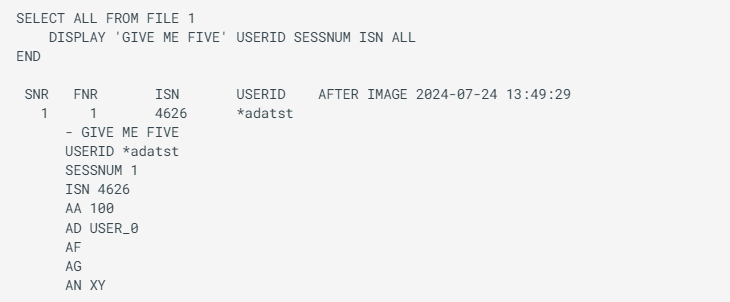
The output of a display command contains a header section and an output body. An example in the main frame format can look as follows:
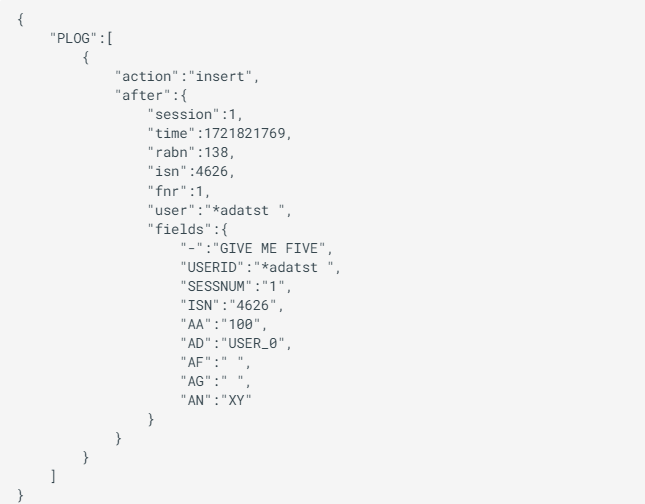
The same example in JSON format can look like this:
For the main frame format, the header section contains the following fields:
sequence number
file number
ISN
user ID
record type
Time stamp of the data block.
The body of the output lists the desired output fields as described in the query. In the example, the output specifier ISN results in the display of the corresponding number and the specifier ALL lists all the data fields contained in the block. The result of each output specifier will always be printed in a separate line. It is possible to combine multiple specifiers in one DISPLAY command or have multiple DISPLAY commands.
The JSON format lists all blocks as an array structure. This structure is machine readable and can be used to interface with other applications.