
These Release Notes inform you of the enhancements and new features that are provided with Version 3.5.3 of System Automation Tools, and apply to all supported operating systems: z/OS and UNIX (Linux).
The following topics are covered below:
Before you can install System Automation Tools on a mainframe computer, the following Software GmbH products must have been installed at your site:
Adabas Version 8.5.4 or above;
Natural Version 9.2 or above; the installation must include the Software AG Editor component;
Entire System Server, Version 3.7.2 or above;
Entire System Server for Linux/Windows, version 2.1.17 or above (optional, for Linux/Windows access);
Natural Security (optional).
EntireX Version 10.9 or higher for z/OS (optional, for multi-node support);
Entire Net-Work (optional, for multi-node support);
Before you can install System Automation Tools on a Linux system, the following Software GmbH products must have been installed at your site:
Adabas for Linux, Version 7.2 or above;
Natural for Linux, Version 9.3 or above;
Entire System Server for UNIX, Version 2.1.17 or above;
EntireX Version 10.9 or above (optional, for multi-node support and cross-platform access);
With the release of System Automation Tools Version 3.5.3, versions below 3.5.2 are no longer supported. Therefore, we strongly advise that you switch to the current version at your earliest convenience.
You can view all available Software GmbH product versions and check the dates when their maintenance ends by visiting the Empower website at https://empower.softwareag.com/:
Log in to Empower.
Expand in the left menu of the page and select :
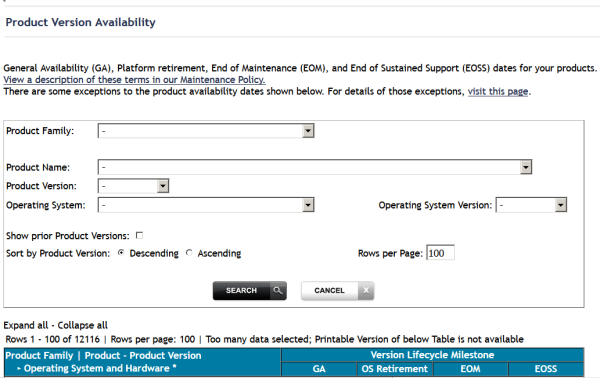
Select the required filter criteria from the drop-down list boxes and click on the button.
A list of supported Software GmbH products that meet the filter criteria is shown. In addition, the end-of-standard-maintenance dates are indicated in the EOM column.
If you mark Show prior Product Versions, only product versions that are out of maintenance are listed.
A migration to Version 3.5.3 is possible from Versions 3.5.2, 3.5.1 and 3.4.3 but not from earlier versions.
For more information on migration see Migrating from Previous Version
If you want to migrate environments running Entire Operations Version 5.4 as well as Entire Output Management Version 3.4, you have to upgrade Entire Operations before you upgrade Entire Output Management because Entire Operations requires System Automation Tools Version 3.5.3 for execution.
| Short Name | Adabas | Natural | Natural Field |
|---|---|---|---|
BM
|
3 P NU |
P5 |
LOG-MICROSECONDS
|
BN
|
3 P NU |
P5 |
LOG-MICROSECONDS-INV
|
BP |
5 A NU |
A5 |
LOG-TIME-ZONE |
| Short Name | Adabas | Natural | Natural Field |
|---|---|---|---|
S2 |
SUPDE='S2=AB(1,10),AD(1,7),BM(1,3)' |
A20 |
LOG-ENV-TIME |
S3 |
SUPDE='S3=AB(1,10),BB(1,7),BN(1,3)' |
A20 |
LOG-ENV-TIMEINV |
S4 |
SUPDE='S4=AB(1,10),BA(1,2),BC(1,25,BB(1,7),BN(1,3)' |
A47 |
LOG-ENV-TYPE-OBJECT-TIMEINV |
S5 |
SUPDE='S5=AB(1,10),BA(1,2),BB(1,7)BN(1,3)' |
A22 |
LOG-ENV-TYPE-TIMEINV |
S6 |
SUPDE='S6=AB(1,10),AN(1,8),BB(1,7),BN(1,3)' |
A28 |
LOG-ENV-USERID-TIMEINV |
S9 |
SUPDE='S9=AH(1,10),AD(1,7),BM(1,3)' |
A20 |
LOG-NOP-KEY-OT |
SA |
SUPDE='SA=AH(1,10),AI(1,10),AD(1,7),BM(1,3)' |
A30 |
LOG-NOP-KEY-ONT |
SB |
SUPDE='SB=AH(1,10),AI(1,10),AJ(1,4),AD(1,7),BM(1,3)' |
A34 |
LOG-NOP-KEY-ONRT |
Existing System Automation Tools log files can be adapted by using Adabas Online Services or another Adabas utility.
All solved problems of the previous version are included in this version.