
With an XCIPOPUPMENU control, you enable the usage of context menus on a page. The application creates the contents of the context menus dynamically at execution time, in response to certain events. There is only one instance of XCIPOPUPMENU needed in each page.
Context menus are supported on the page level and by the following controls:
The following events are raised when the user right-clicks in corresponding areas of the page:
When the user right-clicks in a non-empty line in a grid or tree, the event
value-of-griddataprop.reactOnContextMenuRequest
or
value-of-treecollectionprop.reactOnContextMenuRequest
is raised.
When the user right-clicks in an empty line in a grid or tree, the event defined in the
property contextmenumethod of the grid or tree is
raised.
When the user right-clicks in a FIELD control for which
"myfield" has been defined with the
valueprop property, the event
reactOnContextMenuMyfield or the event defined in the property
contextmenumethod of the FIELD control is raised (see the
description of the FIELD control for more information on the properties
contextmenu and
contextmenumethod).
When the user right-clicks elsewhere in the page, the event defined in the
contextmenumethod of the page is raised.
In the event handler of these events, you do no have to necessarily open a context menu; you can also start other operations, if this makes sense. But in order to open a context menu, you need to fill the structure generated for the XCIPOPUPMENU control, which is described below.
If the user selects one of the context menu items, the event
xcipopupmenu.reactOnSelect is raised.
This document covers the following topics:
The following screen displays a grid control with several rows. It uses the XCIPOPUPMENU control to show a context menu when the user right-clicks on a row. It shows a different context menu when the user right-clicks in an empty area of the grid and yet another one when the user right-clicks elsewhere in the page.
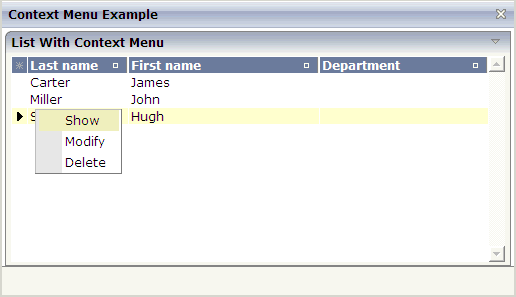
The XML layout definition contains the following:
<natpage>
    <xcipopupmenu>
    </xcipopupmenu>
...
</natpage>
The example Natural code is contained in the Natural for Ajax demos as program
CTRCTX-P.
1 XCIPOPUPMENU
2 MENUNODE (1:*)
3 ID (A) DYNAMIC
3 IMAGE (A) DYNAMIC
3 LEVEL (I4)
3 REFERENCE (A) DYNAMIC
3 TEXT (A) DYNAMIC
2 SELECTEDREFERENCE (A) DYNAMIC
A menu is reflected by a tree of menu nodes. Each menu node is represented by an
ID, a TEXT, an optional IMAGE and a
REFERENCE value. When the user selects a menu item, the
REFERENCE value of that menu item is then returned in the parameter
SELECTEDREFERENCE.
To include a separator in a context menu, you define
"&SEPARATOR" as the TEXT value. Example:
RESIZE ARRAY MENUNODE TO (1:3)
XCIPOPUPMENU.ID(1) := '1'
XCIPOPUPMENU.TEXT(1) := 'Open'
XCIPOPUPMENU.LEVEL(1) := 1
XCIPOPUPMENU.ID(2) := '2'
XCIPOPUPMENU.TEXT(2) := '&SEPARATOR'
XCIPOPUPMENU.LEVEL(2) := 1
XCIPOPUPMENU.ID(3) := '3'
XCIPOPUPMENU.TEXT(3) := 'Close'
XCIPOPUPMENU.LEVEL(3) := 1
If you want to disable menu items, you have to set the value of the
withinactivenodes property to
"true". In this case, the adapter is generated with an
additional INACTIVE field:
1 XCIPOPUPMENU
2 MENUNODE (1:*)
3 ID (A) DYNAMIC
3 IMAGE (A) DYNAMIC
3 INACTIVE (L)
3 LEVEL (I4)
3 REFERENCE (A) DYNAMIC
3 TEXT (A) DYNAMIC
2 SELECTEDREFERENCE (A) DYNAMIC
By default, the value of the INACTIVE field is
"false". If you set it to "true",
the corresponding menu item is shown as inactive, that is, it is greyed out and cannot be
selected.
xcipopupmenu.reactOnSelect
| Basic | |||
| withinactivenodes |
Set the value of this property to true if you want to disable menu items. In this case, the Natural adapter is generated with an additional INACTIVE field. |
Optional |
true false |