
Application Designer's grid controls support automated sorting of items.
TEXTGRID(SSS): by default, you can sort the grid columns by clicking on the
corresponding columns header. When using CSVCOLUMN controls, you need to explicitly tell
which property is behind which column (property
proprefsprop).
ROWTABLEAREA2: by using the GRIDCOLHEADER control, you have the same type of sorting as you have with TEXTGRIDs.
This document covers the following topics:
The default sorting is done in the following way:
Application Designer sorts the grid collection on the server side.
Application Designer accesses the grid item objects by reflection or by dynamic access. (See Binding between Page and Adapter for more information on dynamic access.)
Application Designer is taking the data type of the property into consideration when deciding whether to sort lexically or numerically.
You can override the default sorting inside a TEXTGRIDCollection
or GRIDCollection. The following example shows how to do so:
package com.softwareag.cis.demoapps;

// This class is a generated one.

import java.util.*;
import com.softwareag.cis.server.*;
import com.softwareag.cis.server.util.*;
import com.softwareag.cis.util.*;

public class GridSortAdapter
    extends Adapter
{
    /**
     * Own textgrid collection that overrides the default sort behaviour.
     */
    public class MyTGC extends TEXTGRIDCollection
    {
        /**
         * Own SortInfo-class. In the sort-method you can do "everything you like"
         * for sorting: you can e.g. manipulate the grid collection in any way.
         */
        public class MySI extends SORTInfo
        {
            public void sort(String sortProperty, boolean ascending)
            {
                outputMessage(MT_SUCCESS,"Sorting: " + sortProperty + ", " + ascending);
            }
        }

        protected SORTInfo createGridSortInfo()
        {
            MySI result = new MySI();
            return result;
        }
    }

    /**
     * "Normal" lines item object.
     */
    public class LinesItem
    {
        // property >firstName<
        String m_firstName;
        public String getFirstName() { return m_firstName; }
        public void setFirstName(String value) { m_firstName = value; }

        // property >lastName<
        String m_lastName;
        public String getLastName() { return m_lastName; }
        public void setLastName(String value) { m_lastName = value; }
    }

    MyTGC m_lines = new MyTGC();
    public MyTGC getLines() { return m_lines; }

    public void init()
    {
        for (int i=0; i<100; i++)
        {
            LinesItem li = new LinesItem();
            li.setFirstName("FN " + i);
            li.setLastName("LN " + i);
            m_lines.add(li);
        }
    }
}
Instead of working on the normal TEXTGRIDCollection, you work on a
derived one (in the example, this is MyTGC). In the derived
implementation, you need to overwrite the method
createGridSortInfo() returning an object that extends
SORTInfo (in the example, this is MySI).
Inside the SORTInfo object, you need to implement the
sort(..) method as shown in the example.
In the example, all classes are defined as inner classes. Of course, the choice whether to use inner classes or normal classes is up to you.
The CSVCOLUMN is a dynamic arrangement of columns inside a text grid. The adapter
specifies the sequence, width and content of columns at runtime. In order to let Application Designer
know how to sort the corresponding items of the TEXTGRIDCollection,
you need to tell via the CSVCOLUMN property proprefsprop
which property is behind which column.
When using the default sorting (i.e. no derived TEXTGRIDCollection
as shown in the previous section), then Application Designer will sort the grid collection by accessing
the properties. This means that you have to expose each column property accordingly.
Example:
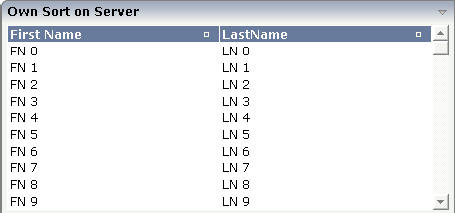
The layout definition is:
<rowarea name="Own Sort on Server">
    <itr takefullwidth="true">
        <textgridsss2 griddataprop="lines" rowcount="10" width="100%">
            <csvcolumn titlesprop="titles" valuesprop="values"
                       widthsprop="widths" proprefsprop="proprefs">
            </csvcolumn>
        </textgridsss2>
    </itr>
</rowarea>
The adapter implementation looks like this:
package com.softwareag.cis.demoapps;

// This class is a generated one.

import java.util.*;

import com.softwareag.cis.file.CSVManager;
import com.softwareag.cis.server.*;
import com.softwareag.cis.server.util.*;
import com.softwareag.cis.util.*;

public class GridSortAdapter
    extends Adapter
{
    public class LinesItem
    {
        String m_firstName;
        public String getFirstName() { return m_firstName; }
        public void setFirstName(String value) { m_firstName = value; }

        String m_lastName;
        public String getLastName() { return m_lastName; }
        public void setLastName(String value) { m_lastName = value; }

        public String getValues()
        {
            return CSVManager.encodeString(new String[] {m_firstName,m_lastName});
        }

    }

    String m_proprefs = "firstName;lastName";
    public String getProprefs() { return m_proprefs; }

    String m_titles = "First Name;LastName";
    public String getTitles() { return m_titles; }

    String m_widths = "50%;50%";
    public String getWidths() { return m_widths; }

    TEXTGRIDCollection m_lines = new TEXTGRIDCollection();
    public TEXTGRIDCollection getLines() { return m_lines; }

    public void init()
    {
        for (int i=0; i<100; i++)
        {
            LinesItem li = new LinesItem();
            li.setFirstName("FN " + i);
            li.setLastName("LN " + i);
            m_lines.add(li);
        }
    }
}
The LinesItem class exposes three properties:
The values property passes back the comma separated
string that contains the content of the columns.
The firstName and lastName
properties are exposed for Application Designer being able to sort the grid collection by property
access.
Since Application Designer communicates all simple datatype properties to the client that are part of an
accessed object in the scenario above, all three properties are transferred to the UI
client - though of course only the values property is
actually required. The other properties are used for sorting purposes only.
To avoid this, you may use a certain interface
IControlPropertyAccess with which you can clearly tell Application Designer that
certain simple datatype properties - though provided in the implementation - are not
relevant to be transferred to the client:
/**
 * "Normal" lines item object.
 */
public class LinesItem
    implements IControlPropertyAccess
{
    String m_firstName;
    public String getFirstName() { return m_firstName; }
    public void setFirstName(String value) { m_firstName = value; }

    String m_lastName;
    public String getLastName() { return m_lastName; }
    public void setLastName(String value) { m_lastName = value; }

    public String getValues()
    {
        return CSVManager.encodeString(new String[] {m_firstName,m_lastName});
    }

    public String[] findPropertiesNotToBeCollected()
    {
        return CSVManager.decodeString(m_proprefs);
    }
}

String m_proprefs = "firstName;lastName";
public String getProprefs() { return m_proprefs; }
If you do not want to provide for the fine granular properties at all
(firstName, lastName), then
you still can use the possibility of doing the sorting completely on your own as shown in
the previous section. In this case, the property references passed by PROPREFSPROP are
just strings thay are communicated to the sort(..) method when
the user sorts a grid.