
This document covers the following topics:
The example looks as follows:
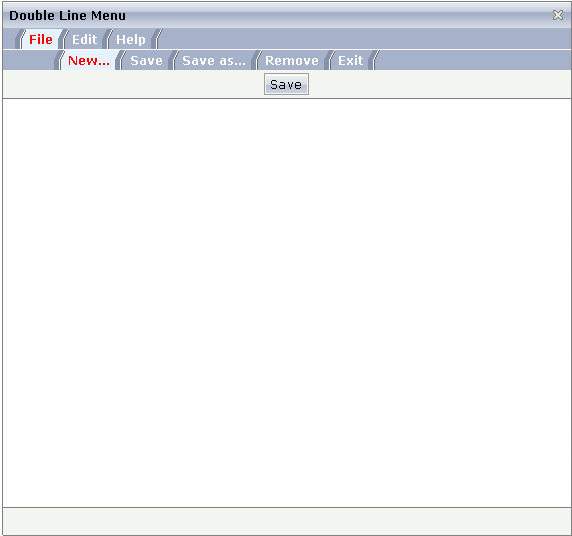
A double-line menu is displayed. When selecting a menu item, then its text is written to the status bar.
The XML layout definition is:
<page model="menue_02_dl_Adapter">
    <titlebar name="Double Line Menu">
    </titlebar>
    <dlmenu menuprop="menuData">
    </dlmenu>
    <header withdistance="false">
        <button name="Save">
        </button>
    </header>
    <pagebody>
    </pagebody>
    <statusbar withdistance="false">
    </statusbar>
</page>
The DLMENU control is positioned directly following the title bar. In its property
menuprop, it holds a binding to the property
menuData.
The Java code of the adapter is:
// This class is a generated one.
import com.softwareag.cis.server.Adapter;
import com.softwareag.cis.server.util.DLMenu;
import com.softwareag.cis.server.util.DLMenuSubItem;
import com.softwareag.cis.server.util.DLMenuTopItem;
public class menue_02_dl_Adapter
extends Adapter
{
// class >MyDLMenuSubItem<
public class MyDLMenuSubItem extends DLMenuSubItem
{
public MyDLMenuSubItem(DLMenuTopItem topItem, String text)
{
super(topItem, text);
}
public void invoke()
{
outputMessage("S",getText() + " was invoked");
}
}
// property >menuData<
DLMenu m_menuData = new DLMenu();
public DLMenu getMenuData() { return m_menuData; }
/** initialisation - called when creating this instance*/
public void init()
{
DLMenuTopItem top;
MyDLMenuSubItem sub;
top = new DLMenuTopItem(m_menuData,"File");
sub = new MyDLMenuSubItem(top,"New...");
sub = new MyDLMenuSubItem(top,"Save");
sub = new MyDLMenuSubItem(top,"Save as...");
sub = new MyDLMenuSubItem(top,"Remove");
sub = new MyDLMenuSubItem(top,"Exit");
top = new DLMenuTopItem(m_menuData,"Edit");
sub = new MyDLMenuSubItem(top,"Undo");
sub = new MyDLMenuSubItem(top,"Cut");
sub = new MyDLMenuSubItem(top,"Copy");
sub = new MyDLMenuSubItem(top,"Paste");
top = new DLMenuTopItem(m_menuData,"Help");
sub = new MyDLMenuSubItem(top,"Online Help");
sub = new MyDLMenuSubItem(top,"About");
}
}
There is an own class MyDLMenuSubItem which is subclassed from
DLMenuSubItem in the package
com.softwareag.cis.server.util. The main task of this own class
is to overwrite the invoke() method and to put some logic
inside.
Each menu node is represented by an object. Menu nodes of the top line are instances of
the class DLMenuTopItem. Menu nodes of the second line are
instances of the own class MyDLMenuSubItem.
All items are arranged inside the member m_menuData which is an instance
of class DLMenu.
When the user clicks an item of the second line at runtime, the
invoke() method of the corresponding item instance is called
in the server.
| Basic | |||
| menuprop |
Name of the adapter property that represents the control on server side. The property must be of type "DLMENUInfo". See detailed information inside the Java API Documentation. |
Obligatory | |
| align |
Horizontal alignment of the control's content. Default is "center". |
Optional |
left center right |
| onlyoneline |
If set to "true" then the DLMENU control only contains its top line - there is no second line below. Default is "false". |
Optional |
true false |
| cellseparatoronly |
If set to "true" then only a very thin cell separator is added between two menu items. Otherwise the separation is rendered explicitly. |
Optional |
true false |
| comment |
Comment without any effect on rendering and behaviour. The comment is shown in the layout editor's tree view. |
Optional | |
| Miscellaneous | |||
| testtoolid |
Use this attribute to assign a fixed control identifier that can be later on used within your test tool in order to do the object identification |
Optional | |