Setting up Specific Generation Options
The generation options are arranged on three different
tabs
and are grouped into generation,
view and path definitions.
The following topics are covered below:
Invoking the Natural XML Options Menu
 To invoke the Natural XML Options Menu
Generation
Special characters that are not valid in XML have to be converted into valid names. The
following menu enables you to change the default conversion settings, if required.
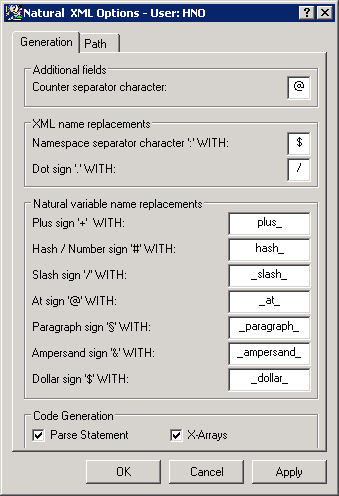
Field Descriptions
Counter Separator Character
| Belongs to Group: |
Additional Fields |
| Default Value: |
@ |
Namespace Separator Character ":" WITH:
| Belongs to Group: |
XML Name Replacements |
| Default Value: |
$ |
Dot Sign '.' WITH:
| Belongs to Group: |
XML Name Replacements |
| Default Value: |
/ |
Plus Sign '+' WITH:
| Belongs to Group: |
XML Variable Name Replacements |
| Default Value: |
plus |
Hash / Number Sign '#' WITH:
| Belongs to Group: |
Natural Variable Name Replacements |
| Default Value: |
hash |
Slash Sign '/' WITH:
| Belongs to Group: |
Natural Variable Name Replacements |
| Default Value: |
slash |
At Sign '@' WITH:
| Belongs to Group: |
Natural Variable Name Replacements |
| Default Value: |
at |
Paragraph Sign '§' WITH:
| Belongs to Group: |
Natural Variable Name Replacements |
| Default Value: |
para |
Ampersand Sign '&' WITH:
| Belongs to Group: |
Natural Variable Name Replacements |
| Default Value: |
amp |
Dollar Sign '$' WITH:
| Belongs to Group: |
Natural Variable Name Replacements |
| Default Value: |
dollar |
Parse Statement
| Belongs to Group: |
Code Generation |
| Default Value: |
checked (Yes) |
X-Arrays
| Belongs to Group: |
Code Generation |
| Default Value: |
checked (Yes) |
Path
The Path tab of the Natural XML Options menu serves to define the location of the target or source DTD file used
for the conversion.
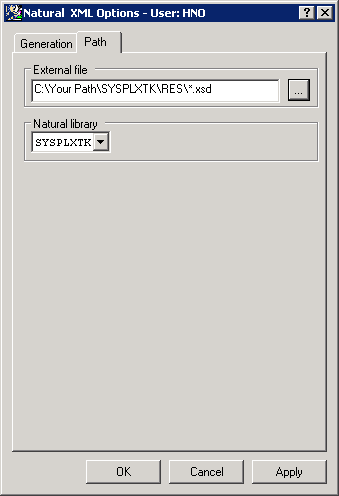
Field Descriptions
External file
| Default Value: |
(Resource directory of current library) |
Natural library
| Default Value: |
(current library) |
Saving Your Options Permanently
All settings made in the XML Options menu are written to the
text object XML-INI.
Whenever a new Natural fix or service pack is installed, all settings made in the XML Options menu are overwritten.
In order to keep your settings permanently, you are recommended to save the text object
XML-INI to the FUSER before you install a fix or service pack.