This section describes the security aspects of the SYSMAIN utility.
In a remote environment located on a z/OS or a Linux platform, file security (that is, passwords and cipher codes) relates to the security that has been defined for a system file in an Adabas environment. If file security has been defined for a system file, you need to specify a password and a cipher code for the source and/or target system file required before you perform a SYSMAIN function. Otherwise, Adabas will issue an appropriate error message. You do not have to provide security information for the default system files assigned to you at the start of the SYSMAIN utility.
Security information for FSEC and/or FDIC system files can only be specified if Natural Security and/or Predict respectively are installed.
In a remote z/OS environment, the security information of the system files refers to the
corresponding profile parameters FNAT,
FUSER, FDIC and FSEC
described in the Parameter Reference documentation.
In a remote Linux environment, the security information of the system files refers to the
corresponding profile parameters FDIC and
FSEC described in the Parameter Reference
documentation.
The following system files and objects or data contained in the files can be affected by security protection:
FNAT or FUSER with programming objects and FDIC with DDMs on a z/OS platform;
FDIC with XRef data (Linux and z/OS);
FSEC with Natural Security profile (Linux and z/OS).
 To specify security information for FNAT or FUSER, or FDIC for DDMs on z/OS
In the Object Maintenance dialog box of a SYSMAIN utility function, change the entry in the DBID or FNR box in the Source and/or Target group boxes.
The Password and Cipher boxes appear below DBID and FNR.
Enter the appropriate security information:
In the Password box, enter the 8-character Adabas
password for the FNAT or FUSER source and/or target system files.
In the Cipher box, enter the 8-character Adabas cipher
code for the FNAT or FUSER source and/or target system files.
To specify security information for FDIC (XRef data) or FSEC
In the Object Maintenance dialog box of a SYSMAIN utility function, choose the FDIC/FSEC button in the Source and/or Target group boxes.
An Object Maintenance - Source or Object Maintenance - Target dialog box similar to the example below appears:
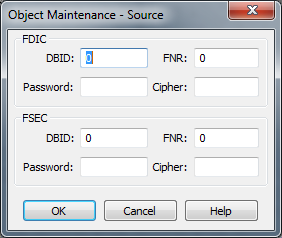
In the FDIC and/or FSEC group boxes, enter the appropriate security information for the FDIC system file (if Predict is installed) and/or the FSEC system file (if Natural Security is installed):
| DBID | The database ID (DBID) of the source or the target database where the
FDIC or FSEC system file is stored. Valid DBIDs are 1 to
65535.
The default value is |
| FNR | The file number (FNR) of the source or the target database where the
FDIC or FSEC system file is stored. Valid FNRs are 1 to
65535.
The default value is |
| Password | The 8-character Adabas password for the FDIC or FSEC source and/or target system files. |
| Cipher | The 8-character Adabas cipher code for the FDIC or FSEC source and/or target system files. |
The file security specifications in the Object Maintenance dialog boxes are retained for the duration of the current SYSMAIN function.
To specify security information for system files using commands
For FSEC:
Use the SEC
keyword of the where-clause described in Using
SYSMAIN with Subprogram.
Or:
For FDIC and XRef data:
Use the DIC
keyword of the where-clause described in Using
SYSMAIN with Subprogram.
Or:
For FNAT or FUSER:
Use the DBID
and FNR keywords
of the where-clause described in Using
SYSMAIN with Subprogram.
Two aspects must be considered when using the SYSMAIN utility within a Natural Security environment:
The source and target libraries can be within one Natural Security environment or within two different Natural Security environments. These environments must be defined to the SYSMAIN utility.
The definition of the Natural Security environment(s) to be used can be specified in the FSEC group boxes of the Object Maintenance - Source and Object Maintenance - Target dialog boxes.
By default, SYMAIN uses the current FSEC settings as specified with the
FSEC profile parameter in the parameter file or at the start of
the Natural Studio session. You can override these settings by changing the entries in
the FSEC group boxes. The new settings remain in effect for the
duration of the current SYSMAIN function. When you execute SYSMAIN with a subprogram
using commands (see Using SYSMAIN with
Subprogram), the SEC keyword should be used to
specify the file security and assignments of the request.
Once the source and target environments have been determined, SYSMAIN verifies both the source libraries and the target libraries with Natural Security. The source and/or target database and file must correspond to the database ID (DBID) and file number (FNR) specified in the library security profile; if these values are not specified, default values are taken from the security profile.
The use of the SYSMAIN utility itself can be restricted, or the use of the source and target libraries to be handled with the SYSMAIN utility can be restricted. The use of SYSMAIN utility functions when invoked with the MAINUSER subprogram can be controlled separately. See Protecting Utilities in the Natural Security documentation for details.