
This document covers the following topics:
Natsubsrv uses a prefork model: a parent process starts the configured number of worker processes and supervises them.
Each worker runs its own Natural nucleus and runtime environment and handles requests independently.
All workers listen on the same TCP port, so incoming connections are distributed across them by the operating system.
A worker reads and validates the request, executes the requested Natural subprogram, and returns the result to the middleware.
Errors are written to the log and returned to the caller as an error response.
Natural's limit counters (MADIO, MAXCL,
MAXERR, and the LT record-read limit) are reset before
each request. Usage counted during an earlier request can therefore never cause an
unrelated later request to fail.
The middleware and Natsubsrv can run on the same machine or on different machines; they communicate over TCP/IP, optionally secured with TLS.
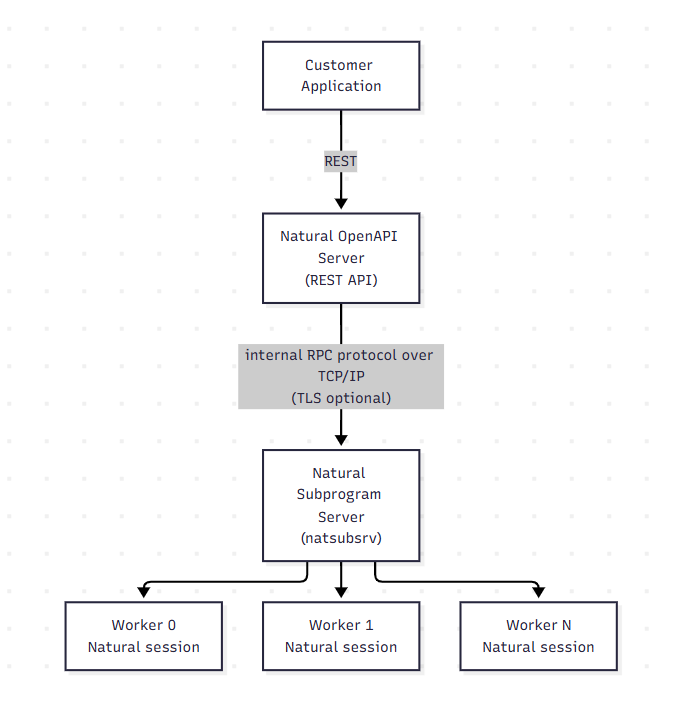
The Natural runtime used by Natsubsrv is initialized as a batch session and runs in
server mode. The system variable *SERVER-TYPE is CALLNAT.
Subprograms must not expect interactive prompts or terminal I/O — statements such
as INPUT or DISPLAY do not behave as in an interactive
session.
Operations that rely on a terminal may fail or need to be adapted.
Use a report specification (REP notation) to emit logging and debugging output.
The report specification VIDEO is not supported.
A worker keeps its Natural session for its entire lifetime and serves any number of requests with it, so requests of different end users run one after another in the same session. Write your subprograms accordingly:
Keep them stateless. A subprogram must not carry data over from one call to the next, and it must not expect data left behind by an earlier call.
Do not depend on the worker. Which worker executes a request is decided by the operating system, so two consecutive calls of the same user may run in different sessions, and two calls of different users may run in the same one.
End your own transactions. Complete every unit of work with END
TRANSACTION or BACKOUT TRANSACTION before
the subprogram returns. The server does not commit for you. What it does do, unless
you switch it off, is back out an open transaction before the next request starts
(see Session Isolation
Between Requests). Rely on that as a safety net, not as
your transaction logic: a unit of work that is never committed is lost either
way.
Because a worker reuses one Natural session for requests of different end users, the server resets that session at the start of every request: application-independent variables, global data areas, session parameters, the library search order and the retained sets are put back to a defined state, so no request can see what its predecessor left behind.
If your subprograms already clean up after themselves, you can disable the two parts of the reset to avoid unnecessary overhead.
Backs out the open transaction of every connected database before the request runs.
Values: true/false —
Default: true
Environment variable:
NATSUBSRV_BACKOUT_TRANSACTION_PER_REQUEST
Choosing a value: Leave it on unless you have measured that it costs you. Switch it off only where every subprogram reliably ends its own unit of work.
A Natural LOGON issues neither END TRANSACTION nor
BACKOUT TRANSACTION. Without this option, a transaction that one
request leaves open remains open when the next request starts. An END
TRANSACTION in that next request then commits the previous end user's
uncommitted work. The backout covers every database type in one step, Adabas and SQL
databases alike, including the branches of a distributed transaction.
It only ends the transaction. Database connections stay open, so the option does not slow down the first database access of the next request.
Closes the work files that the previous request left open.
Values: true/false —
Default: true
Environment variable:
NATSUBSRV_CLOSE_WORK_FILES_PER_REQUEST
Choosing a value: Leave it on unless your subprograms close their own work files or use none at all.
A LOGON closes no work file either. Without this option, a work file
opened by one request stays open into the requests of other end users, who then write
into it — and the records the first request wrote last stay in an unwritten
buffer.
The close is performed at the end of a Natural session, not at the end of a program:
it also closes work files configured with CLOSE MODE=USER, whose purpose
is to outlive a program. On a subprogram server, it is the end of the request that a
work file must not outlive.
Send SIGTERM (for example, kill <pid> or through
your service manager) or press Ctrl+C (SIGINT) to stop the
server. The parent process shuts its workers down in an orderly manner.
Requests that are already being processed are completed; the server then terminates.
Configuration changes take effect only after a restart. Change the configuration file or the environment variables and start the server again.
If a worker terminates unexpectedly, the event is written to the log. See Crash Reports.