
In the Mainframe Navigation view, the z/OS datasets are shown when you expand the Datasets folder of a z/OS node.
This document covers the following topics:
Before displaying z/OS datasets, you can define a filter so that only those datasets are shown which correspond to your filter criteria.
 To define a filter
In the Mainframe Navigation view, select the Datasets folder in the appropriate node.
Invoke the context menu and choose .
Or:
Press F3.
The following dialog box appears:
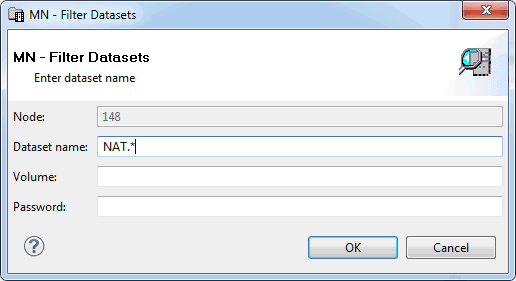
Enter the filter criteria.
| Option | Description |
|---|---|
| Dataset name | Enter the datasets that are to be shown. For example, when you specify "ABC*", only the dataset names starting with these characters will be shown. |
| Volume |
If you do not specify a volume, the dataset list is created from the catalog. If you do specify a volume, the dataset list is created from the VTOC of that volume. |
| Password | Enter the system password if dataset is protected. |
Choose the button.
You can compress a partitioned z/OS dataset (PDS).
To compress a z/OS dataset
In the Mainframe Navigation view, select a partitioned dataset either in the Datasets or Volumes folder of the appropriate node.
Invoke the context menu and choose .
A dialog box appears, asking to confirm the compress function for the selected object.
Choose the button to compress the dataset.
You can display information about a z/OS dataset.
To display the properties of a z/OS dataset
In the Mainframe Navigation view, select a dataset in the Datasets folder.
Invoke the context menu and choose .
Or:
Press ALT+ENTER.
A properties dialog box appears.
The following information is shown on the Server page of the properties dialog box:
| Option | Description | |
|---|---|---|
| Volume | Serial number of the volume on which the dataset is allocated. | |
| Device type | If a volume is not specified, this is the generic identifier from which a volume is to be selected (e.g. 3380). | |
| Organization | For example: | |
| PO | PDS | |
| PS | Sequential dataset | |
| DA | Direct access | |
| Record format | For example: | |
| FB | Fixed block | |
| VB | Variable block | |
| FBA | Fixed block, ANSI control characters | |
| Record length | Logical record length in bytes. | |
| Block size | Block size in bytes. | |
| Allocation type | Space type for dataset. Possible values: | |
| BLK | Blocks | |
| CYL | Cylinders | |
| TRK | Tracks | |
| First extent | Initial quantity allocated. | |
| Second extent | Additional quantity to be allocated if dataset fills. | |
| Security | Security status. Possible values: | |
| NONE | Not password-protected. | |
| READ | Password-protected for read and write operations. | |
| WRITE | Password-protected for write operations. | |
| Allocated cylinders/tracks | Number of cylinders or tracks allocated. | |
| Allocated extents | Number of extents, 1 to 16. | |
| Percentage used | Percentage of dataset used. | |
| Creation date | Dataset creation date in format YYYY-MM-DD. | |
| Last reference | Date of last access in format YYYY-MM-DD. | |
| Expiration date | Date when the dataset expires in format YYYY-MM-DD. Until this date is reached, each attempt to update or delete the dataset causes a console message, requiring an operator reply. | |
| Partitioned dataset | These fields appear only if the dataset is partitioned. | |
| Number of members | Number of members in the dataset. | |
| Directory blocks | Number of directory blocks. | |
| Unused blocks | Number of unused directory blocks. | |
| SMS attributes | These fields appear only if SMS attributes have been defined for the dataset during allocation. | |
| Management class | The management class used to obtain the management-related data for SMS (migration, backup and retention criteria) to allocate the dataset. | |
| Storage class | The storage class used to obtain the storage-related data for dataset allocation. | |
| Data class | The data class used to obtain the data-related information (SPACE, LRECL, etc.) for dataset allocation. | |