z/VSE Volumes
In the object workspace, the z/VSE volumes are shown when you expand the VSE Volumes folder of a z/VSE node. Example:
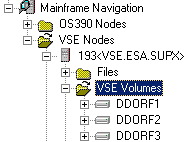
This document covers the following topics:
Filtering z/VSE Volumes
Before displaying z/VSE volumes, you can define a filter so that only those volumes are shown which correspond to your filter criteria.
 To define a filter
-
In the object workspace, select the VSE Volumes folder in the appropriate node.
-
Invoke the context menu and choose .
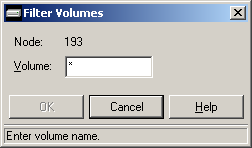
The following dialog box appears:
-
Enter the filter criteria for the volumes that are to be shown.
-
Choose the button.
Listing z/VSE Volumes
The number of objects shown in the list view window depends on whether or not a filter has been defined for the z/VSE volumes (see Filtering z/VSE Volumes).
To list z/VSE volumes
-
In the object workspace, select the VSE Volumes folder in the appropriate node.
-
Invoke the context menu and choose .
Or:
Press F8.The volumes are shown in the list view window. Example:
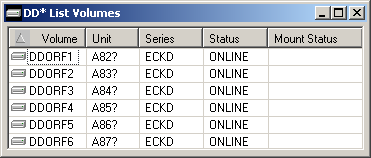
The list contains the following columns:
Column Description Volume Volume serial number Unit Unit address. Series Device series. Status Device status. Possible values: CHANGE Device status is changing. OFFLINE Device is offline. ONLINE Device is online. Mount Status Device mount status. Possible values: MOUNT PEND Mount is pending. NOT READY Device not ready. REMOVABLE Device is removable (a tape, for example). RESERVED Device is reserved. RESIDENT Device is resident (a hard disk, for example).
Filtering Files on z/VSE Volumes
Before displaying the files on a z/VSE volume, you can define a filter so that only those files are shown which correspond to your filter criteria.
To define a filter
-
Select a volume in the object workspace or list view window.
-
Invoke the context menu and choose .
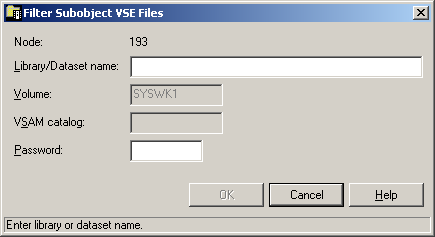
The following dialog box appears:
-
Enter the filter criteria.
Option Description Library/Dataset name The files that are to be displayed. You can use a combination of strings and wildcards (* and _) to display the files matching the dataset name pattern. Password System password if volume is protected. -
Choose the button.
Listing Files on a z/VSE Volume
The number of objects shown in the list view window depends on whether or not a filter has been defined for the files on a z/VSE volume (see Filtering Files on z/VSE Volumes).
To list files on a z/VSE volume
-
Select a volume in the object workspace or list view window.
-
Invoke the context menu and choose .
Or:
Press F8.A list of files contained on the volume shown in the list view window. Example:
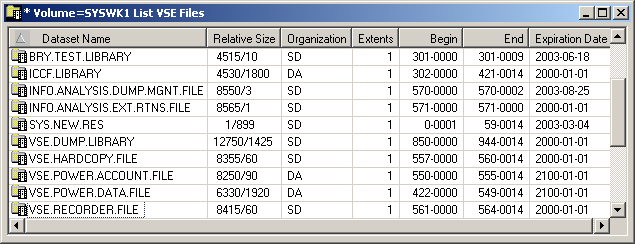
The list contains the following columns:
Column Description Dataset Name Name of the file. Relative Size For a CKD disk: Starting block and number of blocks on which the file resides. For an FBA disk: Size of the file in blocks. Organization Dataset organization. Possible values are: DA Direct access. SD Sequential disk. UN Unknown or unidentified. VS VSAM. Extents Number of extents. Begin Combination of "Starting cylinder head" and "block number" on which the file resides. End Combination of "Ending cylinder head" and "block number" on which the file resides. Expiration Date Date when the file will expire. Until this date is reached, each attempt to update or delete the file will cause a console message, requiring an operator reply.