This document covers the following topics:
A conventional Natural application consists of a collection of Natural and non-Natural objects. Together, they form a functional unit which covers the business logic for a particular business problem. An application consists of a set of libraries and their Natural objects. It is possible that one part of the library belongs to one application while another part belongs to another (different) application.
Note:
The SPoD application concept is not supported by NaturalONE.
With Natural for Windows, the term "Natural application" has been introduced. A Natural application provides a logical view of Natural and non-Natural objects (such as job control files) as well as DDMs. A Natural application does not contain the objects, but it is a collection of links to Natural objects or "sub-applications" describing where the objects are stored. Natural objects or "sub-applications" can be linked to several applications.
The following types of Natural applications exist:
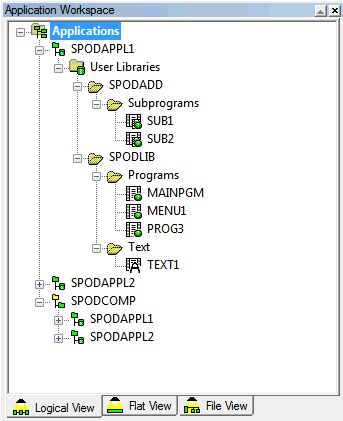
The space where the applications are maintained and displayed in Natural Studio is called the "application workspace".
The application definitions are stored in the development server file
(FDIC). When working with applications which are spread across
different development servers, for example, for building up a compound
application, it is mandatory to use a unique development server file for all
applications and the application server session.
Note:
This application concept is supported by Predict.
The following arguments may give you an idea why you should use the term "Natural application" and the concept that stands behind it:
It groups the content of your libraries in a logical order based on the different applications you are maintaining that can be displayed in parallel to the library structure without using an additional tool.
It focuses your view on the number of objects of a library you intend to work on. You need no longer navigate through all Natural objects located in one library, because you can edit the objects directly from the application workspace.
It reduces the maintenance effort, because you are able to link all objects of different libraries to the application, especially those located in the steplibs.
It gives you the opportunity to group an application into different "sub-applications" where each "sub-application" can be assigned to a member of the development team that is responsible for its development or maintenance.
Thinking of client/server architecture, you are able to group your application into different "sub-applications", and each "sub-applications" can be stored on a different platform at application runtime.
A base application is defined as a set of Natural object links. The
associated Natural objects pertain to one specific Natural Development Server
and are all located on the same FUSER system file.
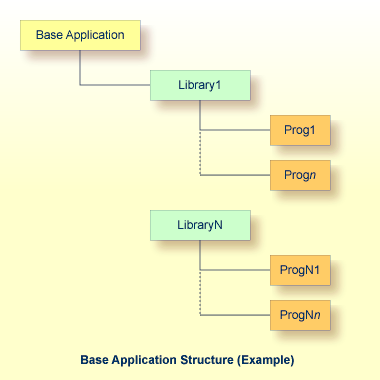
The following information is stored for a base application:
Name of the application
Description of the application (textual information only)
Name and port ID of the Natural development server where the linked objects reside, that is, the application environment
Profile for the application environment
Entry points describing the start objects of your application
Identification of each object linked
A compound application enables the application developer to combine several base applications. It is defined as a set of links to these base applications.
The base applications involved in a compound application can be spread
across different FUSER system files or different development
servers. Each base application may have a different parameter setting.
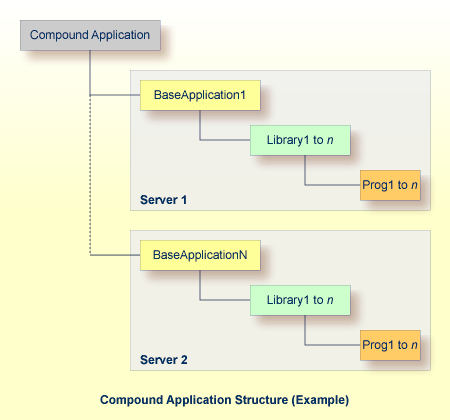
The following information is stored for a compound application:
Name of the application
Description of the application
Identification of each base application linked
The application workspace is an area on the Natural Studio screen (similar to Natural Studio's library workspace) where all known applications and their objects are shown in a view which complements the existing logical, flat and file views and displays a tree structure comprising all program objects belonging to an application, see example below.