
This section covers the following topics:
You have two options to use a service directory:
Normally, to locate a service, the Natural RPC uses a service directory in a Natural
subprogram. This directory is an initialized LDA data structure in
program NATCLTGS generated by the SYSRPC
Service Directory
Maintenance function and has to be available to every RPC
client application.
You can use a remote directory to locate a service. A remote directory server (RDS) enables you to define directory definitions in one place so that the RDS's services can be used by all clients in your environment.
This section describes how to use a remote directory server to locate a service.
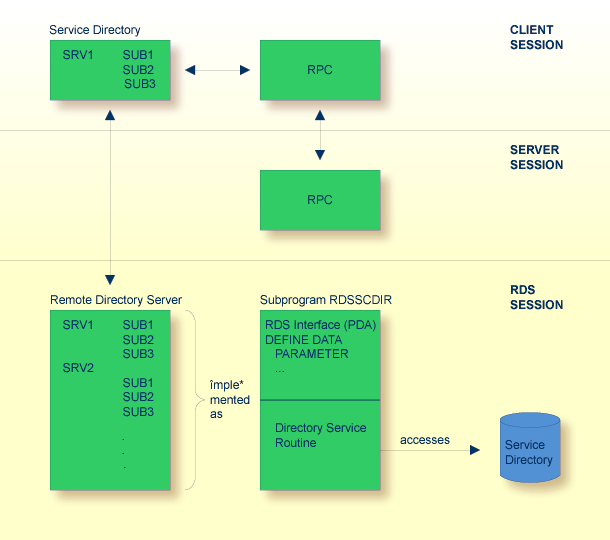
The remote directory server is implemented as a Natural subprogram.
A sample of such a subprogram is provided in library SYSRPC. It is named
RDSSCDIR and reads the required directory information from a work file. The
interface of this subprogram is documented, which enables you to develop your own remote
directory service. For more information, see the section Creating an RDS
Interface.
The RDS interface is the Natural parameter data area of the Natural subprogram and the
directory service routine is the code section of the Natural subprogram. If a remote
CALLNAT is not found within the client's local service directory, the RPC
runtime contacts the remote directory server by executing an internal remote
CALLNAT.
An internal directory cache minimizes the access to the remote directory. The cache information is controlled by an expiration time which is defined by the remote directory server.
 To use a remote directory server
Create a directory file for the remote directory service using the Service Directory
Maintenance function of the SYSRPC utility.
The subprogram RDSSCDIR is provided in the library SYSRPC and reads the
directory information from a Natural work file (fixed-block, record length 80
bytes). This is the work file CMWKF01 assigned to the appropriate
dataset in the server startup JCL.
Start the remote directory server and proceed with the following steps.
You have two options:
Specify the RDS in the keyword subparameter RDS of profile parameter RPC or
parameter macro NTRPC.
Or use the maintenance function of the SYSRPC utility to define
remote directory servers (refer to Service Directory
Maintenance in the SYSRPC Utility
documentation). The definition of remote directory servers is still supported
for reasons of compatibility. You should, however, define your RDS in the
keyword
subparameter RDS of profile parameter RPC or
parameter macro NTRPC. For this purpose,
entries are provided that allow to define the location of the directory server.
This enables you to expand existing local directory information by one or more
remote directory server definitions.
Below is an example of how to define a remote directory server in the service directory
NATCLTGS.
| Service Directory | |||||
|---|---|---|---|---|---|
| NODE | SERVER | LIBRARY | PROGRAM | LOGON | |
| 1 | NODE1 |
||||
| 2 | SERVER1 |
||||
| 3 | SYSTEM |
||||
| 4 | TESTS1 |
||||
| 5 | TESTS2 |
||||
| 6 | RDSNODE |
||||
| 7 | DIRSRV1 |
||||
| 8 | #ACI |
||||
| 9 | RDSSCDIR |
||||
This example locally defines a server named SERVER1. This server may execute
the services TESTS1 and TESTS2.
Additionally, there are definitions for the remote directory server DIRSRV1.
A remote directory server is identified by a preceding hash (#) sign for the library
definition.
The definitions of NODE and SERVER are used as usual in Natural
RPC. The library definition defines the transport protocol (ACI) which has to be used to
connect the RDS.
Finally, the PROGRAM entry contains the name of the remote subprogram which
represents the remote directory service (in this case, it refers to the sample subprogram
RDSSCDIR).
The RDS interface is the parameter data area (PDA) of a Natural subprogram.
To create your own RDS interface you can use the parameter data area shown below.
DEFINE DATA PARAMETER
  1 P_UDID(B8)                      /* OUT
  1 P_UDID_EXPIRATION(I4)           /* OUT
  1 P_CURSOR(I4)                    /* INOUT
  1 P_ENTRIES(I4)                   /* IN
  1 P_REQUEST(A16/1:250)            /* IN
  1 P_EXTENT (A16/1:250)            /* OUT
  1 P_RESULT(A32)                   /* OUT
  1 REDEFINE P_RESULT
    2 SRV_NODE(A8)
    2 SRV_NODE_EXT(A8)
    2 SRV_NAME(A8)
    2 SRV_NAME_EXT(A8)
END-DEFINE
For an explanation of the parameters, refer to the table below.
| Parameter | Format/Length | Explanation |
|---|---|---|
P_UDID
|
B8 | Unique directory identifier, should be increased after changing the directory information. The client saves this identifier in its cache. If the binary number increases from one client request to the next, it causes the client to delete its local cache information, because it no longer corresponds to the remote directory information. |
P_UDID_EXPIRATION
|
I4 | This defines the expiration time in seconds, that is, the
number of seconds during which the client can use its local cache information
without connecting the RDS to validate the UDID setting. It
allows you to define a time limit after which you can be sure that your directory
modifications are active for all clients. If you set this time to an unnecessarily
low value, you may cause a lot of network traffic to the RDS.
|
P_CURSOR |
I4 | The remote procedure call has the option to scan for an
alternative server if a connection to the previous one cannot be established, see
the keyword subparameter TRYALT of profile parameter RPC or
parameter macro NTRPC
.
This parameter contains zero for a scan from the top and may be modified by the RDS to remember the record location to continue the scan. The value will not be evaluated by the client, it will only be inserted from the cache to continue scanning. |
P_ENTRIES
|
I4 | This parameter contains the number of service definitions in
P_REQUEST.
|
P_REQUEST
|
A16/1:250 | A list of services for which a server address can be scanned.
An entry is structured as:
program name (A8) |
P_EXTENT |
A16/1:250 | Reserved for future use. |
SRV_NODE |
A8 | Contains the server node. |
SRV_NODE_EXT |
A8 | Contains the server node extension. |
SRV_NAME |
A8 | Contains the server name. |
SRV_NAME_EXT |
A8 | Contains the server name extension. |
The Remote Directory Service Routine is the code area of a Natural subprogram (the
default version of this code area is subprogram RDSSCDIR in library
SYSRPC).
To create your own RDS routine
Modify the pseudo-code documented below.
Set UDID and UDID_EXPIRATION values
IF P_ENTRIES = 0
    ESCAPE ROUTINE
IF P_CURSOR != 0
   position to next server entry after P_CURSOR
   Scan for server which may execute P_REQUEST(*)
IF found
   SRV_NODE        = found node name
   SRV_NODE_EXT    = node extension
   SRV_NAME        = found server name
   SRV_NAME_EXT    = server extension
   P_CURSOR        = position of found server
ELSE
   P_CURSOR = 0
This program is to be found in library SYSRPC. It reads the directory
information from a work file (fixed-block, record length 80 byte).
Your program could also read the directory information from elsewhere (from a database,
for example). For the delivered version of RDSSCDIR, this is
the work file CMWKF01, which is assigned to the appropriate dataset in the
server startup JCL.
* comment
UDID definition
UDID_EXPIRATION definition
node definition
...
node definition
(UDID)
   binary number
(UDID_EXPIRATION)
   number of seconds
(NODE)
   namevalue     (logon-option)
   server definition
   ...
   server definition
(SERVER)
   namevalue     (logon-option)
   library definition
   ...
   library definition
(LIBRARY)
   namevalue
   program definition
   ...
   program definition
(PROGRAM)
   namevalue
   ...
   namevalue
Max. 8 characters in uppercase
The logon-option after
namevalue as well as the following definition
lines are optional. For the possible values of
logon-option, refer to Service Directory
Maintenance in the SYSRPC utility documentation.
(UDID)
ACB8AAB4777CA000
  (UDID_EXPIRATION)
  3600
  * this is a comment
  (NODE)
  NODE1
         (SERVER)
         SERVER1
             (LIBRARY)
             SYSTEM
                  (PROGRAM)
                  TESTS1
                  TESTS2
                  TESTS3
         (SERVER)
         SERVER2   (logon-option)
               (LIBRARY)
               SYSTEM
                    (PROGRAM)
                    TESTS4
  (NODE)
  NODE2   (logon-option)
        (SERVER)
        SERVER1
              (LIBRARY)
              SYSTEM
                   (PROGRAM)
                   TESTS1
                   TESTS2
                   TESTS3
                   TESTS4
In the above example, the directory contains:
Two servers SERVER1 and SERVER2 running on node
NODE1.
The server SERVER1 may execute the programs TESTS1,
TESTS2 and TESTS3 in library SYSTEM.
The server SERVER2 may execute the program TESTS4 on
library SYSTEM.
One server SERVER1 on node NODE2 which may execute the
programs TESTS1 - TESTS4 in library SYSTEM.
The indentation of the lines in the example above is not required. All lines may start at
any position (one). You can modify this file manually or generate it using the
SYSRPC
Service Directory
Maintenance function.