
This document describes the "ADAKMS" utility.
The following topics are covered:
The ADAKMS administration utility helps to manage keys for encrypted Adabas assets. It can display, create, delete and undelete keys, and perform key rotation on encrypted databases as well as on backup save sets and protection log files (PLOG).
The database must be offline for key rotation.
This utility is a multi-function utility. For more information about single- and multi-function utilities, see Adabas Basics > Using Utilities.
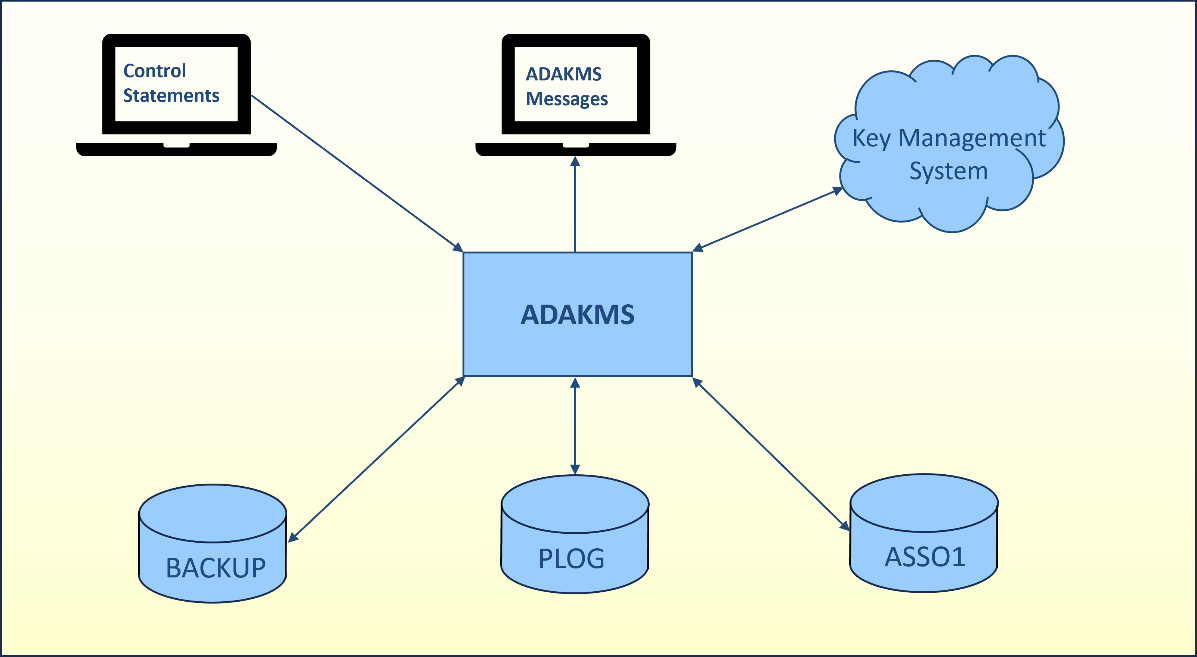
| Data Set | Environment Variable / Logical Name | Storage Medium | Additional Information |
|---|---|---|---|
| Database configuration | DBnnn.INI | ||
| Associator | ASSO1 | Disk | |
| Control statements | stdin | See the Control Parameters section | |
| ADAKMS messages | stdout | Messages and Codes | |
| PLOG | Disk | ||
| Backup | Disk |
The utility writes no checkpoints.
The following control parameters are available:
     CREATE = keyword, DESCRIPTION = string, ALIAS = string

     DELETE = (string[,string]...)

     DISPLAY = keyword

     ROTATE= keyword, {DBID=number | FILENAME=(string[,string]...), KEYNAME=string}

M    KMSTARGET = keyword

     UNDELETE = (string[,string]...)
CREATE=keyword, description=string, alias=string
This function creates a key encryption key (KEK) in the desired key management system. The keyword can take the KEY value .
- DESCRIPTION=string
A string describing the key. The string can be up to 256 characters.
- ALIAS=string
A smaller string up to 32 characters used as an alternative for the key name which might be difficult to read.
If the utility is being used non-interactively and strings contain spaces, the string must be surrounded by quotes. For interactive usage where strings contain spaces, each command must be entered in a separate line, and the strings must not be surrounded by quotes. For more information, see Using Utilities.
Non-interactive:
$> adakms kmstarget=aws create=key description=”My new key” alias=KEY_1
Interactive:
$> adakms
adakms: kmstarget=aws
adakms: create=key
adakms: description=My new key
adakms: alias=KEY_1
DELETE=(string[,string]...)
This function removes a key from the key management system. The key will not be deleted immediately. It is marked as deleted and will only be deleted after a key management system dependent period.
A maximum of 5 keys can be deleted in one command.
adakms: display=keys
            NO STATE KEY NAME                                                         ALIAS                DESCRIPTION
             0 Act   1773647932CC6F9763449248C321E00EC360EB04F924EEEEAB62CBA55BB8C10F KEK_DB200            KEK created at: 16-MAR-2026 08:58:52
             1 Act   177364865014F6F88735D694F9BFF4A0BEB55BABE87ECC1A181AAFD965D07FE5 KEK_DB210            KEK created at: 16-MAR-2026 09:10:50
             2 Act   177364869273FB5449AF532517D57B314A31348E5FF6FF0664F00B228790B157 KEK_DB202            KEK created at: 16-MAR-2026 09:11:32
adakms: delete=177364865014F6F88735D694F9BFF4A0BEB55BABE87ECC1A181AAFD965D07FE5
%ADAKMS-I-KEYDEL, Key 177364865014F6F88735D694F9BFF4A0BEB55BABE87ECC1A181AAFD965D07FE5 deleted
adakms: display=keys
            NO STATE KEY NAME                                                         ALIAS                DESCRIPTION
             0 Act   1773647932CC6F9763449248C321E00EC360EB04F924EEEEAB62CBA55BB8C10F KEK_DB200            KEK created at: 16-MAR-2026 08:58:52
             2 Act   177364869273FB5449AF532517D57B314A31348E5FF6FF0664F00B228790B157 KEK_DB202            KEK created at: 16-MAR-2026 09:11:32
adakms:
DISPLAY=keyword
This function lists all keys from the key management system. The keyword can take the KEYS value for displaying all active keys, and KEYS_FULL value for displaying all keys including the deleted keys. Active keys are shown with the ‘Act’ state, while deleted keys are shown with the ‘Del’ state.
Display only active keys.
adakms: display=keys

     NO STATE KEY NAME                                                         ALIAS                DESCRIPTION
      0 Act   1773647932CC6F9763449248C321E00EC360EB04F924EEEEAB62CBA55BB8C10F KEK_DB200            KEK created at: 16-MAR-2026 08:58:52
      2 Act   177364869273FB5449AF532517D57B314A31348E5FF6FF0664F00B228790B157 KEK_DB202            KEK created at: 16-MAR-2026 09:11:32
Display all keys including deleted keys.
adakms: display=keys_full

     NO STATE KEY NAME                                                         ALIAS                DESCRIPTION
      0 Act   1773647932CC6F9763449248C321E00EC360EB04F924EEEEAB62CBA55BB8C10F KEK_DB200            KEK created at: 16-MAR-2026 08:58:52
      1 Del   177364865014F6F88735D694F9BFF4A0BEB55BABE87ECC1A181AAFD965D07FE5 KEK_DB210            KEK created at: 16-MAR-2026 09:10:50
      2 Act   177364869273FB5449AF532517D57B314A31348E5FF6FF0664F00B228790B157 KEK_DB202            KEK created at: 16-MAR-2026 09:11:32
adakms:
ROTATE=keyword, {DBID=number | FILENAME=(string[,string]...), KEYNAME=string}
This function will encrypt the data encryption key (DEK) with a new key encryption key (KEK) from the key management system. It first decrypts the DEK with the former KEK, encrypts the DEK with a new KEK, and then writes it back to either the database, backup save set, or protection log file.
The keyword can take the DATABASE value for rotating the key in an existing encrypted database, or the FILE value for rotating in sequential files. Only backup save sets and protection log files are supported; all other files will be rejected.
Key rotation does not mean to encrypt the database or sequential file with a new key, only the data encryption key will be encrypted with the new key. See also Adabas Security Features > Adabas Encryption for Linux > Key Management System.
The ADAKMS utility uses a temporary file for key rotation in sequential files in the same directory as the original file. The file name is constructed from the original file name with a suffix like ‘.XXXXXX’, where ‘X’ can be any character. A correspondingly large amount of space is needed in this directory.
The key rotation can take the new key encryption key from a different key management
system. It will first decrypt the data encryption key using the key management system
stored in the database or file, then encrypt it with the key specified from the key
management system specified by the KMSTARGET command.
- DBID=number
Selects the database for the key rotation. The database must be offline.
- FILENAME=(string[,string]…)
Selects the sequential files for key rotation. Up to 100 files can be specified for key rotation in one command and the files can be a mixture of backup save sets and protection log files.
Note
Wildcards are not supported.
Rotate the key in a database.
$> adarep dbid=200 sum
…
ENCRYPTION                       AES_256_XTS
KMSTARGET                        FILE
KEKNAME                          1773647932CC6F9763449248C321E00EC360EB04F924EEEEAB62CBA55BB8C10F
…

adakms: rotate=database, dbid=200, keyname=177364865014F6F88735D694F9BFF4A0BEB55BABE87ECC1A181AAFD965D07FE5
%ADAKMS-I-DBOFF, database 200 accessed offline
%ADAKMS-I-KEYROTSUCC, Successfully exchanged encryption with new key: 177364865014F6F88735D694F9BFF4A0BEB55BABE87ECC1A181AAFD965D07FE5
%ADAKMS-I-IOCNT, 4 IOs on dataset ASSO

$> adarep dbid=200 sum
…
ENCRYPTION                       AES_256_XTS
KMSTARGET                        FILE
KEKNAME                          177364865014F6F88735D694F9BFF4A0BEB55BABE87ECC1A181AAFD965D07FE5
…
Rotate the key in a sequential file.
$> export BCK001=BCK200.ENC
$> adabck sum
…
ENCRYPTION                       AES_256_XTS
KMSTARGET                        FILE
KEKNAME                          1773647932CC6F9763449248C321E00EC360EB04F924EEEEAB62CBA55BB8C10F
…

adakms: rotate=file, filename=BCK200.ENC, keyname=177364865014F6F88735D694F9BFF4A0BEB55BABE87ECC1A181AAFD965D07FE5
%ADAKMS-I-KEYROTSUCC, Successfully exchanged encryption with new key: 177364865014F6F88735D694F9BFF4A0BEB55BABE87ECC1A181AAFD965D07FE5
%ADAKMS-I-IOCNT, 178 IOs on dataset BCK200.ENC

$> adabck sum
…
ENCRYPTION                       AES_256_XTS
KMSTARGET                        FILE
KEKNAME                          177364865014F6F88735D694F9BFF4A0BEB55BABE87ECC1A181AAFD965D07FE5
…
Rotate the key in a database with the new key from a different key management system.
$> adarep dbid=200 sum
…
ENCRYPTION                       AES_256_XTS
KMSTARGET                        FILE
KEKNAME                          1773647932CC6F9763449248C321E00EC360EB04F924EEEEAB62CBA55BB8C10F
…

adakms: kmstarget=aws
adakms: rotate=database
adakms: dbid=200
adakms: keyname=ad6e4b57-5bd7-4613-9879-310d89e42487
%ADAKMS-I-DBOFF, database 200 accessed offline
%ADAKMS-I-KEYROTSUCC, Successfully exchanged encryption with new key: ad6e4b57-5bd7-4613-9879-310d89e42487
%ADAKMS-I-IOCNT, 4 IOs on dataset ASSO

$> adarep dbid=200 sum
…
ENCRYPTION                       AES_256_XTS
KMSTARGET                        AWS
KEKNAME                          ad6e4b57-5bd7-4613-9879-310d89e42487
…
KMSTARGET=keyword
This function loads the plugin library for the desired key management system and it is mandatory to be entered as the first command. The keyword can take the values for the key management system:
For interactive usage of the utility, the KMSTARGET command
does not need to be repeated for subsequent commands. The same target will be used unless it is changed by a new
KMSTARGET command.
UNDELETE=(string[,string]...)
This function reverts a deletion of a key from the key management system. This is only possible for keys that are in the deleted state but not already removed.
A maximum of 5 keys can be undeleted in one command.
adakms: display=keys_full
     NO STATE KEY NAME                                                         ALIAS                DESCRIPTION
      0 Act   1773647932CC6F9763449248C321E00EC360EB04F924EEEEAB62CBA55BB8C10F KEK_DB200            KEK created at: 16-MAR-2026 08:58:52
      1 Del   177364865014F6F88735D694F9BFF4A0BEB55BABE87ECC1A181AAFD965D07FE5 KEK_DB210            KEK created at: 16-MAR-2026 09:10:50
      2 Act   177364869273FB5449AF532517D57B314A31348E5FF6FF0664F00B228790B157 KEK_DB202            KEK created at: 16-MAR-2026 09:11:32
adakms: undelete=177364865014F6F88735D694F9BFF4A0BEB55BABE87ECC1A181AAFD965D07FE5
%ADAKMS-I-KEYUNDEL, Key 177364865014F6F88735D694F9BFF4A0BEB55BABE87ECC1A181AAFD965D07FE5 undeleted
adakms: display=keys
     NO STATE KEY NAME                                                         ALIAS                DESCRIPTION
      0 Act   1773647932CC6F9763449248C321E00EC360EB04F924EEEEAB62CBA55BB8C10F KEK_DB200            KEK created at: 16-MAR-2026 08:58:52
      1 Act   177364865014F6F88735D694F9BFF4A0BEB55BABE87ECC1A181AAFD965D07FE5 KEK_DB210            KEK created at: 16-MAR-2026 09:10:50
      2 Act   177364869273FB5449AF532517D57B314A31348E5FF6FF0664F00B228790B157 KEK_DB202            KEK created at: 16-MAR-2026 09:11:32