
This part of the documentation provides information on the operator commands for ADACOM and for an Adabas cluster nucleus.
This document covers the following topics:
Special ADACOM operator commands exist to display and control the multiprocessing environment. These commands, which are similar to regular Adabas operator commands, are issued to the local ADACOM initialization job.
This section covers the following topics:
The main ADACOM task controls the initial processing and routing of operator commands. It also attaches and detaches a pair of subtasks (load modules ADACOT and ADADSP) for each specific SVC/DBID combination. After initialization ADACOT processes SVC/DBID-specific operator commands. ADADSP allocates, owns and deallocates dataspaces.
The SVC/DBID-specific subtasks may be attached as specified in ADACOM Initialization Parameters DDKARTE statements or by operator commands after ADACOM has initialized.
Note
ADACOM writes global ADACOM messages into the output data set with the DD name
COMPRINT. It writes messages pertinent to an individual SVC/DBID combination into the
output data set with the DD name 'Pssddddd', where
ss is the last two digits of the SVC number and ddddd is the
database ID. Similarly, dataspace-related messages are written to DD name
‘Dssddddd'
When running the Adabas Cluster and Parallel Services routine ADACOM, the operator commands described in this section can be specified in following input formats:
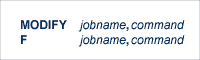
where
| jobname | name of the ADACOM job or started task |
| command | one of the operator commands described in this section |
Every operator command is first processed by the ADACOM main task and is echoed with the message
PLI060 SVC=svc DBID=dbid Operator Command:xxx
Certain SVC/DBID-specific commands must identify which SVC/DBID is being addressed:

After initialization, any command issued is directed to the last SVC/DBID pair encountered in the input. Whenever a new default SVC/DBID is established by an operator command this message will appear:
PLI052 Commands will go to SVC=svc DBID=dbid
Commands to be serviced by the ADACOT SVC/DBID-specific subtask show this message:
PLI062 Command queued
Message PLI062 is issued by the ADACOM main task. The subtask will respond to the command.
If you enter an operator command for an SVC/DBID and a previous command to the same SVC/DBID has not yet completed, you will receive message PLI062 but only one of the commands will be processed. If the first command has not yet been accepted by the subtask the second command will take precedence and the first command will be ignored. If processing has begun on the first command the second command will be ignored.
A command can be given only if the SVC/DBID subtasks are already active (has been specified before, and not terminated). Otherwise, specify the SVC/DBID pair without a command to activate the SVC/DBID (as shown above), and then issue the command separately (as shown below). If, when starting an SVC/DBID pair, a PLXCB is not found one will be allocated using default values. Specific values may also be given:

When you change or add a SVC/DBID, the new SVC/DBID becomes the default for all commands issued until the SVC/DBID is changed.
The ADACOM subtasks used to allocate and monitor the PLXCB and subordinate data structures terminate after processing if CMDMGR=NO has been specified for that SVC/DBID pair. If CMDMGR=YES (the default setting) has been specified for the SVC/DBID pair, the ADACOM subtasks stay active and accepts operator commands for displaying and controlling the multiprocessing environment.
Any SVC/DBID pair specifying the PLXCB to be placed in a dataspace requires ADACOM to be running with active SVC/DBID subtasks.
Cluster Services (ALS) nuclei do not require ADACOM SVC/DBID subtasks to be active for normal operation. However, operator commands other than those that start the subtasks or terminate ADACOM cannot be issued unless the subtasks are active.
SVC/DBID subtasks may be terminated by sending an ADAEND command to the specific SVC/DBID:

 |
Warning: You must specify the SVC and DBID when terminating an SVC/DBID combination. Otherwise, the ADAEND command terminates the entire ADACOM job. The currently set default does not apply when using ADAEND. |
The command will be rejected if there are active nuclei using the PLXCB.
When the subtasks terminate all dataspaces are deleted. The PLXCB remains unless it was allocated in a dataspace.
A PLXCB and associated structures (PLXNuc, PLXMap, PLXUser) must exist for each SVC/DBID combination with active nuclei. These are created as specified by DDKARTE initialization parameters or operator commands as described above. If there is no PLXCB, the first Cluster Services nucleus will allocate one using the nucleus ADARUN NU value and the defaults for the other parameters.
PLXCB parameters such as NU and LOC cannot be changed after the PLXCB is allocated. Any existing PLXCB must be deleted and a new one allocated. This is done automatically when ADACOM is started if the change is initiated by DDKARTE input statements as long as there are no active nuclei using the PLXCB. It is also done automatically if, when the first Cluster Services nucleus starts, there are no ADACOM SVC/DBID subtasks running and NU is different from the existing PLXCB.
When the subtasks aren’t running and no nuclei are using an existing PLXCB, an operator command directed to the SVC/DBID specifying or defaulting NU, LOC, FORCE or CMDMGR parameters will delete any existing PLXCB and allocate a new one using the specified parameters.
You can delete an existing PLXCB without allocating a new one as long as no nuclei are using the existing PLXCB by specifying NU=0 on either a DDKARTE statement or an operator command. Using the operator command requires the subtasks not be active.
The FORCE=YES operand will override the requirement that no active nuclei are using the existing PLXCB, as may be the case after certain abnormal terminations. Note that if one or more active nuclei are using the PLXCB they will ABEND after the existing PLXCB is deleted.
LOC=DSP requires the SVC/DBID subtasks be active.

This command is serviced by an SVC/DBID subtask.
Use DIM to display the number of commands processed and the number of currently active users for each active nucleus on every image known to the local image.
If the image name is specified, DIM displays the information for the specified image only.
PLI060 SVC=svc DBID=dbid OPERATOR COMMAND:DIM
PLI004 image-name NUCID UP LO RO -#USERS- -#CMNDS- LURA=  RULA=
       jobname    00001 Y  Y  N  00000152 00000001
PLI007 image-name NUCID UP LO RO -#USERS- -#CMNDS- LURA=  RULA=
       jobname    00002 Y  ** NN 00000089 00000000
Nuclei on the local image start open; nuclei on remote images start closed to the local image. The display uses the following indicators:
| image-name | the name of the image: in PLI004 displays, this is the local image; in PLI007 displays, this is a remote image |
| jobname | the job name of a cluster nucleus active on that image |
| NUCID | the unique cluster nucleus identifier between 1 and 65000 |
| UP | whether (Y or N) the specified nucleus is available for normal processing |
| LO | whether the specified nucleus is on the local image and open for new users (Y); on the local image and closed for new users (N); or not on the local image (**) |
| RO | whether the specified local nucleus (PLI0004 message) is closed for new users from remote images (N) or open for new users from all images (G); or whether the specified remote nucleus (PLI007 message) is closed for new users from remote (as seen from that nucleus) images (NN), open for new users from this image (where DIM was issued) but not necessarily other images (LN), or open for new users from all images (NG and LG) |
| #USERS | the number of users currently assigned to the specified nucleus |
| #CMNDS | the number of commands currently in progress in the specified nucleus |
| LURA= | the number of local users currently assigned to a remote image |
| RULA= | the number of remote users currently assigned to the local image |
This command is serviced by an SVC/DBID subtask.
Use DN to display the number of commands processed and the number of currently active users for each active nucleus on the local image only.
PLI060 SVC=svc DBID=dbid OPERATOR COMMAND:DN
PLI004 image-name NUCID UP LO RO -#USERS- -#CMNDS- LURA=  RULA=
       jobname    00001 Y  Y  N  00000152 00000001
PLI004 image-name NUCID UP LO RO -#USERS- -#CMNDS- LURA=  RULA=
       jobname    00002 Y  Y  N  00000000 00000000
Nuclei on the local image start open. The display uses the following indicators:
| image-name | the name of the image: in PLI004 displays, this is the local image name |
| jobname | the job name of the cluster nucleus active on the local image |
| NUCID | the unique cluster nucleus identifier between 1 and 65000 |
| UP | whether (Y or N) the specified nucleus is available for normal processing |
| LO | whether the specified local nucleus is open (Y) or closed for new users (N) |
| RO | whether the specified nucleus is closed for new users from remote images (N) or open for new users from all images (G) |
| #USERS | the number of users currently assigned to the specified nucleus |
| #CMNDS | the number of commands currently in progress in the specified nucleus |
| LURA= | the number of local users currently assigned to a remote image |
| RULA= | the number of remote users currently assigned to the local image |
This command is serviced by an SVC/DBID subtask.
The DUMP command displays internal information about various storage areas that Adabas Cluster Services and Adabas Parallel Services use for controlling the communication with the cluster nuclei. Use this command as directed by Software GmbH Support. Its output might be helpful in the diagnosis of communication-related problems with cluster databases.

where stg-area can be any of the following storage areas: CLUDSP, IDTE, IDTH, IDTHPRFX, PLXCB, PLXMAP, PLXNUC, PLXUSER, or SVC.
This command is serviced by an SVC/DBID subtask.

where
| RMTALL | is REMOTE ALL: all nuclei on all remote images |
| OP | is OPEN |
| CL | is CLOSE |
| LCLALL | is LOCAL ALL: all nuclei on the local image |
| LCL | is LOCAL: local users |
| GBL | is GLOBAL: all sysplex cluster users |
The possible options settings for the SN command are described as follows:
| Option | Action |
|---|---|
| RMTALL {OP | CL} | open or close all nuclei on all remote images to the image issuing the command. |
| image-name {OP | CL} | open or close all nuclei on the specified remote image to the image issuing the command. |
| nucleus-id {OP | CL} | open or close the specified remote nucleus to the image issuing the command. |
| LCLALL {OP | CL} LCL | open or close all nuclei on the local image to local users. Information is not broadcast to other images. |
| nucleus-id {OP | CL} LCL | open or close the specified local nucleus to local users. Information is not broadcast to other images. |
| LCLALL {OP | CL} GBL | open or close all nuclei on the local image to all sysplex cluster users. |
| nucleus-id {OP | CL} GBL | open or close the specified local nucleus to all sysplex cluster users. |
By default, nuclei start open to local users and closed to remote users.
After the nuclei start, the SN operator commands may be used to exercise some control over the assignment of users to nuclei. For example, in a node with no active local nuclei, it is necessary to open at least one remote nucleus to users from the local node in order to run user programs in that node.
The following console operator commands can be issued against a local Adabas cluster nucleus. In addition, the console operator commands documented in Adabas Operations documentation can be issued against any local nucleus.
| Command | To ... |
|---|---|
| CLUFREEUSER | Delete leftover cluster user table elements (UTEs or PLXUSERs) in common storage that are no longer associated with user queue elements (UQEs) in a nucleus |
| CLUPUBLPROT | Dynamically modify the setting of the ADARUN CLUPUBLPROT parameter |
| DMEMTB | Display information about active Adabas cluster nuclei |
| DNFV | Display information about current file use |
| DPARM | Display Adabas session parameters currently in effect |
| DPPT | Display information about the nucleus's own PPT block |
| DRES | Display the allocated pool space and the highest use level (high water mark) during current session |
| DTARG | Display the system image currently servicing commands routed using the Entire Net-Work DBID target |
| DXCACHE | Display the primary cache-related statistics |
| DXFILE | Display the cache-related statistics for 1 to 5 files |
| DXLOCK | Display the lock-related statistics |
| DXMSG | Display the Adabas Cluster Services messaging performance statistics |
| DXSTAT | Display all cache- and lock-related statistics |
| DXWORK | Display the I/O statistics for WORK datasets of peer nuclei in the cluster |
| MXCANCEL | Dynamically change the ADARUN MXCANCEL setting |
| MXCANCELWARN | Dynamically change the ADARUN MXCANCELWARN setting |
| MXMSG | Dynamically change the ADARUN MXMSG setting |
| MXMSGWARN | Dynamically change the ADARUN MXMSGWARN setting |
| MXSTATUS | Dynamically change the ADARUN MXSTATUS setting |
| MXWTOR | Dynamically change the ADARUN MXWTOR setting |
| SMFDETAIL | Dynamically select the detail section types in SMF Interval and Termination records |
| TARGET | Route commands to a specified target. |
Note
See the Adabas Cluster Services
Operations documentation for information about issuing Adabas
utility ADADBS OPERCOM commands against the local cluster nucleus, a specified cluster
nucleus, or all cluster nuclei.

Note:
The CLUFREEUSER command is
only valid in cluster environments. It can be issued against the local nucleus
only or, with the GLOBAL option, against all active and inactive nuclei in the
cluster.
Use the CLUFREEUSER command to delete leftover cluster user table elements (UTEs or PLXUSERs) in common storage that are no longer associated with user queue elements (UQEs) in a nucleus.
| TNA | TNA specifies a decimal number specifying the timeout value in seconds (max-time). PLXUSERs that are not used during the time specified may be deleted if other conditions are fulfilled. If TNA= is not specified, PLXUSERs may be deleted without regard to their recent use. | |
| UID | UID specifies a character string or hexadecimal byte string format user ID (userid) as follows: | |
| cccccccc | where the argument is 1-8 letters, digits, or embedded '-' signs without surrounding apostrophes. | |
| 'cccccccc' | where the argument is 1-8 characters with surrounding apostrophes. | |
| X'xxxxxxxxxxxxxxxx' | where the argument is an even number of 2-16 hexadecimal digits enclosed by X' '. | |
| A character string must be enclosed in
apostrophes if it contains characters other than letter, digits, or embedded '-'
signs. If a specified character string is less than eight characters long, it is
implicitly padded with blanks. If a specified hexadecimal string is shorter than 16
hexadecimal digits, it is implicitly padded with binary zeros. If the last eight
bytes of a user's 28-byte communication ID match a specific user ID or user ID
prefix (UIDPRFX parameter), that user's PLXUSER may be deleted if other conditions
are fulfilled. If UID is not specified, PLXUSERs may be deleted regardless of their
user IDs. "UID" may be abbreviated to
"U".
UID and UIDPRFX are mutually exclusive; one or the other, but not both, can be specified. |
||
| UIDPRFX | UIDPRFX accepts the same operands as UID. It
operates in the same manner as UID, except that the operand is considered a prefix
and there is no implicit padding. If the operand matches the initial bytes of the
last eight bytes of the 28-byte communication ID, that PLXUSER may be deleted if
other conditions are fulfilled. "UIDPRFX" may be
abbreviated to "UP".
UID and UIDPRFX are mutually exclusive; one or the other, but not both, can be specified. |
|
| FORCE | FORCE indicates that leftover PLXUSERs are to be deleted even if the users are due a response code 9 (ADARSP009), subcode 20. If FORCE is not specified, such PLXUSERs are not deleted. Before using the FORCE parameter, ensure that the users owning the PLXUSERs to be deleted will not expect any of their transactions to remain open. | |
| GLOBAL | GLOBAL indicates that leftover PLXUSERs throughout the Adabas cluster are to be deleted if they are no longer associated with UQEs and are eligible according to the other specified parameters. Additionally and subject to the other rules, leftover PLXUSERs are deleted if their assigned nuclei have terminated since their last use. If GLOBAL is not specified, only PLXUSERs assigned to the local nucleus and used since the nucleus start are eligible for deletion. | |

Use the CLUPUBLPROT command to dynamically modify the setting of the ADARUN CLUPUBLPROT parameter. For more information, read CLUPUBLPROT Parameter: Publishing of Protection Data.
The CLUPUBLPROT command is only valid in cluster environments. It is global by definition and affects all nuclei in the cluster.

The DMEMTB command can be issued against Adabas cluster nuclei to display the member state table, which provides information about all of the active nuclei in an Adabas cluster. The information produced by this command may be used by technical support.
The output produced by the DMEMTB command includes a third flag that indicates whether a system- or message-level XCF status monitoring exception has been encountered and whether a message was issued for the exception.
ADAX61 00226 2009-06-24 16:53:26 Member Status Table
ADAX61 00226 2009-06-24 16:53:26 Other members:        1
ADAX61 00226 2009-06-24 16:53:26   This system:        1
ADAX61 00226 2009-06-24 16:53:26
ADAX61 00226 2009-06-24 16:53:26         NUCID:    2,261
ADAX61 00226 2009-06-24 16:53:26   Internal ID:        2
ADAX61 00226 2009-06-24 16:53:26        System: DA2F
ADAX61 00226 2009-06-24 16:53:26      Job Name: USACHPD1
ADAX61 00226 2009-06-24 16:53:26   Flags 1/2/3: 11/00/00
ADAX61 00226 2009-06-24 16:53:26
ADAX61 00226 2009-06-24 16:53:26         NUCID:    2,262
ADAX61 00226 2009-06-24 16:53:26   Internal ID:        3
ADAX61 00226 2009-06-24 16:53:26        System: DA2F
ADAX61 00226 2009-06-24 16:53:26      Job Name: USACHPD2
ADAX61 00226 2009-06-24 16:53:26   Flags 1/2/3: D7/00/00
ADAN41 00226 2009-06-24 16:53:26 Function completed
Flags 1, 2, and 3 in this report are hexadecimal values that provide the following information about each nucleus:
| Flag | Provides |
|---|---|
| 1 |
The cluster member service summary, as a combination of one or more of the following values:
For example, a value of 97 for Flag 1 indicates that all services are active (X’80’), the nucleus is accepting and processing intracluster commands (X’10’), and cache (X’04’), lock (X’02’) and messaging (X’01’) services are all available (80+10+4+2+1=97). |
| 2 |
The cluster member failure status, as a combination of one or more of the following values:
|
| 3 |
The cluster XCF status monitoring summary, as a combination of one or more of the following values:
For example, a value of 41 for Flag 3 indicates that a member-level XCF status monitoring exception occurred (X’40’) and that a warning message (X’01’) was issued for it (40+1=41). |

Use the DNFV command to display information about current file use.
This command provides information about the files in use at a particular point in time. It also indicates which other nucleus has exclusive file control if, for example, a user program receives a response 148 (ADARSP148), subcode 15.
Here is some sample output:
ADAI29 OPER CMD: DNFV

FNR=00008  A=Y U=Y ID=      CA=00000   CU=00001
where;
| FNR=nnnnn | is the file number |
| A={Y | N} | (yes or no) indicates whether the file is used for access (read and/or search) |
| U={Y | N} | (yes or no) indicates whether the file is used for update. Use for update includes use for access. |
| ID=nucid | is the ID of the nucleus that owns the file lock, if the file is locked. |
| CA=nnnnn | is the number of users on this nucleus who are currently accessing this file. |
| CU=nnnnn | is the number of users on this nucleus who are currently updating this file. |

Use the DPARM command to display the Adabas session parameters currently in effect. Here is an example:
15:54:43 ADAI29 Oper cmd: DPARM
15:54:43 ADAN16 00035 2016-11-29 15:54:42 AOSLOG=NO
15:54:43 ADAN16 00035 2016-11-29 15:54:42 ARNWORKBUFFERS=5
15:54:43 ADAN16 00035 2016-11-29 15:54:42 ASSOSPACEWARN=0
15:54:43 ADAN16 00035 2016-11-29 15:54:42 ASYTVS=YES
15:54:43 ADAN16 00035 2016-11-29 15:54:42 AUTOCQENV=ALL
15:54:43 ADAN16 00035 2016-11-29 15:54:42 AUTOCQTIME=0
15:54:43 ADAN16 00035 2016-11-29 15:54:42 CLOGMRG=NO
15:54:43 ADAN16 00035 2016-11-29 15:54:42 CLUCACHENAME=SAG1_CACHE
15:54:43 ADAN16 00035 2016-11-29 15:54:42 CLUGROUPNAME=SAG1CLU
15:54:43 ADAN16 00035 2016-11-29 15:54:42 CLULOCKNAME=SAG1_LOCK
15:54:43 ADAN16 00035 2016-11-29 15:54:42 CLUPUBLPROT=YES
15:54:43 ADAN16 00035 2016-11-29 15:54:42 CLUSTER=SYSPLEX
15:54:43 ADAN16 00035 2016-11-29 15:54:42 CLUWORK1CACHE=5
15:54:43 ADAN16 00035 2016-11-29 15:54:42 CT=900
15:54:43 ADAN16 00035 2016-11-29 15:54:42 DATASPACEWARN=0
15:54:43 ADAN16 00035 2016-11-29 15:54:42 DIRRATIO=4
15:54:43 ADAN16 00035 2016-11-29 15:54:42 ELEMENTRATIO=1
15:54:43 ADAN16 00035 2016-11-29 15:54:42 FMXIO=1
15:54:43 ADAN16 00035 2016-11-29 15:54:42 INDEXCROSSCHECK=YES
15:54:43 ADAN16 00035 2016-11-29 15:54:42 INDEXUPDATE=ADVANCED
15:54:43 ADAN16 00035 2016-11-29 15:54:42 INTNAS=3,600
15:54:43 ADAN16 00035 2016-11-29 15:54:42 LARGEPAGE=NO
15:54:43 ADAN16 00035 2016-11-29 15:54:42 LBP=104,858,624
15:54:43 ADAN16 00035 2016-11-29 15:54:42 LCP=10,000
15:54:43 ADAN16 00035 2016-11-29 15:54:42 LDEUQP=7,000
15:54:43 ADAN16 00035 2016-11-29 15:54:42 LFIOP=90,000
15:54:43 ADAN16 00035 2016-11-29 15:54:42 LFP=100,000
15:54:43 ADAN16 00035 2016-11-29 15:54:42 LI=4,000
15:54:43 ADAN16 00035 2016-11-29 15:54:42 LOGCB=YES
15:54:43 ADAN16 00035 2016-11-29 15:54:42 LOGFB=NO
15:54:43 ADAN16 00035 2016-11-29 15:54:42 LOGGING=NO
15:54:43 ADAN16 00035 2016-11-29 15:54:42 LOGIB=NO
15:54:43 ADAN16 00035 2016-11-29 15:54:42 LOGIO=NO
15:54:43 ADAN16 00035 2016-11-29 15:54:42 LOGMB=NO
15:54:43 ADAN16 00035 2016-11-29 15:54:42 LOGRB=NO
15:54:43 ADAN16 00035 2016-11-29 15:54:42 LOGSB=NO
15:54:43 ADAN16 00035 2016-11-29 15:54:42 LOGUX=NO
15:54:43 ADAN16 00035 2016-11-29 15:54:42 LOGVB=NO
15:54:43 ADAN16 00035 2016-11-29 15:54:42 LOGVOLIO=NO
15:54:43 ADAN16 00035 2016-11-29 15:54:42 LOGWARN=0
15:54:43 ADAN16 00035 2016-11-29 15:54:42 LP=1,200
15:54:43 ADAN16 00035 2016-11-29 15:54:42 LQ=30,000
15:54:43 ADAN16 00035 2016-11-29 15:54:42 LRDP=10,485,760
15:54:43 ADAN16 00035 2016-11-29 15:54:42 LS=19,968
15:54:43 ADAN16 00035 2016-11-29 15:54:42 LU=655,350
15:54:44 ADAN16 00035 2016-11-29 15:54:42 LWP=5,242,880
15:54:44 ADAN16 00035 2016-11-29 15:54:42 MXCANCEL=6,000
15:54:44 ADAN16 00035 2016-11-29 15:54:42 MXCANCELWARN=1,500
15:54:44 ADAN16 00035 2016-11-29 15:54:42 MXMSG=6,000
15:54:44 ADAN16 00035 2016-11-29 15:54:42 MXMSGWARN=1,500
15:54:44 ADAN16 00035 2016-11-29 15:54:42 MXSTATUS=6,000
15:54:44 ADAN16 00035 2016-11-29 15:54:42 MXTNA=3,600
15:54:44 ADAN16 00035 2016-11-29 15:54:42 MXTSX=3,600
15:54:44 ADAN16 00035 2016-11-29 15:54:42 MXTT=3,600
15:54:44 ADAN16 00035 2016-11-29 15:54:42 MXWTOR=0
15:54:44 ADAN16 00035 2016-11-29 15:54:42 NC=500
15:54:44 ADAN16 00035 2016-11-29 15:54:42 NCLOG=0
15:54:44 ADAN16 00035 2016-11-29 15:54:42 NH=8,000
15:54:44 ADAN16 00035 2016-11-29 15:54:42 NISNHQ=1,999
15:54:44 ADAN16 00035 2016-11-29 15:54:42 NONDES=YES
15:54:44 ADAN16 00035 2016-11-29 15:54:42 NPLOG=0
15:54:44 ADAN16 00035 2016-11-29 15:54:42 NPLOGBUFFERS=5
15:54:44 ADAN16 00035 2016-11-29 15:54:42 NQCID=250
15:54:44 ADAN16 00035 2016-11-29 15:54:42 NSISN=100
15:54:44 ADAN16 00035 2016-11-29 15:54:42 NT=20
15:54:44 ADAN16 00035 2016-11-29 15:54:42 NU=500
15:54:44 ADAN16 00035 2016-11-29 15:54:42 NUCID=10,001
15:54:44 ADAN16 00035 2016-11-29 15:54:42 NWORK1BUFFERS=50
15:54:44 ADAN16 00035 2016-11-29 15:54:42 READONLY=NO
15:54:44 ADAN16 00035 2016-11-29 15:54:42 REFSTPRT=YES
15:54:44 ADAN16 00035 2016-11-29 15:54:42 REVIEW=NO
15:54:44 ADAN16 00035 2016-11-29 15:54:42 RIAFTERUPDATE=NO
15:54:44 ADAN16 00035 2016-11-29 15:54:42 SECUID=ALLOW
15:54:44 ADAN16 00035 2016-11-29 15:54:42 SMF=NO
15:54:44 ADAN16 00035 2016-11-29 15:54:42 TLSCMD=20
15:54:44 ADAN16 00035 2016-11-29 15:54:42 TNAA=1,800
15:54:44 ADAN16 00035 2016-11-29 15:54:42 TNAE=1,800
15:54:44 ADAN16 00035 2016-11-29 15:54:42 TNAX=1,800
15:54:44 ADAN16 00035 2016-11-29 15:54:42 TT=1,800
15:54:44 ADAN16 00035 2016-11-29 15:54:42 UPDATECONTROL=NODELAY
15:54:44 ADAN16 00035 2016-11-29 15:54:42 UTIONLY=NO
15:54:44 ADAN16 00035 2016-11-29 15:54:42 V64BIT=NO
15:54:44 ADAN41 00035 2016-11-29 15:54:42 Function completed
Additional Adabas add-on products and nucleus components may display more parameters than are shown in this sample.

Use the DPPT command to display the parallel participant table (PPT) block for a nucleus.
This command produces internal information for use by Software GmbH technical support.
ADAI29 Oper cmd: DPPT
ADAN24 00199 2009-01-27 22:31:35 Display PPT RABNs 00000083 to 000000A2
ADAN24 00199 2009-01-27 22:31:35
ADAN24 00199 2009-01-27 22:31:35          PPT RABN: 00000083
ADAN24 00199 2009-01-27 22:31:35 Number of entries: 05
ADAN24 00199 2009-01-27 22:31:35 Nucleus indicator: E2
ADAN24 00199 2009-01-27 22:31:35             NUCID: 0000
ADAN24 00199 2009-01-27 22:31:35    Session number: 0005
ADAN24 00199 2009-01-27 22:31:35   Last PLOG block: 00000000
ADAN24 00199 2009-01-27 22:31:35    PLOG block ind: 00
ADAN24 00199 2009-01-27 22:31:35  PPT Entry length: 0023
ADAN24 00199 2009-01-27 22:31:35          Entry ID: E6
ADAN24 00199 2009-01-27 22:31:35 Dataset=/SAGUID/PLX2/V7/WORKR1/
ADAN24 00199 2009-01-27 22:31:35  PPT Entry length: 0023
ADAN24 00199 2009-01-27 22:31:35          Entry ID: 61
ADAN24 00199 2009-01-27 22:31:35 Dataset=/ SAGUID /PLX2/V7/PLOGR1/
ADAN24 00199 2009-01-27 22:31:35  PPT Entry length: 0023
ADAN24 00199 2009-01-27 22:31:35          Entry ID: 62
ADAN24 00199 2009-01-27 22:31:35 Dataset=/ SAGUID /PLX2/V7/PLOGR2/
ADAN24 00199 2009-01-27 22:31:35  PPT Entry length: 0023
ADAN24 00199 2009-01-27 22:31:35          Entry ID: 41
ADAN24 00199 2009-01-27 22:31:35 Dataset=/ SAGUID /PLX2/V7/CLOGR1/
ADAN24 00199 2009-01-27 22:31:35  PPT Entry length: 0023
ADAN24 00199 2009-01-27 22:31:35          Entry ID: 42
ADAN24 00199 2009-01-27 22:31:35 Dataset=/ SAGUID /PLX2/V7/CLOGR2/
ADAN41 00199 2009-01-27 22:31:35 Function completed
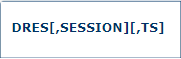
Use the DRES command to display the allocated pool space and the highest use level (high water mark) during current session. Here is an example:
17:32:07 ADAI29 Oper cmd: DRES
17:32:07 ADAN28 00035 2016-11-29 17:32:05 Resource       Size       Current    Highwater
17:32:07 ADAN28 00035 2016-11-29 17:32:05 AB  -Pool    1228800          N/A        1536
17:32:07 ADAN28 00035 2016-11-29 17:32:05 CQ  -Pool      96000            0         192
17:32:07 ADAN28 00035 2016-11-29 17:32:05 DUQ -Pool       7000            0           0
17:32:07 ADAN28 00035 2016-11-29 17:32:05 FI  -Pool     100000            0         160
17:32:07 ADAN28 00035 2016-11-29 17:32:05 HQ  -Pool     416000            0        5200
17:32:07 ADAN28 00035 2016-11-29 17:32:05 Redo-Pool   10485760            0         176
17:32:07 ADAN28 00035 2016-11-29 17:32:05 Sec -Pool      10000            0           0
17:32:07 ADAN28 00035 2016-11-29 17:32:05 TBI -Pool       4000            0           0
17:32:07 ADAN28 00035 2016-11-29 17:32:05 TBS -Pool      30000            0           0
17:32:07 ADAN28 00035 2016-11-29 17:32:05 UQ  -Pool     183456         1092        1456
17:32:07 ADAN28 00035 2016-11-29 17:32:05 UQF -Pool      48384           72         144
17:32:07 ADAN28 00035 2016-11-29 17:32:05 Wrk1-IO B         50            0           5
17:32:07 ADAN28 00035 2016-11-29 17:32:05 WORK-Pool    5242880          128       34584
17:32:07 ADAN28 00035 2016-11-29 17:32:05 Work Part1      1200            0           7
17:32:07 ADAN28 00035 2016-11-29 17:32:05 Work Pt 1b         4            4           4
17:32:07 ADAN28 00035 2016-11-29 17:32:05 Work Part2        20            0           0
17:32:07 ADAN28 00035 2016-11-29 17:32:05 Work Part3       270            0           0
17:32:07 ADAN41 00035 2016-11-29 17:32:05 Function completed
Note:
The usage of the protection data extension area (resource name Work Pt 1b)
reflects the number of WORK blocks that the nucleus is keeping/has kept in the global cache.
The protection data extension area provides space for these WORK blocks for the case that the
nucleus occasionally does not participate in a buffer flush performed by a peer nucleus in the
cluster.

Use the DTARG command to display the system image currently servicing commands routed using the Entire Net-Work DBID target. This command can be issued against Adabas cluster nuclei.
The Entire Net-Work DBID target is used to route commands from users on remote systems with no active PLXCB. Such systems may be part of the z/OS sysplex or other Entire Net-Work nodes outside the sysplex.

Issue the DXCACHE command against cluster nuclei to display the primary cache-related statistics. Statistics are displayed in messages on the console. The kinds of statistics displayed are described in External Cache Statistics (Cluster Nucleus Only).
The full set of statistics shown in this output is displayed only for users who have the selectable unit Adabas Online System (AOS) installed.
If you have installed only the demo version of AOS delivered with Adabas, only the statistics in the sections Totals, Data Storage, and Normal Index are displayed using this command.

Issue the DXFILE command against cluster nuclei to display cache-related statistics for one to five files.
Statistics are displayed in messages on the console. The kinds of statistics displayed are described in External Cache Statistics (Cluster Nucleus Only).

Issue the DXLOCK command against cluster nuclei to display lock-related statistics. Statistics are displayed in messages on the console. The kinds of statistics displayed are described in External Lock Statistics (Cluster Nucleus Only).

The DXMSG command can be used to display the messaging performance statistics available for Adabas Cluster Services or Adabas Parallel Services. Statistics are displayed in messages on the console. The kinds of statistics displayed are described in Messaging Statistics, in the Adabas Cluster Services Operations Guide or Adabas Parallel Services Operations Guide.
The statistics produced by the DXMSG command can be used to determine the impact of messaging on system performance and to determine how to set the ADARUN MXMSG parameter.

Use the DXSTAT command against cluster nuclei to display all cache- and lock-related statistics as well as I/O statistics for WORK datasets in the cluster. Statistics are displayed in messages on the console. The kinds of statistics displayed are described in External Cache Statistics (Cluster Nucleus Only), External Lock Statistics (Cluster Nucleus Only) and WORK Data Set I/O Statistics (Cluster Nucleus Only) .
The full set of external cache statistics shown in this output is displayed only for users who have the selectable unit Adabas Online System (AOS) installed.
If you have installed only the demo version of AOS delivered with Adabas, only the external cache statistics in the sections Totals, Data Storage, and Normal Index are displayed using this command. All file cache statistics for files and all external lock statistics are displayed.

Use the DXWORK command to display the read and write I/O statistics for the accesses to the WORK datasets of peer nuclei by a particular nucleus in the cluster. The DXWORK command may or may not display I/O statistics for a nucleus’ own WORK dataset. Here is an example:
17:04:58 ADAI29 Oper cmd: DXWORK
17:04:58 ADAX61 00035 2016-12-01 17:04:57 WORK dataset I/O statistics:
17:04:58 ADAX61 00035 2016-12-01 17:04:57
17:04:58 ADAX61 00035 2016-12-01 17:04:57 Internal NUCID :               2
17:04:58 ADAX61 00035 2016-12-01 17:04:57 External NUCID :           10002
17:04:58 ADAX61 00035 2016-12-01 17:04:57  Reads         :               3
17:04:58 ADAX61 00035 2016-12-01 17:04:57  Writes        :               0
17:04:58 ADAX61 00035 2016-12-01 17:04:57
17:04:58 ADAX61 00035 2016-12-01 17:04:57 Internal NUCID :               3
17:04:58 ADAX61 00035 2016-12-01 17:04:57 External NUCID :           10001
17:04:58 ADAX61 00035 2016-12-01 17:04:57  Reads         :               1
17:04:58 ADAX61 00035 2016-12-01 17:04:57  Writes        :               0
17:04:58 ADAN41 00035 2016-12-01 17:04:57 Function completed

The MXCANCEL command can be used against cluster nuclei to dynamically change (while the Adabas nucleus is running) the setting of the MXCANCEL ADARUN parameter for a nucleus. This command can be used to specify the maximum number of seconds for which one cluster nucleus waits for the termination of another nucleus in the cluster that it has canceled for not responding to an internal, intracluster command. Valid values range from 15 through 2147483647.
If the new MXCANCEL value is less than or equal to the current MXCANCELWARN setting, the MXCANCELWARN setting is automatically set to zero (0). (You can then use the MXCANCELWARN command to dynamically set the MXCANCELWARN setting appropriately.)
For more information about the MXCANCEL setting for a nucleus, read about the ADARUN MXCANCEL parameter in the Adabas Operations Manual.

The MXCANCELWARN command can be used to dynamically change (while the Adabas nucleus is running) the setting of the MXCANCELWARN ADARUN parameter for a nucleus. This command can be used to specify the number of seconds after an intracluster cancellation request is made when the cluster nucleus requesting the cancellation should issue warnings about the inability of the canceled peer nucleus to terminate. Valid values can be zero (0) or an integer ranging from 4 through the value of MXCANCEL minus 1 (MXCANCEL-1).
The value of the MXCANCELWARN setting must be less than the value of the MXCANCEL setting. If MXCANCELWARN is set to a value greater than or equal to the value specified for MXCANCEL, the value is rejected. If MXCANCELWARN is set to zero, no warnings are issued about canceled cluster nuclei that are slow to terminate.
For more information about the MXCANCELWARN setting for a nucleus, read about the ADARUN MXCANCELWARN parameter in the Adabas Operations Manual.

The MXMSG command can be used to dynamically change (while the Adabas nucleus is running) the setting of the MXMSG ADARUN parameter for a cluster nucleus. This command can be used to specify the maximum number of seconds in which one cluster nucleus waits for the response of another nucleus in the cluster to an internal, intracluster command. Valid values range from 15 through 32767.
If the new MXMSG value is less than or equal to the current MXMSGWARN setting, the MXMSGWARN setting is automatically set to zero (0). (You can then use the MXMSGWARN command to dynamically set the MXMSGWARN setting appropriately.)
For more information about the MXMSG setting for a nucleus, read about the ADARUN MXMSG parameter in the Adabas Operations Manual.

The MXMSGWARN command can be used to dynamically change (while the Adabas nucleus is running) the setting of the MXMSGWARN ADARUN parameter for a cluster nucleus. This command can be used to specify the number of seconds after an intracluster request is made when the cluster nucleus issuing the intracluster request should issue warnings about the failure of the target cluster nucleus to respond. Valid values can be zero (0) or an integer ranging from 4 through the value of MXMSG minus 1 (MXMSG-1).
The value of MXMSGWARN must be less than the value of MXMSG. If MXMSGWARN is set to a value greater than or equal to the value specified for MXMSG, the value is rejected. If MXMSGWARN is set to zero, no warnings are issued about cluster nuclei that are slow to respond.
For more information about the MXMSGWARN setting for a nucleus, read about the ADARUN MXMSGWARN parameter in the Adabas Operations Manual.

The MXSTATUS command can be used to dynamically change (while the Adabas nucleus is running) the setting of the MXSTATUS ADARUN parameter for a cluster nucleus. This command can be used to specify the number of seconds between member-level XCF status monitoring heartbeats. Valid values range from 15 through 21474836.
Note
The MXSTATUS command is only used for Adabas Cluster Services and not for
Adabas Parallel Services. Adabas Parallel Services does not use XCF and ignores
the setting.
The MXSTATUS command can only be used to change the value of the MXSTATUS parameter if the ADARUN MXSTATUS parameter is not zero (0). This command cannot be used to turn status monitoring on (by specifying a nonzero value if the ADARUN MXSTATUS setting is zero) or to turn it off (by specifying a value of zero when the ADARUN MXSTATUS setting is nonzero). However, setting MXSTATUS to a very high value is effectively the same as turning status monitoring off (monitoring will occur very infrequently at least).
For more information about the MXSTATUS setting for a nucleus, read about the ADARUN MXSTATUS parameter in the Adabas Operations Manual.

The optional MXWTOR command can be used to dynamically change (while the Adabas nucleus is running) the setting of the MXWTOR ADARUN parameter for a cluster nucleus. This command can be used to specify the maximum number of seconds that a cluster nucleus should wait for an operator response to a self-terminating operator query. Valid values range from 15 through 64800 or zero (0).
If MXWTOR is set to zero, the operator query does not occur (no ADAX9J messages are written) and no operator intervention is expected.
For more information about the MXWTOR setting for a nucleus, read about the ADARUN MXWTOR parameter in the Adabas Operations Manual.

Adabas SMF records can contain a variable set of detail sections in Interval and Termination records (subtypes 2 and 3). This command allows you to override the setting of the SMFDETAIL ADARUN parameter defined for this Adabas session. Using this command you can select the detail section types in Interval and Termination records that should be included in the Adabas SMF records. Unlike the SMFDETAIL ADARUN parameter, the value or values you specify for the SMFDETAIL command do not need to be enclosed in parentheses. If you specify NONE or ALL, they should be specified alone. However, you can specify one or more of the other detail section names (CMD, CSHB, CSHF, CSHG, CSHP, FILE, IODD, LOCK, MSGB, MSGC, MSGH, PARM, STG, THRD, ZIIP or USER) in one SMFDETAIL parameter, separating each value with a comma.
The following table describes the meaning of the possible detail section names that can be used in the SMFDETAIL command:
| Detail Section Name | Description |
|---|---|
| ALL | Generate all possible detail sections in the Adabas SMF records. If this value is specified, no others can be specified on the SMFDETAIL parameter. |
| CMD | Generate Adabas command activity detail sections in the Adabas SMF records. |
| CSHB1 | Generate global cache activity by block detail sections in the Adabas SMF records. |
| CSHF1 | Generate global cache activity by Adabas file number detail sections in the Adabas SMF records. |
| CSHG1 | Generate global cache activity detail sections in the Adabas SMF records. |
| CSHP2 | Generate Adabas Parallel Services cache activity detail sections in the Adabas SMF records. |
| FILE | Generate Adabas file activity detail sections in the Adabas SMF records. |
| IODD | Generate I/O activity by DD statement detail sections in the Adabas SMF records. |
| LOCK1 | Generate global lock activity detail sections in the Adabas SMF records. |
| MSGB1 | Generate internucleus messaging control block activity detail sections in the Adabas SMF records. |
| MSGC1 | Generate internucleus messaging count detail sections in the Adabas SMF records. |
| MSGH1 | Generate internucleus messaging service time histogram detail sections in the Adabas SMF records. |
| NONE | Generate no detail sections in the Adabas SMF records. If this value is specified, no others can be specified on the SMFDETAIL parameter. |
| PARM | Generate ADARUN parameter value detail sections in the Adabas SMF records. |
| STG | Generate Adabas storage pool detail sections in the Adabas SMF records. |
| THRD | Generate thread activity detail sections in the Adabas SMF records. |
| ZIIP | Generate zIIP statistics detail sections in the Adabas SMF records. |
| USER | Generate user-defined details sections in the Adabas SMF records. If USER is specified, a value for the UEXSMF parameter should also be specified to identify the user exit to be invoked to generate the user-defined detail section. |
| 1 Available only in
cluster environments (Adabas Cluster Services or Adabas Parallel Services must
be installed).
2 Available only in cluster environments with Adabas Parallel Services installed. |
|
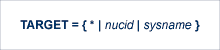
Use this command against an Adabas Cluster Services nucleus to specify the system on which the Entire Net-Work DBID target for the cluster database is to be established. Specify a system name or the NUCID of a cluster nucleus on that system. The DBID target can be established on any system where a nucleus of the cluster is active. It is used to route commands from users on remote systems with no active PLXCB. Such systems may be part of the z/OS sysplex or other Entire Net-Work nodes outside the sysplex.
The command instructs Entire Net-Work to route requests to an Entire Net-Work node on an implicitly or explicitly specified system image. All future commands will be routed to the new destination. If there are existing users who have been routed using the DBID target and the target is relocated to another Entire Net-Work node, they will be reassigned to any cluster nuclei on the new node. These users lose their existing sessions with their previously assigned nuclei. As a consequence, they may receive response code 9 (ADARSP009) on the first command after the target is moved. Furthermore, they may receive response code 21 (ADARSP021) if they attempt to reuse previously defined command IDs (logical read sequences or search results).
Several possible operands can be used to specify the desired DBID target assignment, as described in the following table.
| Operand | Description |
|---|---|
| * | Specify an asterisk (*) to assign the DBID target to the Entire Net-Work node associated with the nucleus receiving the command. |
| nucid | Specify the nucleus ID (as defined in the ADARUN NUCID parameter) of an active cluster nucleus to assign the DBID target to the Entire Net-Work node associated with that nucleus. |
| sysname | Specify a system name (LPAR name) to assign the DBID target to the Entire Net-Work node associated with an active cluster nucleus on that system. |
Note
The DBID target identifies an Entire Net-Work node, not a specific
nucleus on a system. The DBID target is jointly serviced by all nuclei on that
Entire Net-Work node.