
Adabas-to-Adabas (A2A) replication is a component of the Event Replicator for Adabas Open Systems. This means that you must install the Event Replicator for Adabas Open Systems before you can use the A2A replication. The A2A replication also requires a special Adabas license file; A2A replication is only possible after you have activated this license file.
Please refer to the documentation of the Event Replicator for Adabas Open Systems for further information. In order to support the A2A replication, some additional functionality has been incorporated into Adabas; this additional functionality is described in the following.
While the replication to other replication targets is performed by the Event Replicator without the necessity of special code in the Adabas nucleus, the A2A replication is performed directly in the Adabas nucleus by additional code. Three system files (and one LOB file) are used for metadata and for intermediate storage of the transactions to be replicated. Unlike the replication execution, the administration of the A2A replication is a part of the Event Replicator administration; in order to let Adabas know the definitions made in the Event Replicator interface, the Event Replicator administration calls an Adabas-A2A-internal replication administration interface.
- Replication metadata file
The replication metadata file contains information about the source, target and status of currently defined replications. It contains one record for each replication source file of an A2A replication.
- Replication command file
The replication command file contains records that describe database modification commands (A1, E1, N1, N2) not yet replicated to all target files.
- Replication transaction file
This is for the intermediate storage of transactions not yet replicated to all target files. The replication transaction file contains one record for each transaction until this transaction has been replicated to all target databases.
- Replication LOB file
This is the LOB file of the replication command file. The buffers of an Adabas command can become quite large, especially if you use the ACBX interface. For this reason, the buffers for the commands stored in the replication command file are stored in LOB fields.
Note
LOB files require a DATA block size of 32 KB. Therefore, you must add a DATA container extent with 32 KB block size if you want to start using A2A replication, and if all of your other DATA container extents have a smaller block size.
The following diagram shows the architecture of the A2A replication:
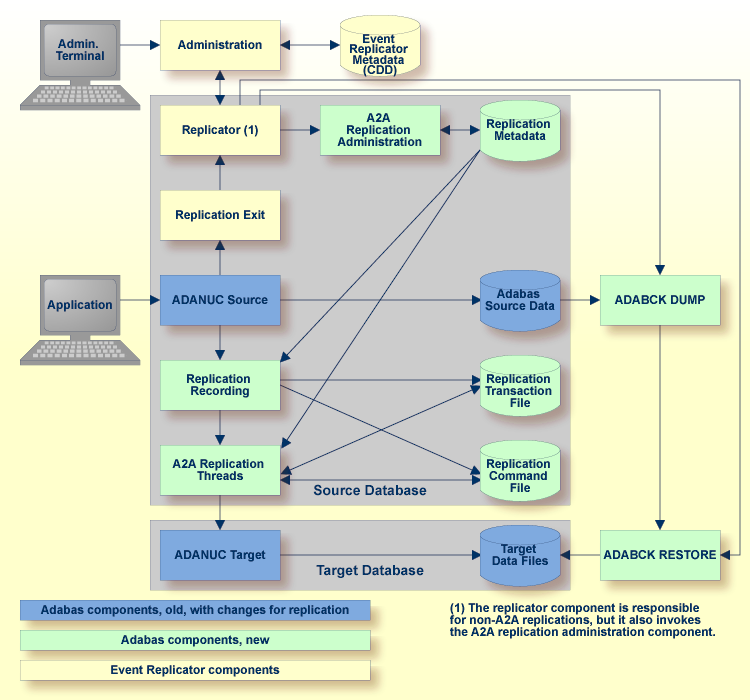
The Event Replicator provides an administration tool which writes information to the Event Replicator metadata.
The administration tool communicates with the replicator component, which is not only responsible for the Adabas-to-relational and Adabas-to-JMS replication, but also invokes the A2A replication administration component, which is part of Adabas. The A2A replication administration stores the replication metadata in the Adabas replication metadata system file. Having the replication metadata within Adabas enhances the performance of the A2A replication.
For the connection between Adabas and the Event Replicator, a special kind of user exit, the replication exit is required. The replication exit starts the replicator component.
In order to start live data event replication, you must first copy the data to be replicated into the target database. It is important that this copy contains a consistent state of the files to be replicated (all users at ET status) and also that the replication guarantees that the recording of the transactions to be replicated starts at exactly the time when the files have this consistent state. In the Event Replicator, this step is called the initial state.
When you execute deploy in the Event Replicator administration, this initial state processing is started by internally using the backup utility ADABCK. ADABCK functionality has been extended in order to guarantee the consistency between the replication source and target files.
Note
If the target database is too small for the replication target files, ADABCK
automatically increases the size of target database. For more information, please refer to
Utilities, ADABCK, Functional Overview.
During the initial state processing, the recording of the database modification commands to be replicated is started: the replication recording component writes the transactions and commands to be replicated to the replication transaction file and to the replication command file.
The replicator reads the transaction records in the correct chronological sequence, then it reads the corresponding command records in the right sequence. This guarantees that the commands are replicated in the correct sequence. The A2A replicator threads apply the commands to the target database. They try to do this in parallel, but some internal rules governing the order in which the commands are to be executed are necessary in order to guarantee the consistency between source and target files. When all replication data have been processed, the replicator threads wait for notification from the replication recording that a new transaction has been committed.