| uppercase, bold
|
Syntax elements appearing in uppercase and bold font are
Adabas keywords. When specified, these keywords must be entered exactly as
shown.
|

The syntax elements ADADBS, CHANGE, and FILE are Adabas keywords.
|
| lowercase, italic, normal font
|
Syntax elements appearing in lowercase and normal, italic
font identify items that you must supply.
|
The syntax element file-number identifies and
describes the kind of value you must supply. In this instance, you must supply
the number of the file affected by the ADADBS CHANGE operation.
|
| mixed case, normal font
|
Syntax elements appearing in mixed case and normal font (not
bold or italic) identify items established by other Adabas control statements.
This notation is usually used to identify how default values are determined for
some parameters in Adabas syntax.
|

The syntax element "ADARUN-device" indicates that
the device type identified by the ADARUN DEVICE parameter will be used if a
different device type is not specified. The literal
"ADARUN-device" should not be specified
for the SORTDEV parameter.
|
| underlining
|
Underlining is used for two purposes:
-
To identify default values, wherever appropriate. Otherwise, the defaults
are explained in the accompanying parameter descriptions.
-
To identify the short form of a keyword.
|

In the example above, 4000 is the default that will be used for the LRECL
parameter if no other record buffer length is specified.

In the example above, the short version of the DEVICE parameter is DE.
|
| vertical bars (|)
|
Vertical bars are used to separate mutually exclusive
choices.
Note
In more complex syntax involving the use of large brackets or
braces, mutually exclusive choices are stacked instead.
|

In the example above, you must select RESTRUCTUREF or REF for this ADAORD
function. There are no defaults.
|
| brackets ([ ])
|
Brackets are used to identify optional elements. When
multiple elements are stacked or separated by vertical bars within brackets,
only one of the elements may be supplied.
|

In this example, the SORTSEQ parameter and the MU, NU, and STARTISN
subparameters are optional.
Note
Note that the mutually exclusive choices for the SORTSEQ parameter are
stacked.
|
| braces ({ })
|
Braces are used to identify required elements. When multiple
elements are stacked or separated by vertical bars within braces, one and only
one of the elements must be supplied.
|
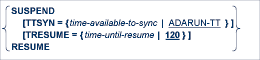
In this example, either the SUSPEND or RESUME parameter is required.
|
| indentation
|
Indentation is used to identify subparameters of a
parameter.
|
In this example, TTSYN and TRESUME are subparameters of the SUSPEND
parameter.
|
| ellipsis (...)
|
Ellipses are used to identify elements that can be repeated.
If the term preceding the ellipsis is an expression enclosed in square brackets
or braces, the ellipsis applies to the entire bracketed expression.
|
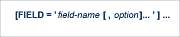
In this example, the FIELD parameter can be repeated. In addition, more than
one option can be associated with a field.
|
| other punctuation and symbols
|
All other punctuation and symbols must be entered exactly as
shown.
|
In this example, the single quotation marks must be specified around the
field definitions and their associated options. In addition, options must be
separated by commas.
|