This document describes the architecture of the Event Replicator for Adabas and covers the following topics:
The Event Replicator for Adabas is not an application in the traditional sense. Rather, it is made up of several components that work together to replicate data to a target application without disrupting normal Adabas operations. A portion of the replication task occurs within the Adabas nucleus address space, while another portion of the task occurs within an address space known as the Event Replicator Server.
Pictured below is a diagram of the Event Replicator for Adabas architecture and the main components involved.
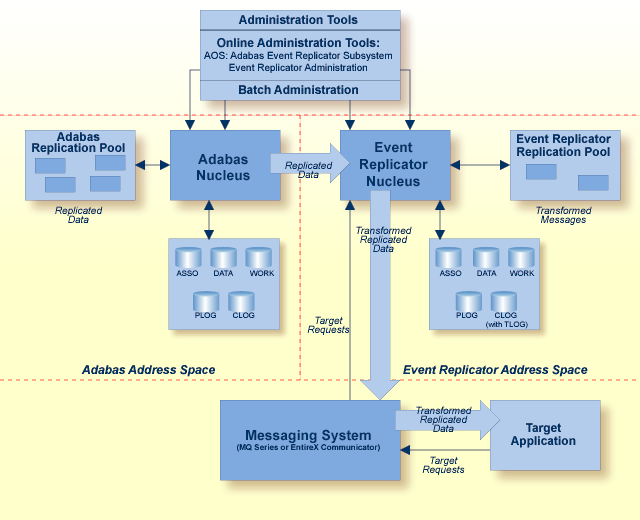
As depicted in the diagram, the Event Replicator for Adabas consists of the following main components:
Definitions and settings required for replication can be specified in any of the following ways:
They can be specified as initialization parameters, which are read from the DDKARTE statements of the Event Replicator Server startup job. The parameters for this batch administration are described in Event Replicator Initialization Parameters.
They can be specified in the Replicator system file which is read at Event Replicator Server startup. The definitions are maintained in the Replicator system file using one of the provided online menu-driven interfaces: Event Replicator Administration or Adabas Online System's Adabas Event Replicator Subsystem. For more information, read Maintaining Replication Definitions Using Event Replicator Administration or Using the Adabas Event Replicator Subsystem.
In addition, the Adabas Online System (AOS) can be used to maintain the definitions for the source Adabas database as well as the Event Replicator database used by the Event Replicator for Adabas and it can be used to activate and deactivate replication resources. For more information on how it can be used to activate and deactivate replication resources, read Managing Replication Definitions from AOS.
The Adabas nucleus is a set of programs that control an Adabas database and coordinate all of its work.
The Event Replicator nucleus is a set of programs that control the Event Replicator Server database and coordinate all of its work. This includes the replication server components that parse and process all replicated data received from the Adabas nucleus and receive and process inbound requests from the target application via the messaging system.
These intermediary systems process messages from the Event Replicator Server and send them to the target application. They also transmit requests from the target application to the Event Replicator Server.
The target application is the outside application to which replicated data is sent.
Target requests are requests from the target application to the Event Replicator Server. Such requests include status requests, initial-state requests, and prior-transaction (resend buffer) requests.
This buffer area contains the replication data processed by the Adabas nucleus.
This buffer area contains transformed replication data processed by the Event Replicator Server.
The operation and administration features of Adabas allow you to activate replication, define files to be replicated, and configure other Adabas features related to the Event Replicator for Adabas. Event Replicator for Adabas administration also involves the configuration of both the Adabas nucleus and the Event Replicator Server components.
You can perform Event Replicator for Adabas administration tasks using standard Adabas utilities and database initialization parameters, the Adabas Online System (AOS) and its Adabas Event Replicator Subsystem, or Event Replicator Administration. For more information on Adabas database administration related to replication, read Adabas Nucleus Administration; for information on Event Replicator database administration necessary for replication, read Event Replicator Server Nucleus Administration.
This section covers the following topics related to replication and the Adabas nucleus.
The following replication setup should be performed for an Adabas database you want replicated.
If you are defining a database, be sure to specify the DEFINE REPTOR=NO parameter of the ADADEF utility to indicate that the database is not an Event Replicator database. For more information, read ADADEF DEFINE REPTOR Function.
You can modify this setting later using the MODIFY REPTOR parameter of the ADADEF utility. For more information, read ADADEF MODIFY REPTOR Function.
The ADARUN REPLICATION=YES parameter must be specified for the database from which you want files replicated. For more information, read REPLICATION Parameter.
The ADARUN LRPL parameter must specify the size of the Adabas replication pool. For more information, read LRPL Parameter.
Using the Adabas Online System or the REPLICATION parameter of the ADADBS utility, activate or deactivate replication for the files in the Adabas database. For more information, read Adabas Online System Features Supporting Event Replicator for Adabas or ADADBS REPLICATION Function.
Use the ADALOD LOAD RPLTARGETID parameter or the Adabas Online System screens to identify the target Event Replicator Server to which replicated records from each database file should be transmitted. You can also optionally specify the primary key for replication (RPLKEY parameter) for the file and whether or not before images of data storage are collected for replication (RPLDSBI parameter) during an update command to the file. For more information, read Adabas Online System Features Supporting Event Replicator for Adabas or ADALOD LOAD Parameters.
The ADAREP utility provides information about the status of replication for the database and files, as well as for the Event Replicator Server.
During session start, the Adabas nucleus performs the following tasks:
Allocates memory needed by the replication-related code.
Determines which files need to be replicated.
Establishes contact with each Event Replicator target ID associated with files to be replicated.
After replication is started for the Adabas nucleus, the following replication processing occurs:
For each user, the nucleus tracks and places in the replication buffer information related to modifications to each record in each file selected for replication. To track modifications, the Event Replicator for Adabas captures the before and after images (compressed) of all modified data.
The nucleus accumulates replication data for an entire user transaction, as follows:
A primary key may or may not be associated with a replicated file. If a primary key is not associated with a replicated file, any before image associated with a record is the before image from data storage. If a primary key is associated with a replicated file and the key is modified, any before image associated with a record is only the compressed value of the primary key. The primary key can be specified using the ADALOD LOAD RPLKEY parameter.
Data for replication is collected at the time protection records are created for modifications to records within a replicated file. The following data is collected during a transaction that modifies records on one or more replicated files:
Data storage after image.
Data storage before image during a delete.
Data storage before image during an update (optionally, if this feature is activated for the file).
For further information, see the ADALOD LOAD RPLDSBI parameter documentation and the ADADBS REPLICATION DSBI parameter documentation. Discussions of Adabas utility functions specific to Event Replicator for Adabas can be found in Utilities Used with Replication.
Primary key before image during an update or delete, when the optional primary key has been defined for the file and the key has been updated or deleted from the record.
If a transaction is backed out, the nucleus discards all replication data collected for the transaction. No replication-related information is collected during an update command when no data is modified during the update command.
If any record is modified more than once during a transaction, the nucleus makes available to the outside destination only the final instance of the modification of the record. This is done by consolidating modifications to the same record within the same user transaction, as follows:
For the sake of performance, no data consolidation occurs at the point the modification related data is collected.
Data consolidation occurs in the nucleus address space.
Data consolidation occurs after a transaction is committed on WORK.
The following rules apply to the consolidation of modifications to the same record during one transaction:
An insert followed by an update is treated as an insert.
An update followed by another update is treated as one update.
An update followed by a delete is treated as one delete.
When a before image exists for a primary key and a before image exists from data storage, the before image for the primary key is used.
The first before image captured is used.
Note:
This rule is subject to the above rule regarding a before
image of a primary key versus the before image from data storage.
The last after image captured is used.
There is an exception to these data consolidation rules: a delete followed by an insert to the same record will be treated as two separate modifications.
Important:
The setting of the RPLSORT parameter can affect how
modifications are consolidated. When RPLSORT=YES is specified, modifications
are consolidated as described in this section. When RPLSORT=NO is specified,
modifications are still consolidated, but their referential integrity is
maintained. In other words, the chronological order of the updates is
maintained for each ISN in a file. For more information, read
RPLSORT
Parameter.
The nucleus notifies the Event Replicator Server when a transaction with replicated data has been committed.
The nucleus makes the replication data available to the Event Replicator Server.
The nucleus discards the replication data for the Adabas replication pool after it has been fully processed by the Event Replicator Server.
Notes:
For information on the Adabas nucleus settings, see Adabas Initialization (ADARUN) Parameters and Utilities Used with Replication .
Replicated information is buffered in the Adabas nucleus in a new replication pool. The replication pool is updated solely by the code within the Adabas nucleus address space. The size of this pool is set by the ADARUN LRPL parameter.
The Adabas replication pool may become full if:
The ADARUN LRPL setting is too small to accommodate the replication data for parallel transactions.
Adabas temporarily or persistently produces more replication data than the Event Replicator Server or the messaging system can process
An outage of the Event Replicator Server or messaging system occurs.
When the Adabas replication pool becomes full, the replication system will deactivate replication for a file and a message is issued indicating which file was deactivated. When replication is inactive for a file, Adabas does not collect any further replicated updates for the file. Deactivated files may be explicitly reactivated via the ADADBS REPLICATION function once pool storage becomes available.
You can request warning messages when the replication pool usage exceeds a threshold that you specify using the ADARUN parameter RPWARNPERCENT. An initial message will be generated when this value, expressed as a percentage of replication pool usage, is exceeded. Additional messages will be generated when usage increases or decreases by the value you specify with ADARUN parameter RPWARNINCREMENT.
To avoid flooding the console with warnings, you can specify ADARUN parameters RPWARNMESSAGELIMIT and RPWARNINTERVAL. If more than RPWARNMESSAGELIMIT warnings are issued within the number of seconds specified by RPWARNINTERVAL, further warnings will be suppressed for the duration of the interval. When the interval expires, you will receive a message showing how many warning were suppressed, and warning messages can then resume.
The Event Replicator Server parses all replicated data received from the Adabas nucleus and receives inbound initial-state requests from the target application through the messaging system. This section covers the following topics related to the Event Replicator for Adabas and the Event Replicator Server:
The following replication setup should be performed for an Event Replicator Server database.
If you are defining the Event Replicator database, be sure to specify the DEFINE REPTOR=YES parameter of the ADADEF utility to indicate that the database is an Event Replicator database. For more information, read ADADEF DEFINE REPTOR Function.
You can modify this setting later using the MODIFY REPTOR parameter of the ADADEF utility. For more information, read ADADEF MODIFY REPTOR Function.
Event Replicator Server definitions must be defined for:
The target destinations to which you want replicated data sent.
Subscriptions that specify the replication processing, transformation, and filtering that should occur for specific files.
The messaging system input queues you will be using.
Other definitions can also be specified, but are not required as, in many cases, defaults are provided. For complete information about Event Replicator Server definitions, read Replication Definition Overview and Maintenance or Event Replicator Initialization Parameters .
These definitions can be specified using either or both DDKARTE initialization parameters in the Event Replicator Server startup job or definitions in the Replicator system file. Replicator system file definitions are maintained using the Adabas Online System's Adabas Event Replicator Subsystem or using Event Replicator Administration. If your definitions are to be stored in the Replicator system file, you will need to use the ADALOD LOAD REPLICATOR parameter to load a Replicator system file into the Event Replicator Server database. For more information, read ADALOD LOAD Parameters.
The ADARUN RPLPARMS parameter must be specified to identify where the replication definitions should be read from. For more information, read RPLPARMS Parameter.
The ADARUN LRPL parameter must specify the size of the Event Replicator Server replication pool. For more information, read LRPL Parameter.
Using the Adabas Online System or the REPTOR parameter of the ADADBS utility, activate or deactivate replication for the files in the Event Replicator Server database. Note that if replication is deactivated for specific files, replication data from the Adabas nucleus for those files will not be processed by the Event Replicator Server. For more information, read Adabas Online System Features Supporting Event Replicator for Adabas or ADADBS REPTOR Function.
Using the Adabas Online System, the REPTOR parameter of the ADADBS utility, or Event Replicator Administration, activate or deactivate specific destination or subscription definitions. Note that if a destination definition is deactivated, replication data from the Adabas nucleus will not be sent to those destinations. Likewise, if a subscription definition is deactivated, replication data for the files covered by the subscription may not be processed (depending on what other subscription definitions are active). For more information, read Adabas Online System Features Supporting Event Replicator for Adabas, ADADBS REPTOR Function, or Maintaining Replication Definitions.
If you will be using subscription logging, use the ADALOD LOAD SLOG parameter to load the SLOG system file into the Event Replicator database. For more information, read .
In addition, you will need to activate subscription logging for specific destinations. For more information, read Using the Subscription Logging Facility.
The ADAREP utility provides information about the status of replication for the Event Replicator database and files, as well as for the Adabas database.
The following description summarizes the processing performed by the Event Replicator Server:
The Event Replicator Server establishes contact with Adabas nuclei for the related database IDs. If an Adabas nucleus is not yet active, the nucleus contacts the Event Replicator Server during nucleus initialization.
The Event Replicator Server processes the received modified data according to the subscriptions defined in the replication definition parameters.
After processing the data, the Event Replicator Server may apply user-customizable logic to the replication process (for example, filtering, conversion, or transformation). The Event Replicator Server then delivers the replicated data to the messaging system destination for replication to the target application.
Each replicated transaction delivered to a target is assigned a unique sequence number. This sequence number is generated for each unique subscription-destination combination of the replicated transaction. In other words, if the same replicated transaction is delivered to two different destinations by a subscription, that transaction may have two different sequence numbers (one for each destination).
Initial-state requests may be needed to resolve an ambiguous state incurred by the target application; the request can contain requests for a single record, a set of records, or an entire file.
The Event Replicator Server notifies the appropriate Adabas nucleus when transaction replication is completed and then removes all information aobut the completed transaction from the Event Replicator Server replication pool.
An Event Replicator Server may process data from multiple databases. Replication data for one Adabas file must be processed by a single Event Replicator Server. No two Event Replicator Servers handle the same set of files from the same database.
A replication pool (separate from the Adabas replication pool) is allocated in the address space of the Event Replicator Server. The size of this pool is set by the ADARUN parameter LRPL. This pool is used by the replication code running in the Event Replicator Server address space. It is used to store the decompressed and transformed data, along with other information.
The Event Replicator replication pool may become full if:
The ADARUN LRPL parameter setting is too small to accommodate the replication data being gathered from participating Adabas nuclei.
The Event Replicator Server temporarily or persistently produces more replication data than the messaging system can process
An outage of a participating Adabas nucleus or message system occurs.
When the Event Replicator replication pool becomes full, the replication system may deactivate its resources, including destinations, subscriptions, files, or databases. The replication system determines and deactivates the resource having the greatest impact on the Event Replicator replication pool usage.
When a destination is deactivated, all subscriptions sent to that destination and to no other active destination will also be deactivated. A message is issued indicating which destination was deactivated.
A destination may be explicitly reactivated once pool storage becomes available using the ADADBS REPTOR function or using the Event Replicator Server management screens in the Adabas Online System. For more information, read Managing Replication Definitions from AOS.
When a subscription is deactivated, all files that occur in that subscription and in no other active subscriptions are also deactivated. A message is issued indicating which subscription is deactivated.
Deactivation of a subscription does not cause deactivation of related destinations. Those destinations containing only subscriptions that have been deactivated simply receive no more data.
A subscription may be explicitly reactivated once pool storage becomes available using the ADADBS REPTOR function or using the Event Replicator Server management screens in the Adabas Online System. For more information, read Managing Replication Definitions from AOS.
When a file is deactivated, subscriptions containing the file remain active. Subscriptions that contain only files for which replication has been deactivated simply receive no more data. Subscriptions that contain both deactivated files and active files will continue to deliver replication data to the target application, even though only partially replicated data will be delivered.
Once a file has been deactivated, the target application will be responsible for determining what to do with any partially replicated data. The application may decide to keep the partial data, and thus avoid the potentially costly refresh of large files for which replication has (or could have) remained active all the time. The target application has the choice to:
Store the partially replicated data in the target database, but deactivate access to that part of the database until full replication has been reestablished.
Store the partially replicated data in some temporary file and pick it up once full replication is being reestablished. Meanwhile, access to the replicated data can continue, as of the time when replication for the file was deactivated.
Deactivate some or all subscriptions that contain the file for which replication has been deactivated.
Deactivation of a file in the Event Replicator Server causes deactivation of the file in the Adabas nucleus. A message is issued, indicating which file was deactivated.
A file may be explicitly reactivated once pool storage becomes available using the ADADBS REPTOR function or using the Event Replicator Server management screens in the Adabas Online System. For more information, read Managing Replication Definitions from AOS.
When a database is deactivated, all of its currently active replicated files are also deactivated. Messages are issued indicating which files were deactivated. See the information above on file deactivation for more information on actions that can be taken when a file is deactivated.
A database may be explicitly reactivated once pool storage becomes available using the ADADBS REPTOR function or using the Event Replicator Server management screens in the Adabas Online System. For more information, read Managing Replication Definitions from AOS.
You can request warning messages when the replication pool usage exceeds a threshold that you specify using the ADARUN parameter RPWARNPERCENT. An initial message will be generated when this value, expressed as a percentage of replication pool usage, is exceeded. Additional messages will be generated when usage increases or decreases by the value you specify with ADARUN parameter RPWARNINCREMENT.
To avoid flooding the console with warnings, you can specify ADARUN parameters RPWARNMESSAGELIMIT and RPWARNINTERVAL. If more than RPWARNMESSAGELIMIT warnings are issued within the number of seconds specified by RPWARNINTERVAL, further warnings will be suppressed for the duration of the interval. When the interval expires, you will receive a message showing how many warning were suppressed, and warning messages can then resume.
The Event Replicator Server sends replicated data to a messaging system (for example, EntireX Communicator or MQSeries) for delivery to the target application.
The target application may send initial-state requests, status requests, and prior-transaction (resend buffer) requests to the messaging system for delivery to the Event Replicator Server.
For information on integrating the message system with your target application, read Integrating the Messaging System with the Target Application.
Normally, only changed data is replicated. However, this presumes that the target system has the same data that the source had before the change. If this is not the case, you need to get an initial version of the data to the target. This is accomplished using an initial-state request.
Initial-state requests must be supported by initial-state definitions. Each request must specify the name of the initial-state definition that should be used, as well as the database ID and file number to be processed. Initial-state definitions are specified in the Adabas Event Replicator Subsystem, Event Replicator Administration, or by INITIALSTATE parameters in the Event Replicator Server startup job.
Initial-state requests are initiated either from the target application (client) to the Event Replicator Server or using the Adabas Event Replicator Subsystem. For information on how to submit an initial-state request from the target application to the Event Replicator Server, read Event Replicator Client Requests. For information on how to submit an initial-state request from the Adabas Event Replicator Subsystem, read Populating a Database With Initial-State Data.
Initial-state data can contain any subset of the data on the Adabas database, based on the specifications in the initial-state definition and parameters supplied in the initial-state request. Records can be selected for initial-state processing in one of the following manners:
The complete file can be selected.
Records are selected from the file based on an ISN list.
Records are selected from the file based on specified selection criteria.
Note:
Each replicated initial-state record contains the related data
storage after image. No before image is replicated for an initial-state record.
During initial-state processing, the nucleus reads the selected records and passes them to the Event Replicator Server. The Event Replicator decompresses the records depending on the subscription format and sends the data to the assigned output destinations.
For more information, read about maintaining initial-state definitions using Adabas Event Replicator Subsystem or about maintaining initial-state definitions using Event Replicator Administration. For information about the DDKARTE statements required for initial-state definitions, read about the INITIALSTATE parameter .
Clients can send specific requests for data to the Event Replicator Server by sending messages to an Event Replicator input queue. The following requests can be made:
Status inquiries
Initial-state data requests
Prior-transaction (resend buffer) data requests.
For more information about submitting these requests to the Event Replicator Server from the target application, read Event Replicator Client Requests.
You can request that some utility functions performed against an Adabas database be replicated to the target application. For example, if you change the field length of a field in an Adabas file, that change can be replicated to the target application. This eliminates the need for you to manually intervene to make the change in the target and eliminates the resulting errors if you do not.
 |
Warning: In order for this utility replication to work properly, you must ensure that your source and target files are maintained in identical manners. If a utility function is performed against the source file and replicated to a target file that cannot accommodate the utility request, errors will result and replication to the target will fail. |
This section covers the following topics:
The following limitations exist in utility replication:
Not all utility functions can currently be replicated. In addition, some functions can only be replicated if they are initiated from Adabas Online System (AOS) or Event Replicator Administration. The functions that are currently replicated include:
Adding new fields. The ADADBS NEWFIELD batch utility function can be replicated as well as the equivalent AOS and AMA functions.
Changing a field length. The ADADBS CHANGE batch utility function can be replicated as well as the equivalent AOS and AMA functions.
Deleting a file. The ADADBS DELETE batch utility function can be replicated as well as the equivalent AOS and AMA functions.
Refreshing (emptying) a file. The ADADBS REFRESH batch utility function can be replicated as well as the equivalent AOS and AMA functions.
Renaming a file. The ADADBS RENAME batch utility function can be replicated as well as the equivalent AOS and AMA functions.
Reusing ISNs. The ADADBS ISNREUSE batch utility function can be replicated as well as the equivalent AOS and AMA functions.
Reusing data storage blocks. The ADADBS DSREUSE batch utility function can be replicated as well as the equivalent AOS and AMA functions.
Modifying FCB parameters. The ADADBS MODFCB batch utility function can be replicated as well as the equivalent AOS and AMA functions.
Defining a file. The Adabas Online System or Adabas Manager functions can be replicated.
Defining a new FDT. The Adabas Online System or Adabas Manager functions can be replicated.
Note:
Event Replicator for Adabas supports the replication of data associated with an
ADALOD LOAD or ADALOD UPDATE functions. For more information on this support,
read ADALOD LOAD
Parameters and
ADALOD UPDATE
Parameters.
For complete information on these Adabas utility functions, refer to your online Adabas utilities, Adabas Online System, or Adabas Manager documentation.
Password protection on the target file or database is not supported
Expanded files are not supported. Any segmentation of a file is hidden to the target. So, file deletion functions operate on the logical file.
The functions defining a new FDT, adding new fields, or defining a file, are replicated to all Event Replicator Servers known to the database nucleus. This is because the Event Replicator Server ID is not yet defined for the file (ADADBS REPLICATION function), so all Event Replicator Servers are informed. The functions are only replicated if the Event Replicator Server includes the file in a subscription with appropriate destination settings.
Replicating Adabas utility functions is controlled by the destination definitions associated with your subscriptions. Using the DREPLICATEUTI parameter in a destination definition, you can control whether utility functions are replicated for that destination. In addition, for Adabas destinations, you can use the DAREPLICATEUTI parameter to control whether utility functions are replicated to a specific target database and file.
For more information about the DREPLICATEUTI and DAREPLICATEUTI parameters in destination definitions, read about the Destination Parameters. For information on using the Adabas Event Replicator Subsystem or Event Replicator Administration to maintain destination definitions, read Maintaining Destination Definitions Using the Adabas Event Replicator Subsystem or Maintaining Destination Definitions Using the Event Replicator Administration
Suppose you have an Adabas database with a database ID of 241. In addition, suppose Event Replicator Server 65535 destination and subscription definitions look like this:
ADARPD DATABASE ID=240,DBCONNECT=NO
*
ADARPD DESTINATION NAME=ADA240
ADARPD  DREPLICATEUTI=YES
ADARPD  DTYPE=ADABAS
ADARPD  DAIFILE=151,DAIDBID=241,DATDBID=240,DATFILE=51
ADARPD   DAREPLICATEUTI=YES
*
ADARPD SUBSCRIPTION NAME=TICKER
ADARPD  SDESTINATION='ADA240'
ADARPD  SFILE=151,SFDBID=241,SFBAI='AA-ZZ.'
*
The TICKER subscription on Event Replicator Server 65535 is set up to replicate data from file 151 on database 241 using destination ADA240. However, suppose neither database file 151 or file 51 are loaded in their respective databases. The following processing can occur:
Define the new FDT and file 151 using Adabas Online System or Adabas Manager on database 241.
Since database 241 runs with REPLICATION=YES, the define operations for file 151 are sent to Event Replicator Server 65535.
The TICKER subscription sends changes from file 151 to destination ADA240 (database 240). Because destination ADA240 has DREPLICATEUTI=YES, it replicates the utility functions it receives in general. In addition, because DAREPLICATEUTI=YES for the target database 240, file 51, the define utility function is replicated to that specific target as file 51. In other words, new file 51 is defined using the definition specifications for file 151.
|
Warning: If a file 51 already exists on database 240, this definition will fail and so will replication to this target. Take care when specifying target specifications for such operations. |
You can now activate replication for file 151 (ADADBS REPLICATION FILE=151,ON,TARGET=65535). This will allow user transactions and utility functions from file 151 on database 241 to be replicated to Event Replicator Server 65535, which will, in turn, replicate them to file 51 on database 240.
The Adabas C5 command can be used to message Event Replicator Server destinations from your application. C5 commands are transmitted via the messaging system. For more information, read C5 Command: Write User Data to Protection Log.
The Event Replicator Server includes functionality to check for inconsistencies between files specified in one or more subscriptions in the Event Replicator Server versus files replicated in Adabas. These inconsistencies may be caused by one of the following instances:
A file may have replication turned on but not be referenced in a subscription in the related Event Replicator Server
A file may be specified in a subscription in an Event Replicator Server and either not have replication turned on in Adabas or have replication turned on in Adabas with a different Event Replicator Server ID.
The Event Replicator Server replication crosscheck function executes when an Adabas database first connects with the Event Replicator Server. It can also be invoked using the RPLCHECK operator command.
The subscription logging facility, also know as the SLOG facility, can be used to ensure that data replicated to specific destinations is not lost if problems occur on those destinations. In order for this to occur, the SLOG facility must be activated for those destinations. For complete information on using the SLOG facility, read Using the Subscription Logging Facility.
Notes:
Event Replicator for Adabas transaction logging (TLOG) allows you to log transaction data and events occurring within the Event Replicator address space. This information can be used as an audit trail of data that has been processed by the Event Replicator Server and of state change events that occurred during Event Replicator Server operations. In addition, it can be used to assist in the diagnosis of problems when replication does not work as expected.
For complete information, read Using Transaction Logging.
Event Replicator for Adabas provides node-to-node support, in which one Event Replicator Server can send replicated data to a second Event Replicator Server. The second Event Replicator Server can then, in turn, send the replicated data onto other destinations.
Consider the example depicted in the following picture:
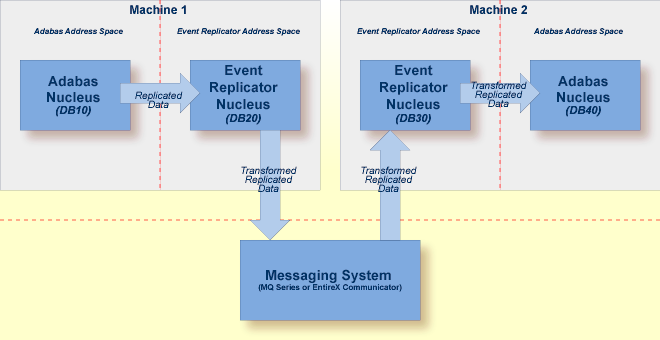
The following processing occurs in this example:
Source Adabas database 10 sends its data to Event Replicator Server 20.
Event Replicator Server 20 sends the replicated data to an EntireX Communicator or MQSeries destination.
Event Replicator Server 30 reads the replicated data from the EntireX Communicator or MQSeries input queue.
Event Replicator Server 30 processes the replicated and sends it to Adabas database 40.
The following definitions must exist for this processing to occur correctly:
The definitions for Event Replicator Server 20 must include one or more subscriptions for Adabas database 10, which send the replicated data to an EntireX Communicator or MQSeries destination. The subscriptions may optionally also transform the replicated data.
The definitions for Event Replicator Server 30 must include EntireX Communicator or MQSeries input queue definitions that match the EntireX Communicator or MQSeries destination definitions in Event Replicator Server 20.
The Event Replicator Server 30 definitions must also include at least one subscription for any data received from Adabas database 10 (in this case via the input queue). This subscription must send the replicated data to an Adabas destination definition for Adabas database 40.
Finally, the Event Replicator Server 30 definitions must also specify that, at
startup, Event Replicator Server 30 will not automatically initiate a connection with
Adabas database 10. In other words, the
DBCONNECT
parameter for database 10 must be set to
"NO" in Event Replicator Server 30.
If Adabas terminates abnormally and restarts, it and the Event Replicator Server are usually able to recover any lost replication data and to deliver the normal stream of replication data to the target application.
This section covers the following topics:
During normal processing, Adabas writes control information to its Work data set to keep track of which replicated transactions the Event Replicator Server has confirmed as successfully processed. If Adabas terminates abnormally and then performs the autorestart at the beginning of the next session, it uses the protection data and control information in the Work data set to rebuild the replication data that existed in its replication pool at the time of the failure.
After reconnecting to the Event Replicator Server, Adabas:
deletes rebuilt replication data that the Event Replicator Server successfully processed,
keeps rebuilt replication data that the Event Replicator Server fully received but has not yet successfully processed, and
resends rebuilt replication data that the Event Replicator Server has not yet fully received.
Adabas marks all replication data that it recovers from the Work data set as possible resends and sends it to the Event Replicator Server (because the Event Replicator Server did not indicate it already received the data). The target application may receive such replication data twice (the second time marked as possible resend) if the Event Replicator Server did not stay active throughout the Adabas outage, because, in this case, the next instance of the Event Replicator Server does not know which replication data the previous instance had already successfully processed.
If the Event Replicator Server has not been able to process the replication data sent by Adabas in a timely manner, it is possible that Adabas will overwrite replication-related protection data on the Work data set that has not yet been successfully processed by the Event Replicator Server. If, in such a situation, Adabas abends, it will not be able to rebuild all replication data that existed in its replication pool at the time of the failure. In this case, Adabas prints messages detailing which replicated files may be involved in the loss of replication data.
No replication data is lost in an Adabas failure if, prior to the failure, the Event Replicator Server processed the replication data in a timely manner so that no replication-related protection data that has not been successfully processed is overwritten on the Work data set. The amount of protection data that can be held on the Work data set before it is overwritten is determined by the ADARUN LP parameter setting of Adabas. Increasing the LP parameter setting provides for a greater safety margin against the overwrite of protection data related to unprocessed replication data.
No replication data is lost in an Adabas failure if the Event Replicator Server stayed active throughout the Adabas outage even though replication-related protection data that has not been successfully processed may have been overwritten on the Work data set. This is because the replication data that Adabas is unable to rebuild from the Work data set is still present in the Event Replicator replication pool. After reconnecting to the Event Replicator Server, Adabas prints messages indicating that although the replication-related protection data that has not been successfully processed was overwritten on the Work data set, no replication data was actually lost.
Furthermore, in the case of the possible loss of replication data, the Event Replicator Server issues a status message to the target application indicating this condition for every subscription-destination related to any affected file.
If, after the session autorestart, Adabas abends again before the Event Replicator Server has received and processed all of the rebuilt replication data, Adabas will in the following second session autorestart again rebuild the relevant replication data from the information on its Work data set and, if necessary, resend it to the Event Replicator Server. This is possible as long as the protection data related to the as yet unprocessed replication data has not been overwritten on the Work data set.
If the session autorestart after an Adabas abend consistently fails for a replication-related reason, it is possible to restart Adabas with REPLICATION=NO. This makes Adabas perform the session autorestart without any attempt to recover replication data. It is an emergency measure to get Adabas back up, but disables replication processing. The replication-related parameters of the files that used to be replicated must be defined again and the original files and their replicas must be brought back in sync.
In a cluster database, the cluster nucleus performing the recovery process makes the Work data sets of the other nuclei (logically) empty at the end of the recovery. Replication data originating from the other nuclei can no longer be rebuilt after successful recovery. To avoid the loss of this replication data when another failure occurs before the recovered replication data has been sent to and processed by the Event Replicator Server, the nucleus performing the recovery process writes all replication data originating from the other nuclei to its own Work data set. Then, even if the first nucleus fails before sending all recovered replication data to the Event Replicator Server, these replication data will be recovered again from where it was written in the first recovery process.
A cluster nucleus writing replication data to the Work data set during recovery incurs a greater risk of a Work data set overflow. If a Work data set overflow occurs in a cluster database and an existing peer nucleus also gets a Work data set overflow during the recovery process, use the following procedure to recover without the need to restore and regenerate the database:
Define (or use) a new cluster nucleus that has not been active at the time of the Work data set overflow. Define a large LP parameter for this new nucleus. An LP value equal to the sum of the LP values of all cluster nuclei that were active at the time of the first failure should be sufficient.
Start the new cluster nucleus with the large LP parameter to let it perform the recovery process. It will read the protection and replication data from the Work data sets of the failed peer nuclei and write new protection and replication data to its own Work data set. The latter one can be made as large as necessary to resolve the Work overflow condition.
This procedure of resolving a Work data set overflow applies to all cluster nuclei, with or without replication, but is especially important for cluster nuclei with replication, as they have a greater risk of Work overflow during recovery.
Event Replicator for Adabas can be used with DTP=RM databases that have transactions coordinated by Adabas Transaction Manager. Replication takes place near real-time in the same way as it does for DTP=NO databases.