The Event Replicator Target Adapter can be used to transform and apply replicated data to a relational database, such as DB2, MySQL, Oracle, SQL Server, Sybase, or Teradata.
Note:
Event Replicator Target Adapter only supports replicating data to one relational database at
a time.
This document covers the following topics:
This section covers the following topics:
The Event Replicator Target Adapter requires the use of:
An Event Replicator for Adabas subscription for which a global format buffer field table has been generated. If no field table has been generated, the Event Replicator Target Adapter will not work. For more information about generating a global format buffer field table, read Generating a GFB using the Adabas Event Replicator Subsystem, Generating a GFB using Event Replicator Administration, or Generating a GFB and Field Table and Importing a Data Mapping Tool GFB and Field Table.
At least one Event Replicator for Adabas destination definition with a destination class type of "SAGTARG". This destination must be used by the subscription. For information on maintaining destination definitions, read Maintaining Destination Definitions using the Adabas Event Replicator Subsystem or Maintaining Destination Definitions using Event Replicator Administration
The subscription and destination definitions listed above must be activated. To activate subscription and destination definitions using Adabas Online System (AOS), read Managing Replication Definitions from AOS. To activate subscription and destination definitions using Event Replicator Administration, read Activating and Deactivating Subscription Definitions and Activating and Deactivating Destination Definitions.
For more information on Event Replicator for Adabas subscription and destination definitions, read Definition Descriptions.
When a subscription definition and one or more of its associated destination definitions have been defined in the manner described in Requirements and if they are activated, the Event Replicator for Adabas automatically creates a schema that maps the replicated data.
The Event Replicator Target Adapter uses the schema to transform and apply the replicated data to your relational database. It will dynamically create tables if they don't exist and populate the tables with Adabas data using insert, update, and delete processing as these processes occur in near real-time in the replicated Adabas file. For more information about activating the Event Replicator Target Adapter, read Activating Event Replicator Target Adapter Processing.
Event Replicator for Adabas and Event Replicator Target Adapter high-level processing are depicted in the following diagram.
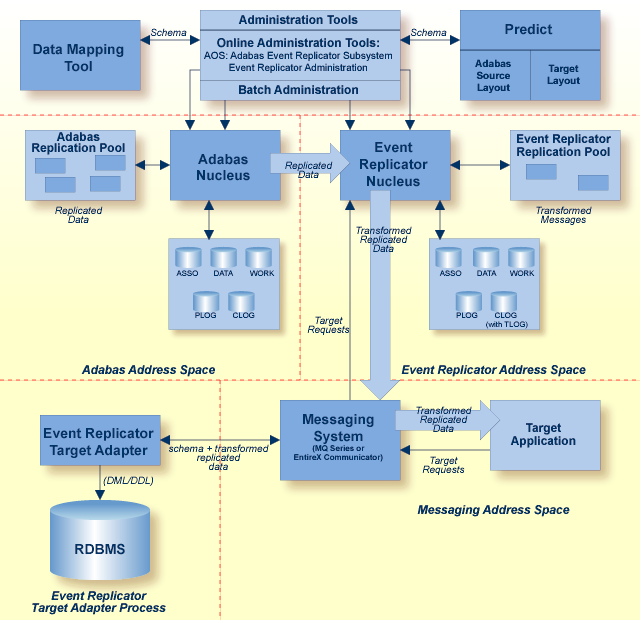
The Adabas data is replicated as usual by the Event Replicator using a subscription with Event Replicator Target Adapter processing activated. The subscription transforms the replicated data and creates a schema from the generated field table. The schema and the transformed replicated data are then sent to the Event Replicator Target Adapter. The Event Replicator Target Adapter then processes the data and populates and creates appropriate tables in the RDBMS, as described next in Table Structure.
Event Replicator Target Adapter creates and populates tables with replicated data in the RDBMS as follows:
If an SQL table has not already been established for the data, the Event Replicator Target Adapter will create one using the XML schema. XML schemas are identified as "Create" operations in the transferred data. Once the SQL table has been established for the data, the replicated data is inserted, updated, and deleted in the table as specified by the "Insert", "Update", and "Delete" operations in the transferred data. Subsequent XML schemas that might be sent are ignored.
At this time, all data is recorded in the table as strings.
The name of the SQL table created by the Event Replicator Target Adapter is determined by combining the name of the subscription with the name of the schema file. For example, if the subscription name is PAYROLL and the schema file name (Predict view name) is EMPLOYEE, the table name will be PAYROLL_EMPLOYEE. The names of the columns in the table are taken from the long names in the generated field table.
Note:
If you specify keyword "NOSPRE" for the
destination class parameter (DCLASSPARM parameter) in the Event Replicator destination
definition, the subscription name will not be used to prefix the names
of the tables produced by the Event Replicator Target Adapter. When
"NOSPRE" is specified (it must be specified in
uppercase only), the schema file name (Predict view name) alone is used for the
table names. For more information about modifying the destination class in an
Event Replicator destination definition, read
DCLASSPARM
Parameter ,
Adding Destination
Definitions Using the Adabas Event Replicator Subsystem, or
Adding
Destination Definitions Using Event Replicator Administration
Event Replicator Target Adapter will process each transaction as a unit-of-work and will only do an SQL commit if all parts of a transaction are successful. For example, if an insert operation is requested and a row with the same primary key already exists in the table, an error occurs and the whole transaction is rejected. Likewise, if an update or delete operation is requested and a row with the specified primary key does not exist in the table, an error occurs and the whole transaction is rejected.
Error messages are written to the Event Replicator Target Adapter console and the sqlrep.log file. Read Managing Event Replicator Target Adapter Log Files for more information.
All SQL root tables require a primary key. If the schema submitted to the Event Replicator Target Adapter does not specify a primary key (which must be defined to Adabas as a Unique Descriptor), the Event Replicator Target Adapter uses the ISN as the primary key. You can define as many other unique keys as you like. All keys will be used to create SQL indexes.
MU and PE fields are supported by the Event Replicator Target Adapter. By default, when MU or PE fields are included in the replicated data, additional tables are created, as described in MU and PE Field Support.
MU and PE fields are supported by the Event Replicator Target Adapter:
Support for MU fields requires that counters for MU fields be available in the initial Predict data dictionary definition that was used to generate the global format buffer field table for Event Replicator Target Adapter processing. Counters for MU fields are available if the Predict data dictionary definition either specifies fields with field types of MC (MU fields with an automatic counter) or includes explicit CM field (MU counter fields) definitions. For more information about CM, MC, and MU field types, refer to your Predict documentation.
Support for PE fields requires that counters for PE fields be available in the initial Predict data dictionary definition that was used to generate the global format buffer field table for Event Replicator Target Adapter processing. Counters for PE fields are available if the Predict data dictionary definition either specifies fields with field types of PC (PE fields with an automatic counter) or includes explicit CP field (PE counter field) definitions. For more information about CP, PC, and PE field types, refer to your Predict documentation.
You can control how many occurrences of PE and MU fields are generated
in the global format buffer field table, and thus, how many occurrences are
available for Event Replicator Target Adapter processing. This is accomplished using a combination of
the Predict Occ field attribute setting and the
Occurrences used setting specified when the global format
buffer field table is generated. By altering the Occurrences
used setting, you can specify that the maximum number of occurrences
be generated, that no additional occurrences be generated, or that the number
of occurrences defined by the Predict Occ
attribute should be generated. For more information about the
Occ field attribute, refer to your Predict
documentation.
For more information about generating a global format buffer field table, read either Generating a GFB using the Adabas Event Replicator Subsystem or Generating a GFB using Event Replicator Administration.
By default, when MU or PE fields are included in the replicated data, additional tables are created, as follows:
| Field Type | Tables Generated |
|---|---|
| MU | A new MU table is generated for each MU field.
Each value of the MU field will be a row in the MU table.
The name of the MU table is comprised of the name of the root table (for example, PAYROLL_EMPLOYEE_ADDRESS-LINE) and the column name of the MU field. The MU table will consist of two columns:
|
| PE | One table is generated for a PE group field. The
elements that comprise the PE group field become columns in the table. For
example, if the PE field consists of five subfields, five columns are created.
The name of the PE table includes the name of the PE field (for example PAYROLL_EMPLOYEE_INCOME). The columns in the table are given the subfield names. |
Using the Data Mapping Tool, you can flatten MU and PE fields in the replicated data so that they are replicated as columns in the resulting table, rather than as separate tables. For more information, read Selecting MU and PE Field Replication Methodology.
If the RDBMS is not operational when the Event Replicator Target Adapter starts, the Event Replicator Target Adapter terminates.
If, at any time during normal Event Replicator Target Adapter processing, the Event Replicator Target Adapter detects that the RDBMS is not operational, it will attempt to reconnect to the database at an interval specified by the retryInterval environment entry. The number of times it attempts to reconnect to the database is determined by the setting of the retryCount environment entry. You can set the values for these environment entries, as described in Configuring the Messaging System for Event Replicator Target Adapter. If you use the default settings of these environment entries, the Event Replicator Target Adapter will attempt to reconnect to the RDBMS database every 30 seconds for a total of five attempts.
If a reconnect attempt is successful, Event Replicator Target Adapter processing continues normally. If, however, all of the reconnect attempts fail, the Event Replicator Target Adapter will terminate. When it terminates, the unprocessed messages remain in the message queue, so no transactions are lost. The Event Replicator Target Adapter will not remove a transaction from the message queue unless its associated transaction has been successfully committed to the RDBMS database.
If a SQL error is detected in a given transaction, by default the Event Replicator Target Adapter will write the transaction to the sqlrep.log file and terminate. However, you can change the value of an environment entry, called sqlerrorcontinue, that logs the error, but allows Event Replicator Target Adapter to continue processing. For more information about error processing, read Managing Event Replicator Target Adapter Log Files. For more information about the environment entries, read Configuring the Messaging System for Event Replicator Target Adapter .
Once appropriate Event Replicator subscription and destination definitions are activated and the Event Replicator Target Adapter is started, normal processing for the Event Replicator Target Adapter will transform and apply replicated data to a relational database as the data is processed by the subscription. In addition, using the Adabas Event Replicator Subsystem or Event Replicator Administration, you can manually submit requests to the Event Replicator Target Adapter that:
initiate an initial-state request to populate the relational database tables
clear data in the relational database tables
delete relational database tables and their data.
For information on using the Adabas Event Replicator Subsystem to do this, read Submitting Event Replicator Target Adapter Requests. For information on using Event Replicator Administration to do this, read Submitting Event Replicator Target Adapter Requests.
In addition, you can set up the ADALOD utility so that data loaded or updated by the utility is also replicated to the relational database tables. However, read Replicating ADALOD Data to the RDBMS Tables for important information on problems that might arise when you do this.
The following table describes the data type conversions used by Event Replicator Target Adapter during its processing.
| Event Replicator Data Type | JDBC Data Types | RDBMS Data Types | ||||
|---|---|---|---|---|---|---|
| DB2 | MySQL | Oracle | SQL Server | Sybase | ||
| binary (length less than or equal to 8) | decimal | decimal(22) | number(22) | numeric(22) | ||
| binary (length greater than 8) | varchar | varchar | varchar2(len*2) | varchar | ||
| date | date | date | datetime | |||
| decimal (with precision) | decimal | decimal(len+pre, pre) | number(len+pre, pre) | decimal(len+pre, pre) | ||
| decimal (without precision) | decimal | decimal(len) | number(len) | numeric(len) | ||
| float | float | float | ||||
| integer | integer | integer | ||||
| string | varchar | varchar | varchar | varchar2 | varchar | varchar |
| time | time | timestamp | datetime | timestamp | datetime | |
XML data sent to Event Replicator Target Adapter is in EBCDIC character encoding. However, support for UTF-8 encoding of the RDBMS data (not table or column names) is available for internationalization purposes. To send XML messages to Event Replicator Target Adapter using UTF-8 format, make sure the SACODE parameter is set to "4091" in the Event Replicator subscription definition used for Event Replicator Target Adapter processing.
Wide-character fields sent to Event Replicator Target Adapter are translated to hexadecimal. However, support for UTF-8 encoding is available for internationalization purposes. To send wide-character fields to Event Replicator Target Adapter using UTF-8 format, make sure the SWCODE parameter is set to "4091" in the Event Replicator subscription definition used for Event Replicator Target Adapter processing.
For more information about these parameters, read SACODE Parameter and SWCODE Parameter.
Note:
If you want to use UTF-8 character encoding, you must verify that
your GFB field lengths are increased as required to accommodate the character
set referenced by the code page you select and the data requested in the GFB.
You can increase these field lengths manually by editing the GFB itself or by
editing the Predict file or data definition module (DDM) used when the GFB is
generated.
A sample of a generated field table, its corresponding XML schema, some replicated data, and the resulting SQL table are provided in Samples.
 To get started using the Event Replicator Target Adapter:
Install the Event Replicator Target Adapter, as described in Installing the Event Replicator Target Adapter.
Make sure you address any Event Replicator Target Adapter installation considerations provided for your relational database, as described in Step 2 of the Event Replicator Target Adapter installation.
Configure the Event Replicator Target Adapter, as described in Configuring the Messaging System for Event Replicator Target Adapter and Configuring the RDBMS Databases for Event Replicator Target Adapter.
Start the Event Replicator Target Adapter, as described in Starting the Event Replicator Target Adapter.
Edit the Event Replicator subscriptions you want used to transform and submit data to the Event Replicator Target Adapter. For each subscription, verify that:
A global format buffer (GFB) and field table are generated for at least one SFILE definition in the subscription. The GFB and field table must be generated either by Event Replicator for Adabas using Predict file definitions or using the Data Mapping Tool.
At least one destination definition used by the subscription specifies a value of "SAGTARG" for the Destination Class field (DCLASS parameter).
Be sure to save the subscription definitions and any destination definitions you modified.
For more information on Event Replicator for Adabas subscription, SFILE, GFB, and destination definitions, read Definition Descriptions.
Activate the subscription and destination definitions. To activate subscription and destination definitions using Adabas Online System (AOS), read Managing Replication Definitions from AOS. To activate subscription and destination definitions using Event Replicator Administration, read Activating and Deactivating Subscription Definitions and Activating and Deactivating Destination Definitions.