
This document provides information for installing Adabas Caching Facility.
This section describes the system requirements of Adabas Caching Facility.
Software AG generally provides support for the operating system platform versions supported by their respective manufacturers; when an operating system platform provider stops supporting a version of an operating system, Software AG will stop supporting that version.
For information regarding Software AG product compatibility with IBM platforms and any IBM requirements for Software AG products, please review the Product Compatibility for IBM Platforms web page.
Before attempting to install this product, ensure that your host operating system is at the minimum required level. For information on the operating system platform versions supported by Software AG products, complete the following steps.
Access Software AG's Empower web site at https://empower.softwareag.com.
Log into Empower. Once you have logged in, you can expand in the left menu of the web page and select to access the Product Version Availability screen.
Use the fields on the top of this screen to filter its results for your Software AG product. When you click the button, the supported Software AG products that meet the filter criteria are listed in the table below the filter criteria.
This list provides, by supported operating system platform:
the Software AG general availability (GA) date of the Software AG product;
the date the operating system platform is scheduled for retirement (OS Retirement);
the Software AG end-of-maintenance (EOM) date for the product; and
the Software AG end-of-sustained-support (EOSS) date for the product.
Note
Although it may be technically possible to run a new version of your
Software AG product on an older operating system, Software AG cannot continue
to support operating system versions that are no longer supported by the
system’s provider. If you have questions about support, or if you plan to
install this product on a release, version, or type of operating system other
than one listed on the Product Version Availability screen described above,
consult Software AG technical support to determine whether support is possible,
and under what circumstances.
For general information regarding Software AG product compatibility with other platforms and their requirements for Software AG products, visit Software AG's Hardware Supported web page.
Adabas Caching supports the following types of cache space.
| Operating System |
Cache Type: |
Cache Type: |
Cache Type: |
Cache Type: |
Cache Type: |
|---|---|---|---|---|---|
| z/OS | Yes | Yes | Yes | Yes | Yes |
For information about data spaces, hiperspaces, large pages, and 64-bit virtual storage, refer to the IBM z/OS documentation, more specifically to the Extended Addressability Guide.
The following requirements must be met to support 1M large pages and 2G large pages:
Virtual 64-bit storage backed by 1M large pages can only be used on IBM z10 (or later) mainframes running z/OS Version 1.9 or later and for which IBM large page support has been enabled. .
Virtual 64-bit storage backed by 2G large pages can only be used on IBM zEC12 (or later) mainframes running z/OS Version 2.1 or later. (IBM enhanced DAT architecture, which provides 2G large page support, has been enabled on zEC12 machines).
In both cases (1M and 2G large page installations), you must also
allocate the size of the large page pool (use the LFAREA
parameter in the IEASYSxx member of SYS1.PARMLIB).
The LFAREA parameter allows you to specify the amount of
real storage to be used for large pages; this parameter cannot be changed
dynamically and, if it is not set, page frames will remain allocated at a size
of 4K.
If Natural Security is installed, the SYSACF library needs to be defined to it.
Adabas Caching requires storage for the RABN indexes to be acquired
above the 16M line (AMODE=31). When using Virtual 64 or
Virtual 64 storage backed by large pages, the RABN indexes will be acquired in
Virtual 64 storage. This may require an adjustment to the
REGION size.
Determine the maximum available storage from your systems programming staff:
for extended memory usage
for data space
for hiperspace
for virtual 64 storage
for virtual 64 storage backed by large pages enabled by IBM z/OS 1.9 Large Page
Support. Refer to the Prerequisites section above regarding the use of the
LFAREA parameter for setting the size of the Large Page
pool.
The cache type and sizes specified for Adabas Caching may have an effect on overall computer performance.
The installation tape for Adabas Caching contains the following data set for z/OS:
| Data Set | Description of Contents |
|---|---|
| ADAvrs.LOAD | Packaged in the Adabas load library containing the load modules ADACSH, ADACS1, ADACS6 and ADACSZ; are now executable with the distributed ACF license module. |
Step 1: Load Adabas Caching Facility Objects into Natural System File
Step 3: Add the Adabas Caching Facility License as documented
Use the INPL utility to load the objects required by Adabas Caching Facility into the Natural system file. The objects are in the data set (file) AOSvrs.INPL. Refer to the Natural Administration documentation for further information about usage of this utility and its parameters. Please check the reports produced to ensure that no errors have occurred.
You can optionally provide a user exit to be invoked at nucleus initialization, termination or when ADACSH is called. The exit must be called ADACSHUX and be available in the nucleus library concatenation. There is no parameter to activate the exit. A sample ADACSHUX module is provided in ADAvrs.MVSSRCE.
On entry R0 contains a function code:
0 Initialization
4 Termination
8 Data block access
On entry R1 contains the address of a CXIT parameter list:
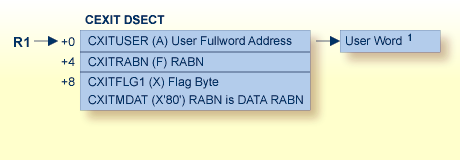
1User Word: Before calling user exit 11, the fullword reserved for the user is set to zero. It is not altered by Adabas between UEX11 invocations. It may be used for any purpose, typically to retain the address of storage acquired for the exit's workarea.
 |
Warning: Sample user exits and programs are not supported under any maintenance contract agreement. |
The Adabas installation package includes a set of sub-products or add-ons. In order to be able to use the sub-products they must be licensed and the corresponding product license file must be provided with the nucleus or utility execution. The following table describes for a product the member name of the license load module created with LICUTIL and the DD/link name for the license file:
| Product | Product Code | Load Module | DD/Link Name |
|---|---|---|---|
| Adabas | ADA | ADALIC | DDLIC |
| Adabas for ZIIP | AZPAD | AZPADLIC | DDLAZPAD |
| Adabas Caching Facility | ACF | ACFLIC | DDLACF |
| Adabas Delta Save | ADE | ADELIC | DDLADE |
| Adabas Cluster Services | ALS | ALSLIC | DDLALS |
| Adabas Parallel Services | ASM | ASMLIC | DDLASM |
| Adabas Online Services | AOS | AOSLIC | DDLAOS |
Verify you have prepared and installed the product license file, as described in the Adabas for Mainframes installation.
The ADARUN parameter CACHE=YES must be
included in the Adabas nucleus start-up job to activate Adabas Caching. Other
Adabas Caching parameter settings are described in the section
Adabas Caching
Parameters.
 To verify successful Adabas Caching Facility installation, start Adabas Caching
Online Services as follows:
To verify successful Adabas Caching Facility installation, start Adabas Caching
Online Services as follows:
Verify that the latest Adabas Caching Facility maintenance has been applied for the current Adabas Caching Facility release. Likewise, verify that the latest Adabas Online System maintenance has been applied for your Adabas Online System installation.
Log on to the application SYSAOS (Adabas Online System).
Select from the main menu.
For more information about the online services provided for Adabas Caching Facility in Adabas Online System, see section Adabas Caching Online Services.